
To create a Google Alert, open google.com/alerts, type your search term, click “Show options,” set frequency, sources and region, then click “Create Alert.” It takes under a minute.
Getting alerts you’ll actually read takes more care: quoted brand names, a few exclusions, and a routine for managing alerts once they pile up.
Google Alerts still works in 2026 and it’s still free. It’s a solid way to catch new web pages that mention your brand, competitors or industry terms.
It can’t see social posts, page edits or what ChatGPT, Perplexity and Gemini say about you. Below you’ll find the setup, the filters that cut noise, and where to fill the gaps.
What You’ll Learn
Here’s what you’ll be able to do by the end:
- Step-by-step instructions to create and configure a Google Alert in 2026
- How to use search operators to filter out noise and get only relevant results
- Settings that change alert quality, and how to pick each one
- Practical use cases for brand monitoring, competitor tracking, and reputation management
- What Google Alerts can’t track, including social media, page changes, and AI search mentions
- How to pair Google Alerts with other monitoring tools for complete brand coverage
How to Create a Google Alert: Step-by-Step Setup
A Google Alert emails you when Google indexes new web content matching a keyword or phrase you choose. Here’s how to set one up.
Step 1: Go to google.com/alerts
Open google.com/alerts in any browser. Sign into your Google account if you aren’t already logged in. You need a Google account to create alerts, there is no workaround for this.
The page displays a single search field at the top and any existing alerts below it.
Step 2: Enter your search term
Type the keyword or phrase you want to monitor into the search field. Google immediately shows a preview of recent results matching your query beneath the field.
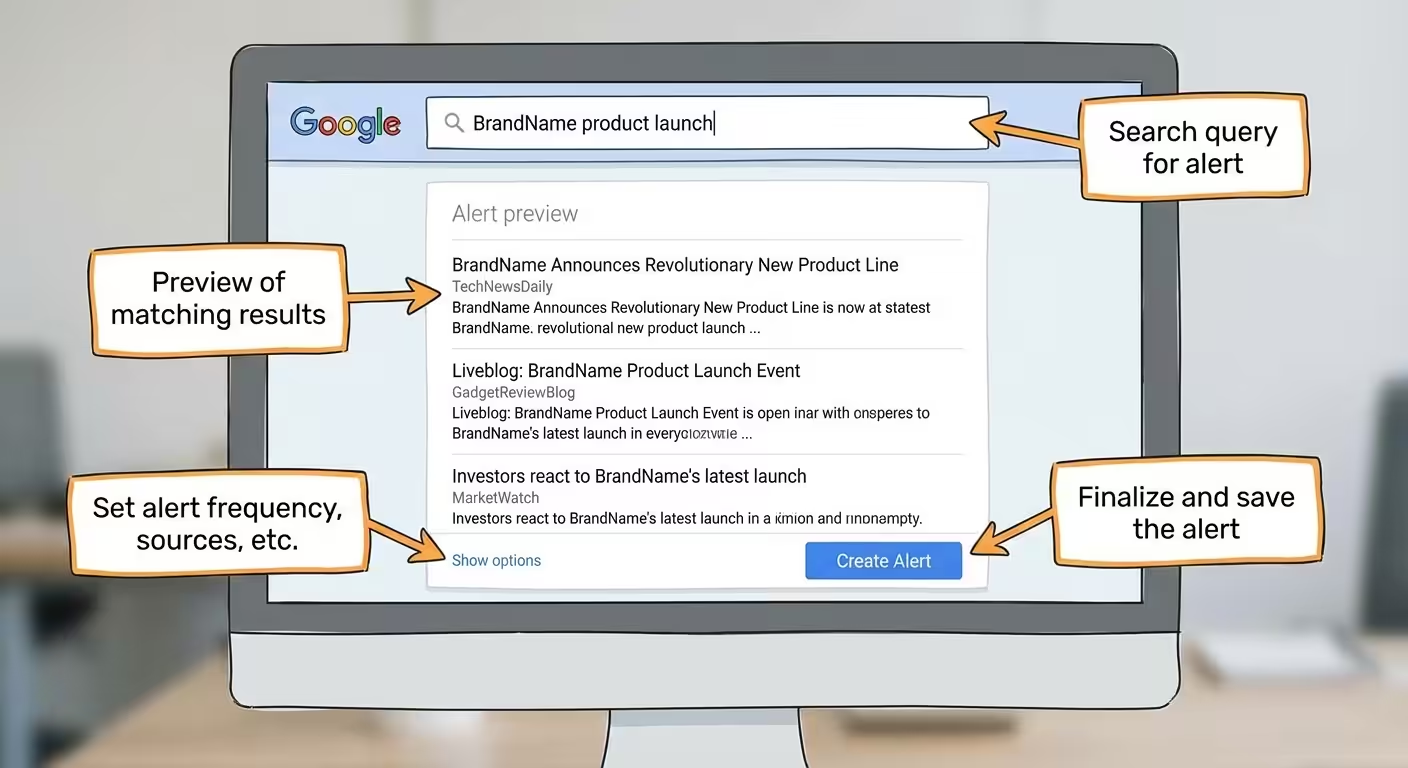
For best results, use specific phrases rather than single generic words. Broad terms like “marketing” or “software” return overwhelming volumes of irrelevant content.
Step 3: Click “Show Options” to configure your settings
This is the step most people skip, and it’s the difference between useful alerts and inbox noise. Click “Show options” beneath the search field to expand the full configuration panel.
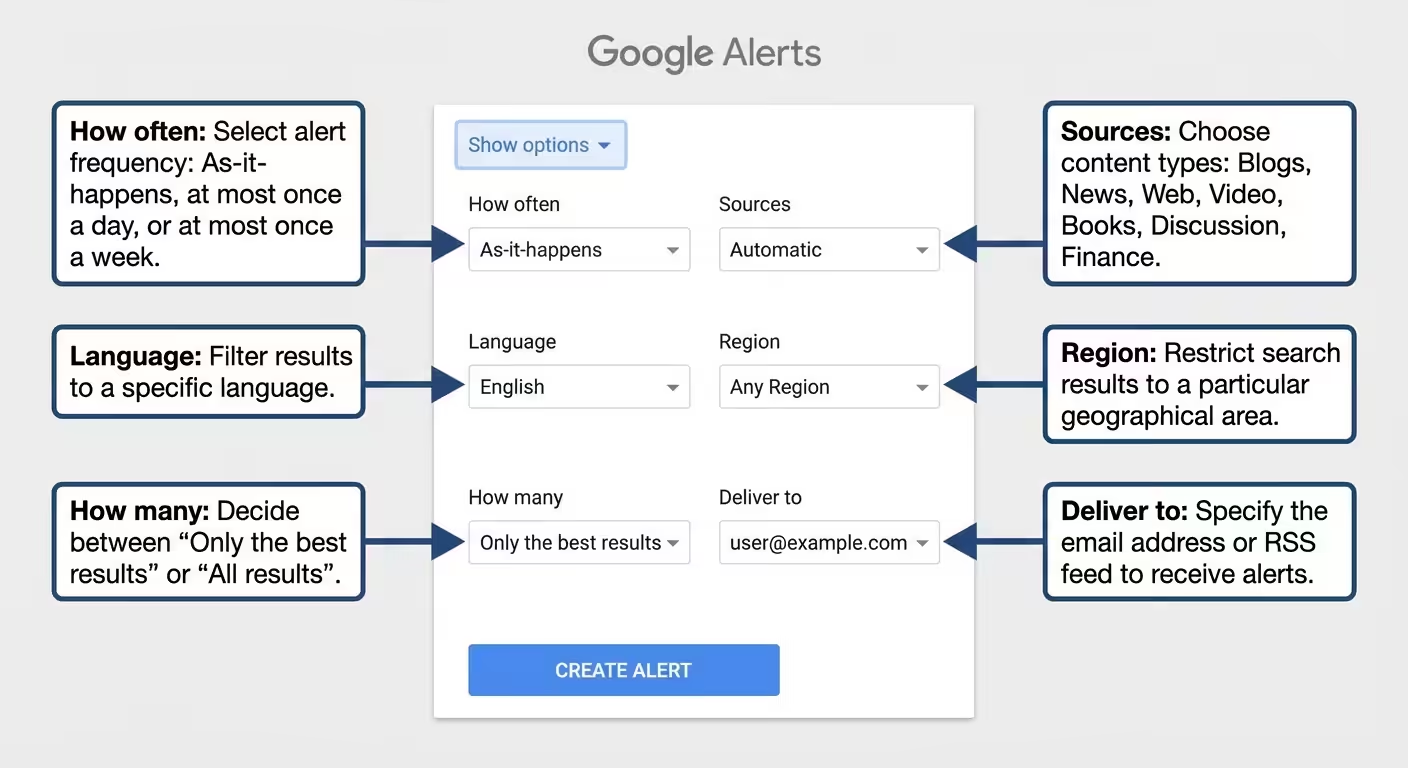
Here is what each setting controls and how to configure it:
| Setting | Options | Recommended Configuration |
|---|---|---|
| How often | As-it-happens, At most once a day, At most once a week | “Once a day” for most use cases. “As-it-happens” only for time-sensitive topics like crisis monitoring. |
| Sources | Automatic, News, Blogs, Web, Video, Books, Discussions, Finance | Leave on “Automatic” unless you have a specific reason to narrow it. Selecting individual sources limits coverage. |
| Language | Any language or a specific language | Match your target market’s language. Select “English” for U.S.-focused monitoring. |
| Region | Any region or a specific country | Set to “United States” if you only need domestic results. Leave on “Any Region” for global coverage. |
| How many | Only the best results, All results | “Only the best results” reduces noise significantly. Switch to “All results” only for niche topics with low volume. |
| Deliver to | Your email address or RSS feed | Email for most users. RSS if you use a feed reader or want to process alerts programmatically. |
Step 4: Click “Create Alert”
Once your settings are configured, click the blue “Create Alert” button. Google will now email you whenever new content matching your query appears in its search index.
Google Alerts doesn’t charge for alerts.
Search Operators That Make Google Alerts Actually Useful
The pattern that pays off: run a quoted, exact-match alert for your brand alongside an unquoted one. The quoted version catches direct references, and the unquoted one catches near-matches and spacing variants.
The Google Alerts search field accepts the same operators as Google Search. Using them is the biggest single improvement you can make to alert quality.
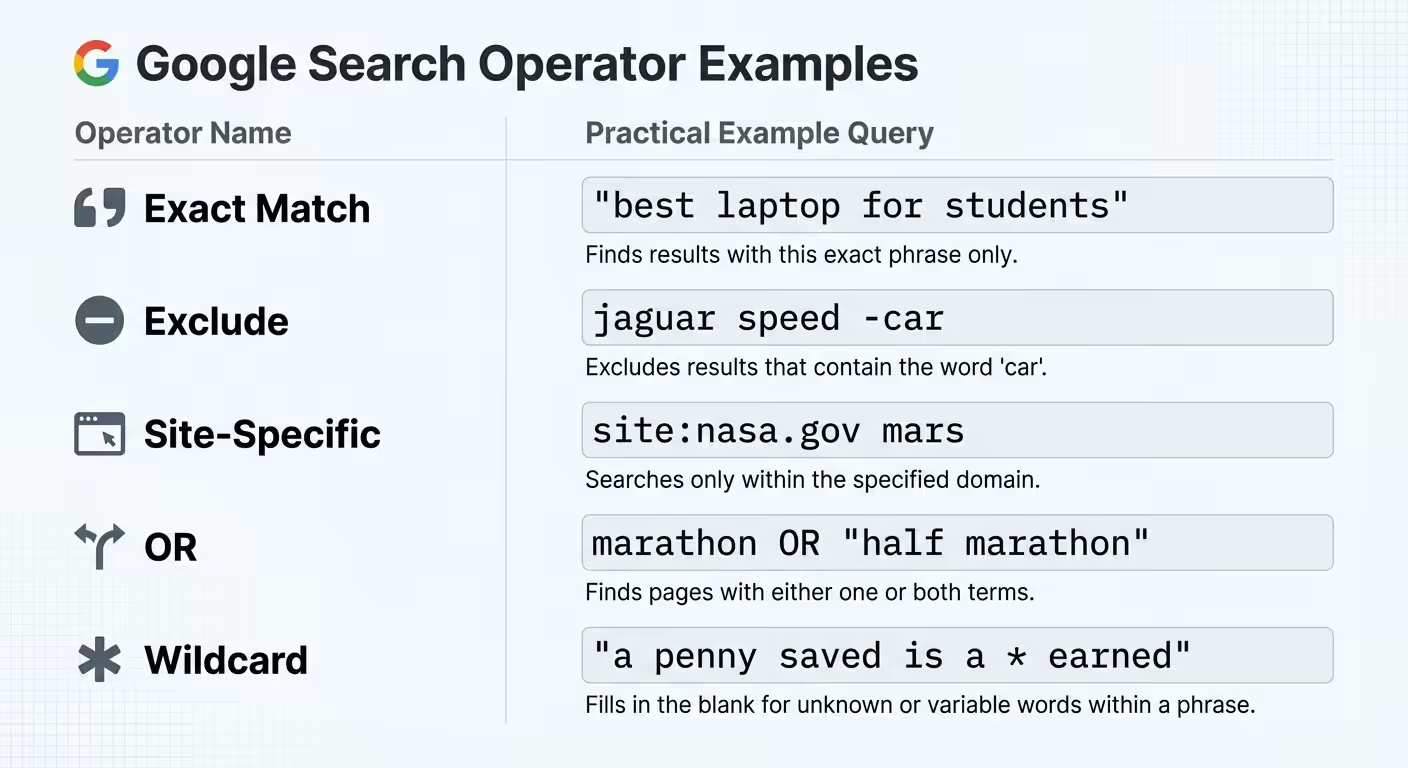
- Exact match with quotes: “your brand name”, returns only results containing that exact phrase. Without quotes, Google matches each word independently, which generates noise.
- Exclude terms with minus signs: “brand name” -jobs -careers -glassdoor, removes job listings, which are common false positives for company name alerts.
- Site-specific alerts: site:reddit.com “your product”, limits results to a single domain. Useful for monitoring specific forums or publications.
- OR operator: “competitor A” OR “competitor B”, combines multiple terms into a single alert.
- Wildcard with asterisk: “your brand * review”, fills in unknown words between your terms. Catches variations like “your brand new review,” “your brand 5-star review,” etc.
- Combined operators: (“competitor A” OR “competitor B”) (launch OR funding OR acquisition) -jobs, creates a highly targeted alert for specific competitor activity.
Pro tip: Start your unquoted alert at “Only the best results.” If it still floods your inbox after a week, add exclusions before you give up on it.
Five High-Value Use Cases for Google Alerts in 2026
Google Alerts works best when you’re tracking new content appearing on the web, not changes to existing pages or mentions in AI platforms. Within that scope, these use cases deliver the most value.
1. Brand mention monitoring
Set up alerts for your company name, product names, and key executives. You’ll catch press mentions, blog references, and forum discussions as Google indexes them.
Example alert: “YourBrand” -site:yourdomain.com
Excluding your own domain keeps the results focused on what others are saying about you, not your own content. This is foundational for any brand reputation monitoring strategy.
2. Competitor tracking
Monitor competitor brand names to catch their press releases, product announcements, partnerships, and media coverage. Pairing this with a dedicated SEO competitor analysis workflow gives you both the content landscape and the search performance picture.
Example alert: “CompetitorName” (launch OR partnership OR acquisition OR funding)
3. Industry keyword monitoring
Track keywords relevant to your market to spot trends, regulatory shifts, and emerging topics. This is particularly useful for content teams looking for timely angles.
Example alert: “AI search optimization” trend OR report OR study
4. Reputation management
Catch negative reviews, complaints, or misinformation before they gain traction. Speed matters here, the sooner you know about a negative mention, the faster you can respond.
Example alert: “YourBrand” complaint OR scam OR problem -site:yourdomain.com
For a structured view of tone across channels, pair alerts with the brand sentiment workflow.
5. Unlinked Mention Discovery
Google Alerts surfaces new pages that name your brand without linking to it. These unlinked brand mentions are a chance to ask the editor for correct attribution or a fix to wrong details.
Example alert: “YourBrand” -site:yourdomain.com -site:linkedin.com -site:twitter.com
Managing Google Alerts: Edit, Pause and Delete
Managing Google Alerts happens on one page: return to google.com/alerts while signed in, and every alert on that account is listed under “My alerts.”
- Edit an alert: Click the pencil icon next to any alert. Adjust your settings, then click “Update Alert.”
- Delete an alert: Click the trash icon next to any alert. Alternatively, click “Unsubscribe” at the bottom of any alert email.
- Adjust global delivery settings: Click the gear icon on the alerts page. Here you can set a specific delivery time and choose “Digest” to bundle all alerts into a single daily email.
Tip: If you use Gmail, create a filter that automatically labels Google Alerts emails and moves them out of your primary inbox. Route them to a dedicated “Monitoring” label for batch review once or twice a day.
A Monthly Cleanup Routine
Alerts decay. Products get renamed, competitors drop out, and one noisy alert trains you to ignore the whole label.
- Delete any alert that sent nothing useful in the last 30 days.
- Add exclusions to any alert where most results were job posts, directories or your own pages.
- Move low-value alerts to weekly frequency instead of deleting them.
- Add alerts for new launches, executives or competitors.
When alerts outgrow one inbox, a shared view helps. Our guide to a brand mentions monitoring dashboard shows how to route alerts into one place.
Where Google Alerts Falls Short
Google Alerts fires when a page gets indexed, not when it’s published. A story can circulate on social and in AI answers before your alert arrives. Treat Google Alerts as a completeness layer, not a speed layer.
Google Alerts does one job: it notifies you when new content matching your keywords enters Google’s search index. That scope leaves four blind spots.
It doesn’t track social media
Google Alerts doesn’t monitor posts on LinkedIn, X (formerly Twitter), Instagram, TikTok, or other social platforms. For brands where social conversations drive perception, this is a significant gap. A dedicated social media monitoring tool fills this.
It doesn’t detect changes to existing pages
If a competitor updates their pricing page, rewrites their homepage messaging, or edits their terms of service, Google Alerts stays silent. The URL already exists in the index, only new URLs trigger alerts.
It doesn’t cover AI search mentions
This is the gap that has grown most significant since 2024. When ChatGPT, Perplexity, Gemini, or Google’s AI Overviews mention, or fail to mention, your brand in their responses, Google Alerts has no way to detect it.
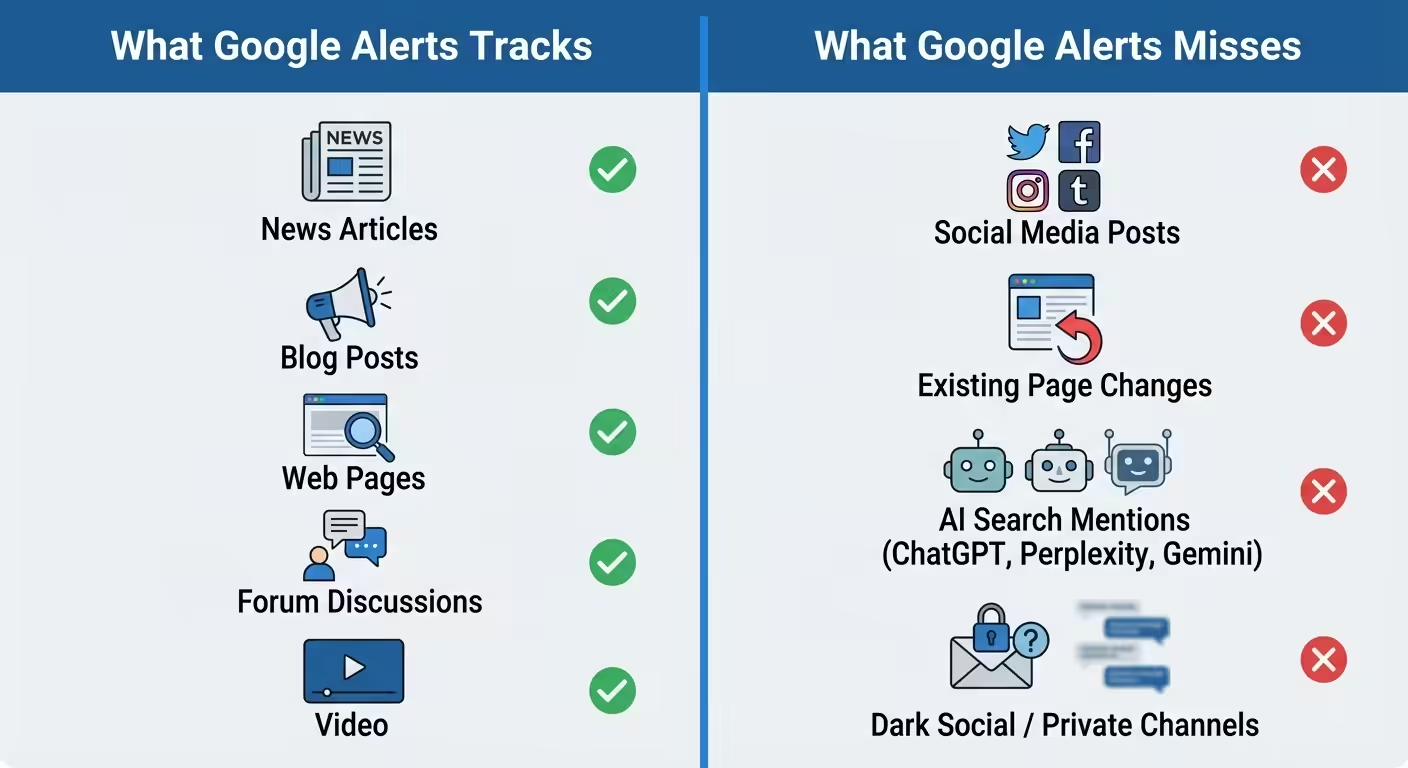
AI search engines now influence purchasing decisions, vendor shortlists, and brand perception for millions of users. In February 2024, Gartner forecast that search engine volume would drop 25% by 2026 as AI chatbots and other virtual agents take over more queries. If your monitoring strategy only covers traditional web mentions, you’re missing an increasingly important surface.
Tracking whether AI models mention your brand requires a different approach entirely. Tools designed for cross-platform brand mention tracking in AI monitor what models like ChatGPT, Perplexity, and Gemini actually say when users ask category-related questions.
Coverage is inconsistent
Google Alerts doesn’t surface every page on the web. Low-traffic sites, new publications and some niche forums don’t trigger alerts even when they mention your keywords, because everything depends on Google’s crawl and its own relevance filter.
Google Alerts vs. AI Brand Mention Monitoring
If you’re deciding how to build the AI-monitoring layer alongside your Google Alerts setup, our the best ChatGPT monitoring tools compares 10 dedicated platforms and explains where each fits.
Google Alerts and AI brand mention monitoring solve different problems. Understanding the distinction helps you decide what your monitoring stack actually needs.
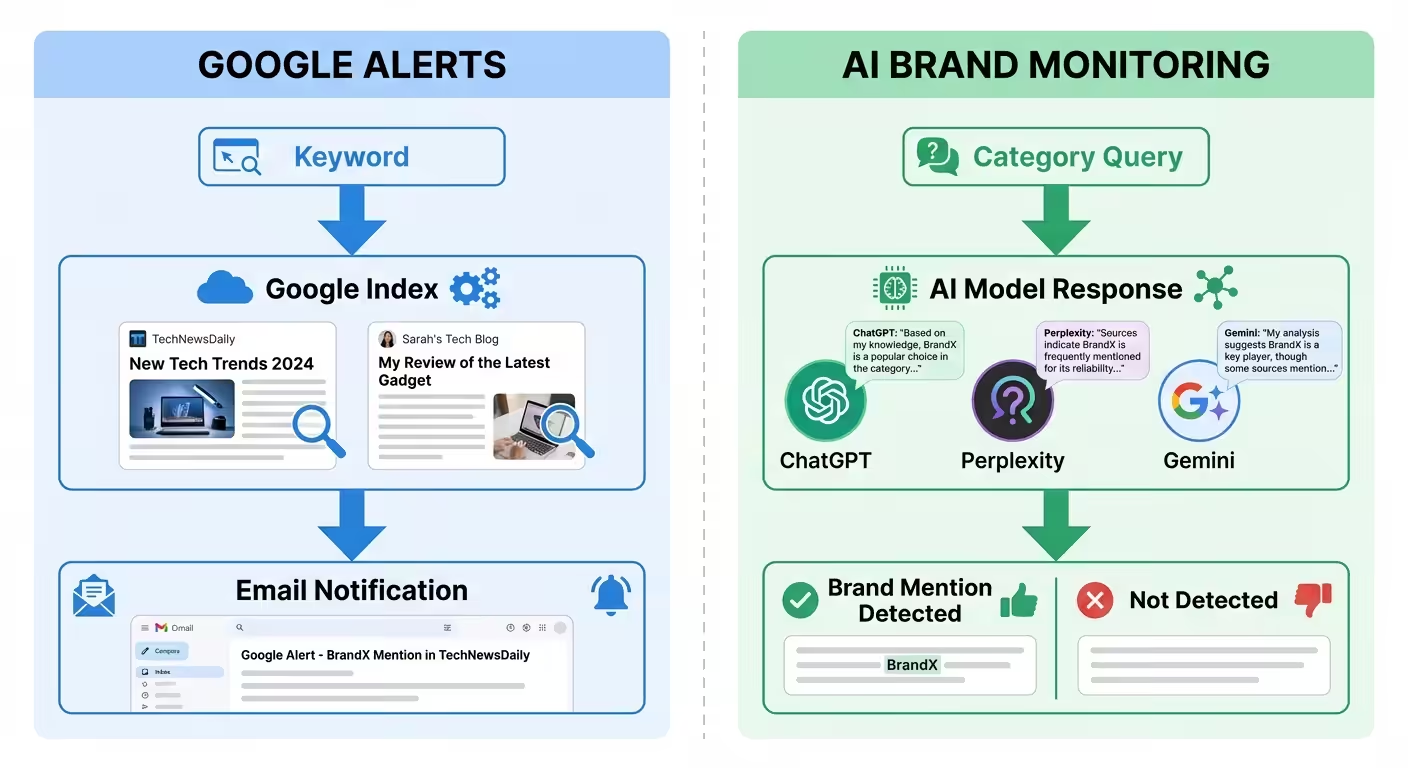
| Capability | Google Alerts | AI Brand Mention Monitoring |
|---|---|---|
| What it tracks | New content in Google’s search index | Brand mentions inside AI model responses (ChatGPT, Perplexity, Gemini, AI Overviews) |
| Data source | Publicly indexed web pages | AI-generated answers to category-relevant queries |
| Social media coverage | No | Depends on tool, some track AI citations of social content |
| Detects page changes | No | No (different function) |
| Tracks competitor mentions in AI | No | Yes |
| Price | Free | Varies by tool and scope |
| Best for | Web content monitoring, news tracking, backlink discovery | Understanding how AI models represent your brand to users |
Google Alerts answers: “What new web pages mention my keywords?”
AI brand mention monitoring answers: “What does ChatGPT say when someone asks about my category, and does it mention my brand?”
Both questions matter, and they need different tools. To check whether AI mentions your brand, you’ll need prompt-based tracking. For a view of alerts that flag shifts before they spread, see predictive AI alerts for brand mentions.
How to Build a Complete Brand Monitoring Stack
No single tool covers every surface where your brand appears, or should appear, in 2026. Here is a practical monitoring stack that addresses each layer.
Layer 1: Web mentions (Google Alerts)
Use Google Alerts for new web content, news articles, blog posts, forum discussions, and web pages that mention your brand, competitors, or industry keywords. This is free and takes minutes to configure.
Layer 2: Social media mentions
Add a social media brand monitoring tool to track conversations on LinkedIn, X, Instagram, Reddit, and other platforms Google Alerts can’t reach.
Layer 3: AI search mentions
Monitor what AI models say about your brand when users ask category questions. Agencies like BrandMentions report when and how brands appear in responses from AI search platforms, and which editorial mentions sit behind them.
Layer 4: Reporting and analysis
Consolidate findings from all three layers into a regular brand mentions report. Tracking mentions without analyzing patterns, where you appear, where competitors appear, and where gaps exist, limits the value of monitoring.
Key insight: Google Alerts is a detection tool, not an impact tool. It can tell you when your brand appears on a new publication. It can’t tell you whether that appearance is being picked up by AI models and surfaced to buyers asking ChatGPT, Perplexity, or Gemini for recommendations in your category. Those two layers are separate and need separate monitoring.
Frequently Asked Questions
Is Google Alerts still free in 2026?
Yes. Google Alerts has no paid tier or trial; you only need a Google account.
Can I send Google Alerts to a non-Gmail email address?
Alerts go to the email address on your Google account. If you want them elsewhere, set a Gmail forwarding rule or use the RSS delivery option.
How quickly does Google Alerts notify me of new content?
Expect a lag even on “As-it-happens.” Google Alerts waits for Google to crawl and index the page, which varies by site. Fast-indexed news sites arrive sooner than small blogs.
Can Google Alerts track my brand mentions on social media?
No. Google Alerts doesn’t monitor social media platforms like LinkedIn, X, Instagram, TikTok, or Facebook. It only tracks content that appears in Google’s search index. For social media coverage, you need a dedicated brand monitoring tool that connects to social APIs.
Does creating a Google Alert help my brand appear in AI search results?
No. Google Alerts only observes and reports. To increase brand mentions in AI search, you need earned editorial coverage on publications buyers and AI assistants already trust.
What is the difference between Google Alerts and Google News?
Google News is a browsable news aggregator that shows trending stories across categories. Google Alerts is an automated notification system that emails you when new content matching your specific keywords appears in Google’s index, across news, blogs, web pages, videos, books, discussions, and finance sources. Alerts are keyword-specific and push-based; Google News is category-based and pull-based.
Does Google Alerts still work in 2026?
Yes. Google Alerts is still live at google.com/alerts and still sends email and RSS alerts. If yours went quiet, check that the query isn’t too narrow and that emails aren’t landing in spam or a filtered label.
How do I set up Google Alerts for company news?
Create an alert for the quoted company name and set Sources to “News.” Add terms like launch, funding or acquisition with OR to focus on announcements.
Set Up Your First Three Alerts This Week
Start with three alerts: your quoted brand name minus your own domain, your top competitor, and one category term. Review them for a week, then add exclusions.
Then ask the question Google Alerts can’t answer: What happens when someone asks an AI assistant about your category?
Once that’s running, the open question is the AI layer. If you’re ready to see where ChatGPT, Perplexity and Gemini place your brand against competitors, book a short strategy call.