

Most sites do not have a crawl budget problem, and cannot create one. A few thousand pages on healthy hosting get crawled as often as they deserve, and no amount of optimisation changes that.
Crawl budget optimization matters at a scale most sites never reach. It also matters at any scale when something on the site is actively wasting the crawler’s time.
Those are two different situations with two different answers, and conflating them is why the topic generates so much wasted effort.
What Crawl Budget Is
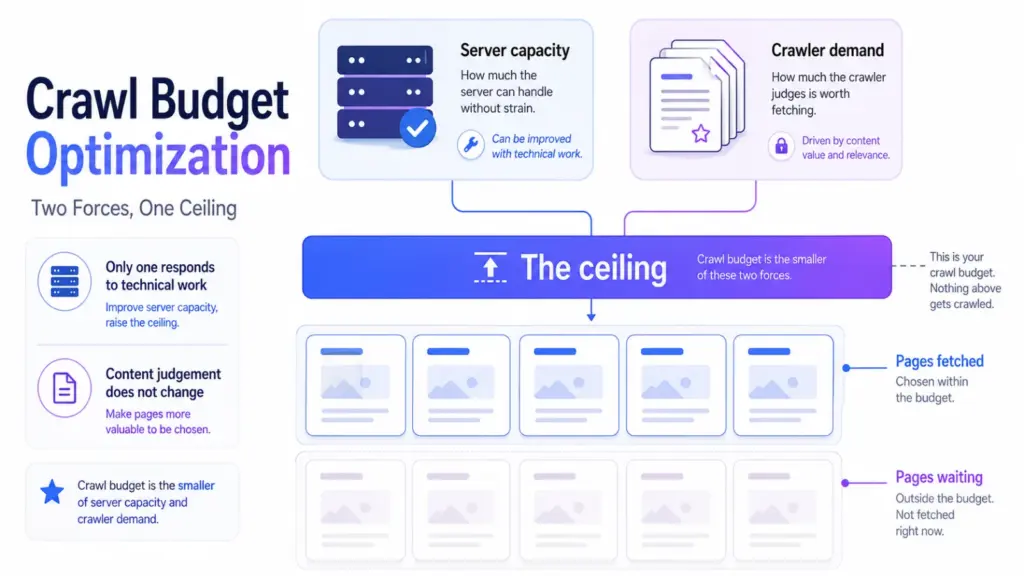
Crawl budget is the number of pages a search engine is willing and able to fetch from your site in a given period. Two forces set it.
- What your server can take. If responses slow down or start erroring, the crawler backs off to avoid hurting you.
- What the crawler thinks is worth fetching. Pages that never change and never get visited earn less frequent attention.
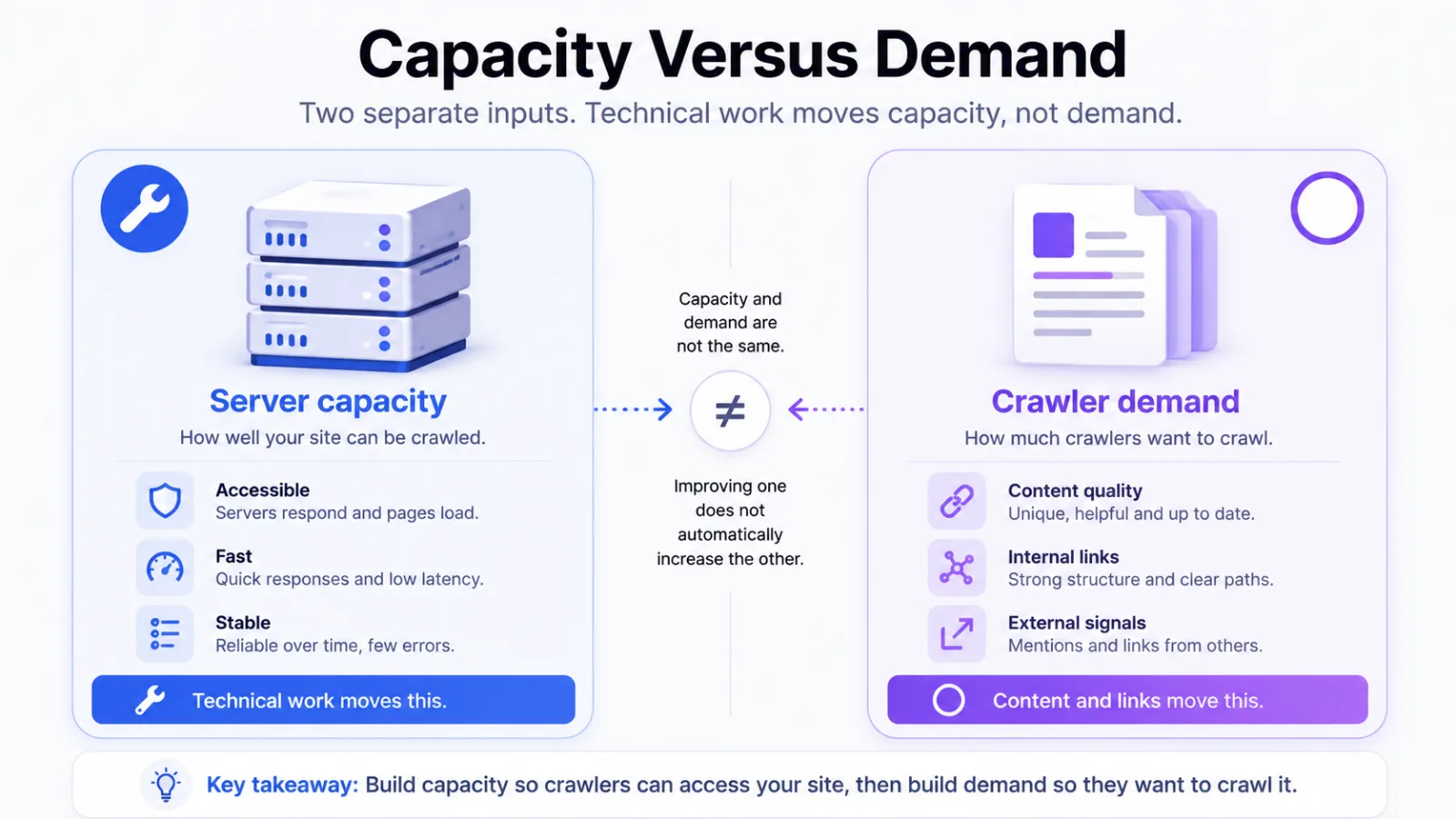
The first is a capacity ceiling and the second is a demand signal. You influence them in completely different ways, and only one responds to technical work.
How to Tell Whether You Have a Problem
You settle this from your own data rather than from a tool that flags crawl budget on every site it scans.
Compare pages published against pages crawled
Open Search Console’s crawl stats and look at whether the number of pages fetched roughly tracks the number you publish. A site whose important pages sit uncrawled for weeks has a real signal.
Look at what the crawler is spending time on
Server logs tell you which URLs got fetched. If most requests land on parameters, filters and pagination rather than your actual pages, the budget is being spent and it isn’t being spent on you.
Reading logs for this is the same exercise described in server logs for AI search, pointed at a different question.
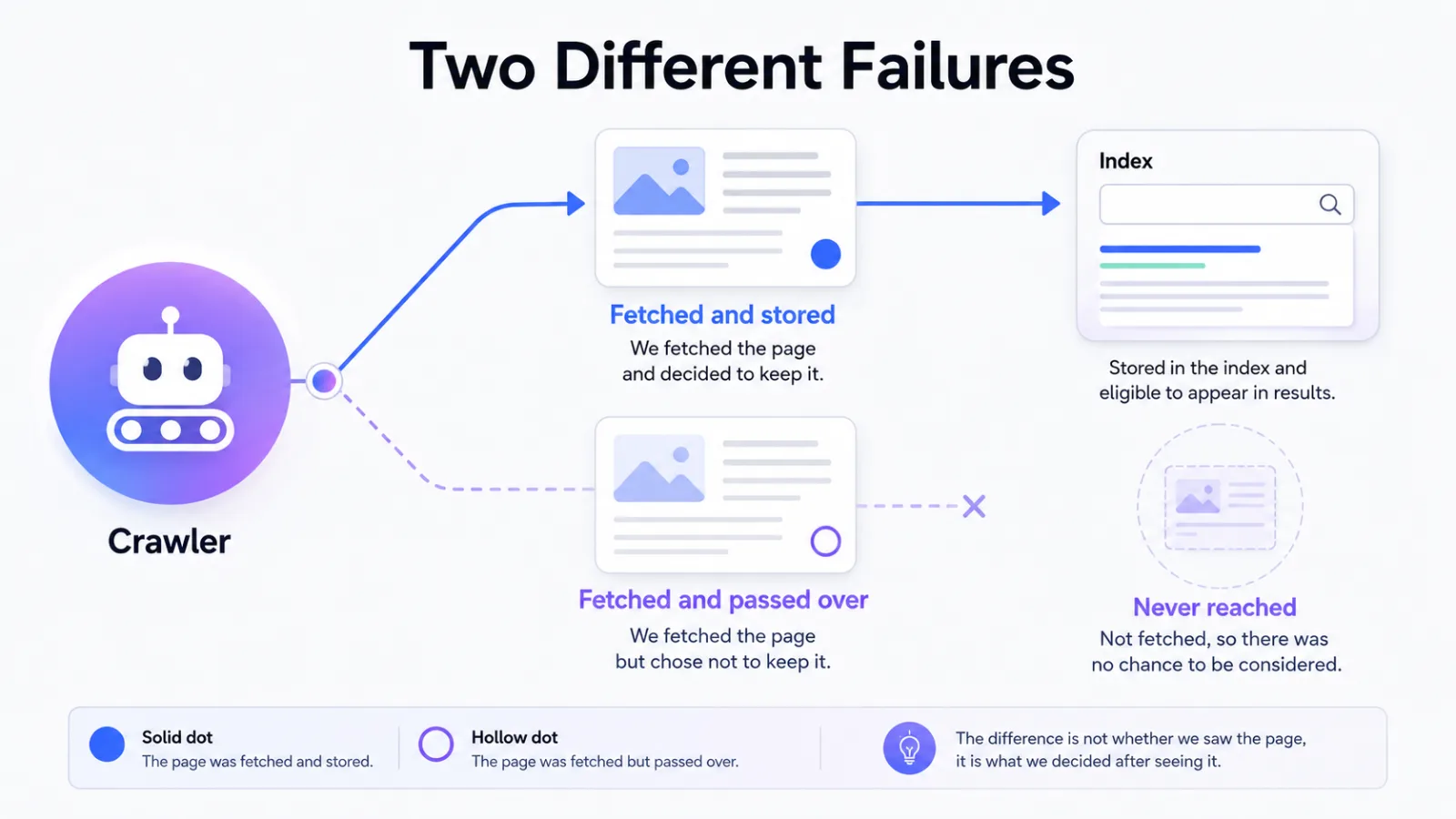
Check whether the problem is discovery or judgement
A page Google has never fetched is a crawl problem. A page Google fetched and declined to store is not, and that distinction is set out in crawled, currently not indexed.
What Genuinely Wastes Crawl
The waste is almost always the site generating URLs nobody asked for.
| Source of waste | What it produces |
|---|---|
| Faceted navigation | One product list multiplied by every filter combination |
| Session and tracking parameters | The same page under endless distinct addresses |
| Internal search results | Thin pages generated on demand and linked from nowhere useful |
| Infinite pagination | Sequences with no end and nothing distinct on them |
| Long redirect chains | Three or four fetches to arrive at one page |
| Soft error pages | Missing content served as a success, so it keeps getting refetched |
Every row is a site-side decision. That’s the good news, because it means every row is fixable without asking a search engine for anything.
Where AI crawlers changed the arithmetic
You’re no longer dealing with search engines as the only heavy fetchers. Training and retrieval crawlers now take a real share of server capacity, and that share is growing.
They don’t consume Google’s budget, because that ceiling is per crawler. They do consume the same server capacity that sets it, which is a link worth understanding before blocking anything. which AI bots crawl your site covers how to measure that share.
What to Fix, in Order
Start with the things that stop URLs being created, because filtering them afterwards is slower work.
- Stop generating the URLs. Parameter handling and facet rules at the application level beat any robots directive.
- Return honest status codes. A missing page should say so, and a soft error keeps a dead URL alive indefinitely.
- Flatten redirect chains. Point old addresses at the final destination rather than through two intermediaries.
- Keep the sitemap truthful. A sitemap listing redirects, errors and noindexed pages spends attention teaching the crawler nothing.
- Link your important pages properly. Discovery is an internal linking problem long before it’s a budget problem.
The last one does most of the work on ordinary sites. A page reachable in two clicks from the homepage rarely has trouble getting fetched.
If You Are One of the Exceptions
Large ecommerce catalogues, marketplaces, news archives and any site where users generate pages are the real cases. They share one trait: the site can produce URLs faster than anyone can review them.
At that scale crawl stops being a technical checkbox and becomes an allocation decision. You’re choosing which sections deserve frequent fetching, and that’s a commercial judgement rather than an engineering one.
Segment your sitemaps to measure it
Split sitemaps by section rather than dumping every URL into one file. Search Console then reports indexation per section, which turns a vague worry into a number you can act on.
A section with thousands of submitted URLs and few indexed is the finding. That tells you where the waste lives without reading a single log line.
Decide what does not deserve fetching
Filter combinations beyond the first level rarely earn their crawl. Neither do archive pages nobody links to, and saying so explicitly is cheaper than hoping the crawler works it out.
What Not to Bother With
Two habits absorb effort and return nothing.
Blocking crawlers in robots.txt to save budget usually backfires. A blocked URL can still be indexed without its content, and you’ve removed your own ability to say anything about it. The distinction between blocking and directing is covered in llms.txt vs robots.txt.
Requesting indexing page by page is not a strategy either. It’s a useful nudge for one important URL and a poor substitute for fixing why the rest are not being found.
Frequently Asked Questions
How large does a site need to be before crawl budget matters
There’s no published threshold, and any number you’ve seen quoted was somebody’s rule of thumb. The honest test is behavioural: if your pages get fetched at a reasonable rate, the size of the site is beside the point.
Does blocking AI crawlers free up crawl budget for Google
Not directly, because the ceiling is set per crawler. It can free server capacity, and capacity is one of the two forces behind the ceiling, so the effect is indirect rather than absent.
Will a bigger sitemap get more pages crawled
No. A sitemap helps discovery and does not raise the ceiling, and padding one with low-value URLs makes it a weaker signal rather than a stronger one.
Is crawl budget the reason my page is not indexed
Usually not. Check whether the page was ever fetched, because a page Google has read and passed over is a judgement about the page rather than a budget question.
Do faster pages get crawled more
They can. Faster responses raise what the server can take, which lifts the capacity side of the ceiling, though it does nothing for the demand side.
Read Your Logs Before You Optimise Anything
Every recommendation here is cheap to check and easy to apply to a site that never needed it. An hour with your own crawl stats tells you which group you’re in, and most readers will find they’re in the larger one.