
Most marketing teams have no reliable way to know whether Perplexity mentions their brand, or how often it recommends a competitor instead. Tracking brand mentions in Perplexity requires a prompt-based monitoring workflow, because Perplexity has no analytics dashboard, no search console, and no native reporting for brands.
The workflow is the same whether you’re checking for the first time or automating ongoing reports: query systematically, record what comes back, and measure changes over time.
This is a different discipline than traditional SEO monitoring. Perplexity uses retrieval-augmented generation (RAG), pulling live web sources in real time and synthesizing them into cited answers.
Your content either earns a mention, a citation, or nothing. And unlike Google rankings, the results shift based on prompt phrasing, model selection, and source freshness.
As of 2026, Perplexity processes over 400 million queries per month, according to the company’s own reporting. That volume makes it a meaningful discovery channel, especially for B2B buyers who use it for vendor research, product comparisons, and shortlisting.
Below, you’ll find a practical system for tracking your brand’s Perplexity visibility, from building a prompt library to defining the right KPIs to choosing between manual and automated workflows.
What You’ll Learn
- The difference between mentions, citations, and links in Perplexity, and why you need to track all three separately
- How to build a repeatable prompt library anchored in real buyer queries
- Which KPIs actually measure Perplexity visibility (and which vanity metrics to ignore)
- A step-by-step manual tracking workflow you can launch in 30 minutes
- When manual tracking breaks down and automation becomes necessary
- How to interpret patterns and turn tracking data into content improvements
- Common mistakes that corrupt your data, and how to avoid them
Why Perplexity Tracking Requires a Different Approach Than Google
However you phrase the question, the workflow is the same: a fixed prompt set, a tool that runs daily or weekly, and a dashboard that captures both mentions and citations. Our breakdown of the 4 metrics that matter covers what to do once that data starts flowing.
One quirk we see catch teams off guard: Perplexity can cite a source that doesn’t mention your brand at all, then synthesize a response that does mention your brand (pulling from a different source in the same query). So tracking just the citation URLs can miss mentions, and tracking just mentions can miss citations. Record both separately from day one; they’re different signals and they improve through different actions.
Google Search Console gives you impressions, clicks, and average position for every query. Perplexity gives you nothing. There is no brand dashboard, no analytics API for publishers, and no way to see how often your domain appears in answers.
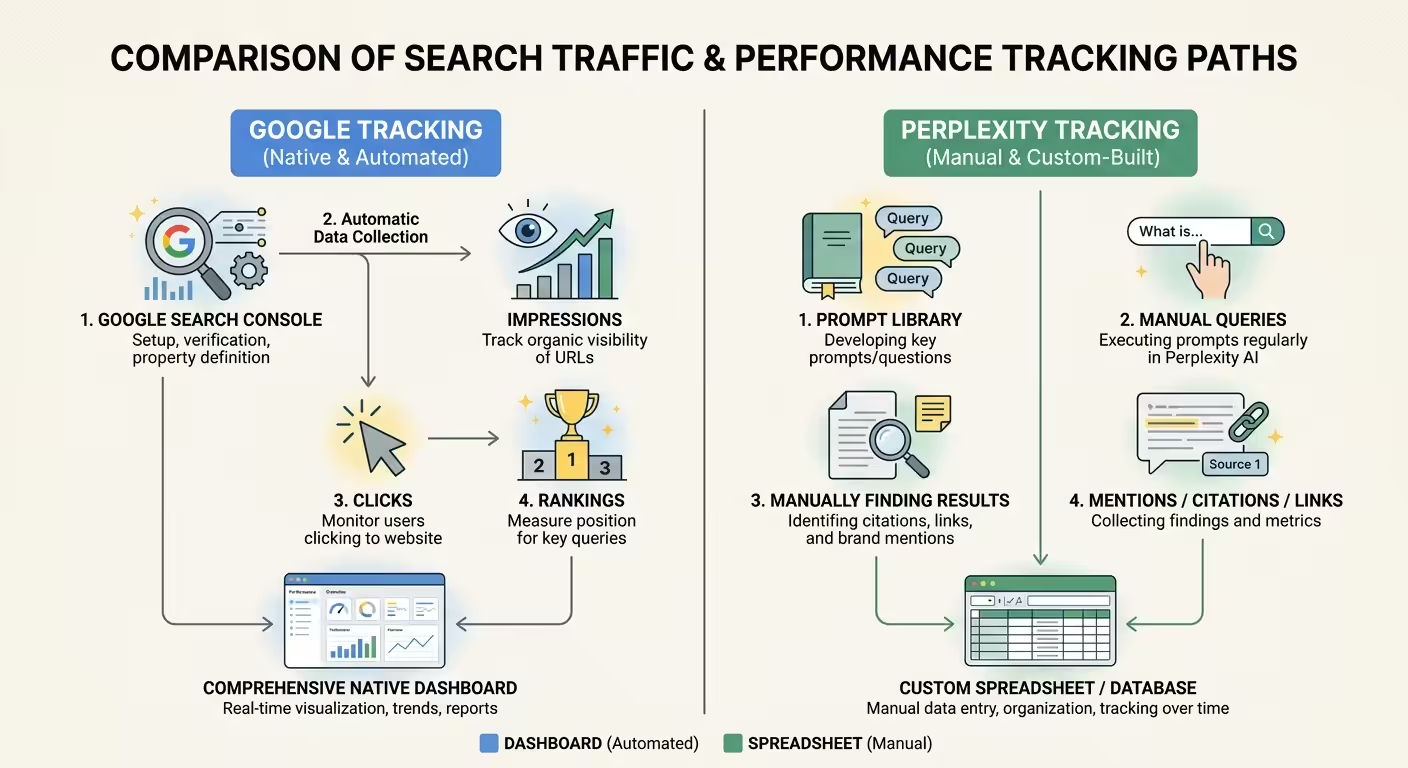
This creates a measurement gap that many marketing teams underestimate. You can rank well in Google organic results while being completely invisible in Perplexity, because Perplexity selects sources based on different signals.
Perplexity’s RAG architecture means it performs a fresh web search for every query, evaluates source quality in real time, and synthesizes an answer with inline citations. The sources it selects depend on:
- Content clarity, direct answers, structured formatting, clear claims
- Source authority, domain trust, editorial quality, backlink profile
- Freshness, recently published or updated content surfaces faster
- Topical depth, consistent coverage across related subtopics
A page that ranks #1 in Google may never appear in Perplexity if it’s poorly structured, lacks clear claims, or competes against a more authoritative source for that specific query. That’s why you need a dedicated tracking workflow, not just a column added to your existing rank tracker.
Mentions vs. Citations vs. Links: Three Metrics, Three Signals
A brand mention in Perplexity is any instance where your company or product name appears in the answer text. A citation is when your domain appears in the numbered reference list at the bottom of the answer. A link is a clickable URL that sends users directly to your site.
| Signal | What it is | What it tells you | How to track it |
|---|---|---|---|
| Mention | Your brand name appears in Perplexity’s synthesized answer text | Perplexity considers you relevant enough to name in the response | Record whether the brand is named for each prompt, and note any competitors named alongside it |
| Citation | Your content is listed as a numbered source backing the answer | Your page was retrieved and trusted as evidence for the claim, not just named | Log which of your URLs appear in the source list and for which prompts they surface |
| Link | A clickable reference to your domain in the cited sources | A potential referral path and confirmation the exact URL was surfaced | Capture the linked URL so you can map which pages earn visibility over time |
These are three distinct outcomes, and they tell you different things about your visibility:
Mention Without Citation
Perplexity recognizes your brand as an entity but doesn’t trust your content enough to source it. This signals an entity recognition problem, not a content problem.
Citation Without Mention
Your content is used as a source, but your brand name doesn’t appear in the answer text. Perplexity treats your page as informational, not as a brand recommendation.
Mention With Citation and Link
The strongest signal. Perplexity both recommends your brand and directs users to your content.
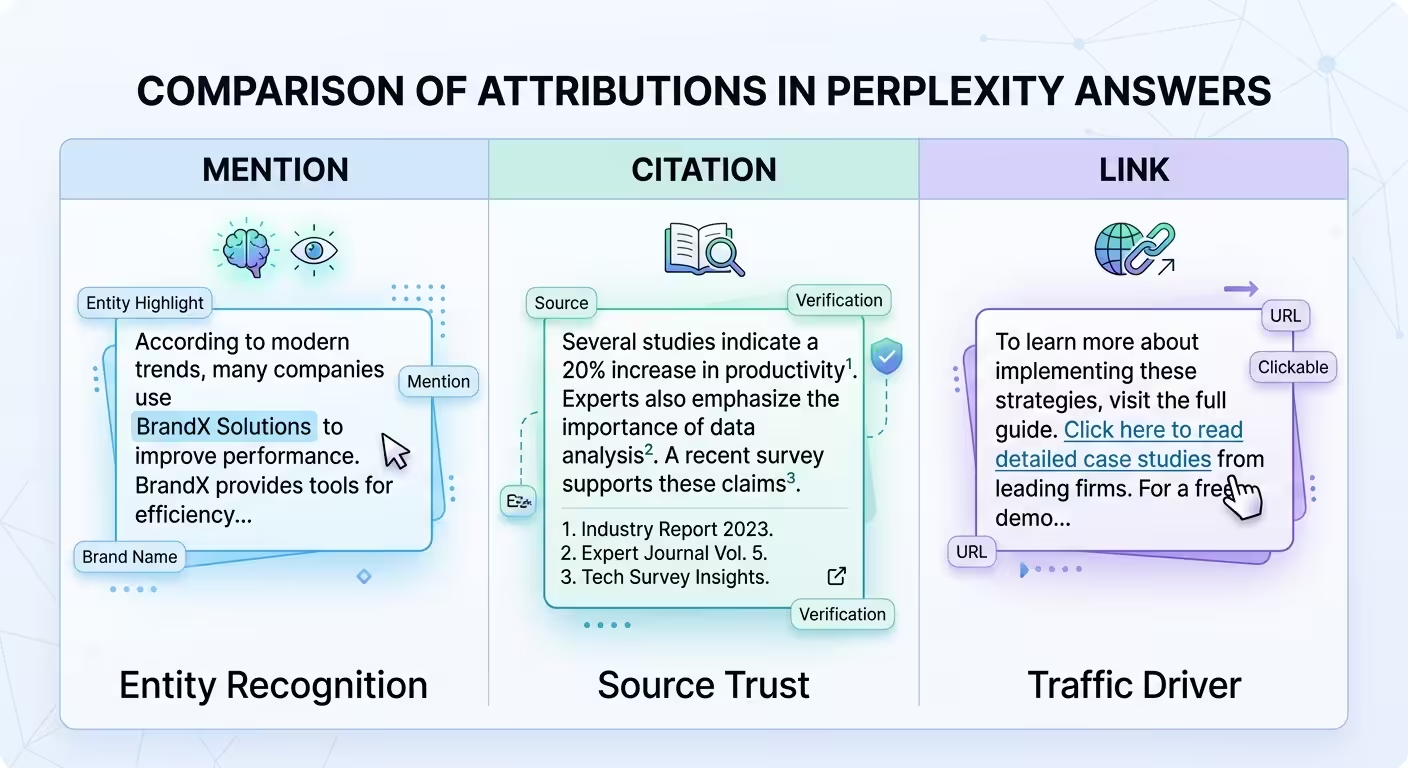
If you blend these three metrics into a single “visibility score,” you lose the diagnostic power. A brand with high mentions but low citations needs different fixes than a brand with zero mentions entirely. Separate tracking columns for each metric let you diagnose the specific gap.
For context on how brand mentions function across AI platforms beyond Perplexity, the overview at AI brand citations explained breaks down the broader landscape.
How to Build a Prompt Library That Mirrors Real Buyer Queries
Your tracking is only as useful as your prompt list. Random questions produce random data. A structured prompt library, anchored in actual buyer language, produces actionable visibility intelligence.
Start with seed keywords from real demand signals
Pull seed terms from sources that reflect how your buyers actually search:
- PPC search term reports (especially high-converting queries)
- CRM call logs and sales conversation transcripts
- On-site search data
- Support ticket themes and common pre-sale questions
- Keyword research tools filtered by commercial and informational intent
Avoid inventing prompts based on what you think buyers ask. Ground every prompt in evidence of real demand.
Transform seeds into natural-language prompts
Perplexity users type conversational queries, not keyword strings. Transform each seed into 3-5 natural-language prompts that mirror how someone would actually ask the question.
Seed keyword: “AI visibility tracking tools”
Prompts:
- “What are the best tools for tracking brand visibility in AI search?”
- “How do I monitor my brand mentions in AI-generated answers?”
- “Which platforms track whether my brand appears in Perplexity and ChatGPT?”
Keep prompts neutral. Never include your own brand name in the prompt unless you’re specifically testing branded awareness. Stuffing your brand into the query biases the result and defeats the purpose of measurement.
Organize prompts by intent category
Cluster your prompts into three categories so you can compare performance across buyer journey stages:
Informational
“How does AI search visibility work?” (awareness stage)
Commercial
“Best AI brand monitoring tools for SaaS companies” (consideration stage)
Comparison
“[Competitor] vs. [Competitor] for tracking AI mentions” (decision stage)
This structure reveals whether Perplexity associates your brand with early-stage education, active vendor evaluation, or neither. Most brands discover they’re missing entirely from commercial-intent prompts, which is where revenue impact concentrates.
How many prompts to start with
Begin with 25-50 prompts. This is enough to establish a baseline across your core topic clusters without creating an unmanageable manual workload. Expand to 100-200 once you’ve validated your tracking cadence and need stable trendlines.
Prioritize prompts with revenue intent first. Backfill informational prompts later, they matter for building the citation graph that feeds commercial answers, but they’re not where you start measuring ROI.
Setting Up a Manual Tracking Workflow
Whether you’re asking what’s the best tool to track Perplexity brand mentions or what’s a good tool to track Perplexity mentions, the underlying workflow is the same. The setup below walks through how to track brand mentions in Perplexity AI manually first, so you understand what an automated tool actually does on your behalf when you graduate to one.
What gets inconsistent over four weeks: the prompt wording. Teams write 25 prompts in week one, then casually tweak phrasing in weeks two and three to feel more natural, and by week four they’re tracking a different question than they started with.
Lock your exact prompt strings in a shared doc and run them verbatim every session. The data only compounds if the inputs stay identical.
Manual tracking works well for initial baselines and small prompt libraries (under 50 queries). Here’s how to set it up so your data is reliable and comparable week over week.
Step 1: Create a controlled testing environment
Open Perplexity in an incognito browser window or a dedicated browser profile. This reduces personalization noise. Before your first run, document your baseline environment:
- Device and browser
- Logged-in or logged-out state
- Region (or VPN endpoint if testing multiple locations)
- Perplexity model selection (Sonar, Sonar Pro, etc.)
Keep these variables consistent across every tracking run. If Perplexity changes its default model between runs, note it explicitly, model changes can shift outputs even when nothing else changes.
Step 2: Build your tracking spreadsheet
Use Google Sheets, Airtable, or Notion. Create columns for:
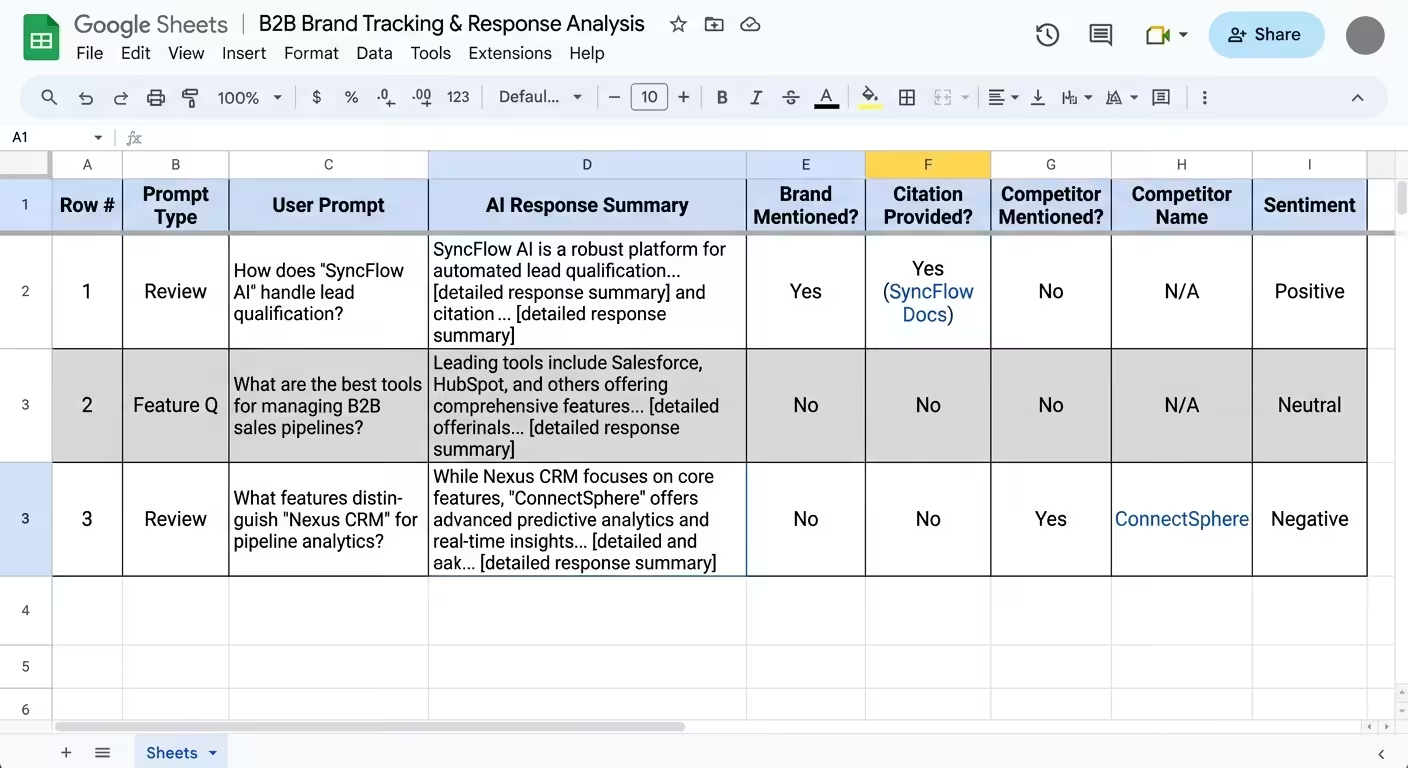
- Date and time
- Exact prompt text
- Perplexity model used
- Mentioned? (Yes/No)
- Cited? (Yes/No, with URL if applicable)
- Linked? (Yes/No, with URL if applicable)
- Competitors mentioned (list all brand names)
- Source URLs in references
- Accuracy score (1-5: does the description match your actual positioning?)
- Notes (entity errors, outdated info, wrong service area, etc.)
Save the full answer text or a screenshot for each prompt. You’ll need it for trend analysis and for diagnosing why visibility changed.
Step 3: Run prompts in weekly batches
Pick a fixed day and time each week. Run your full prompt library (or a prioritized subset if you’ve 100+). Record every data point for every prompt, even when the results look the same as last week.
Annotate your sheet with any external events that could affect results: new content published, a PR hit, a schema update, a product launch, or a directory listing improvement. Without these annotations, you’ll struggle to explain what caused a visibility change.
Step 4: Define your baseline KPIs
Two primary metrics anchor your tracking:
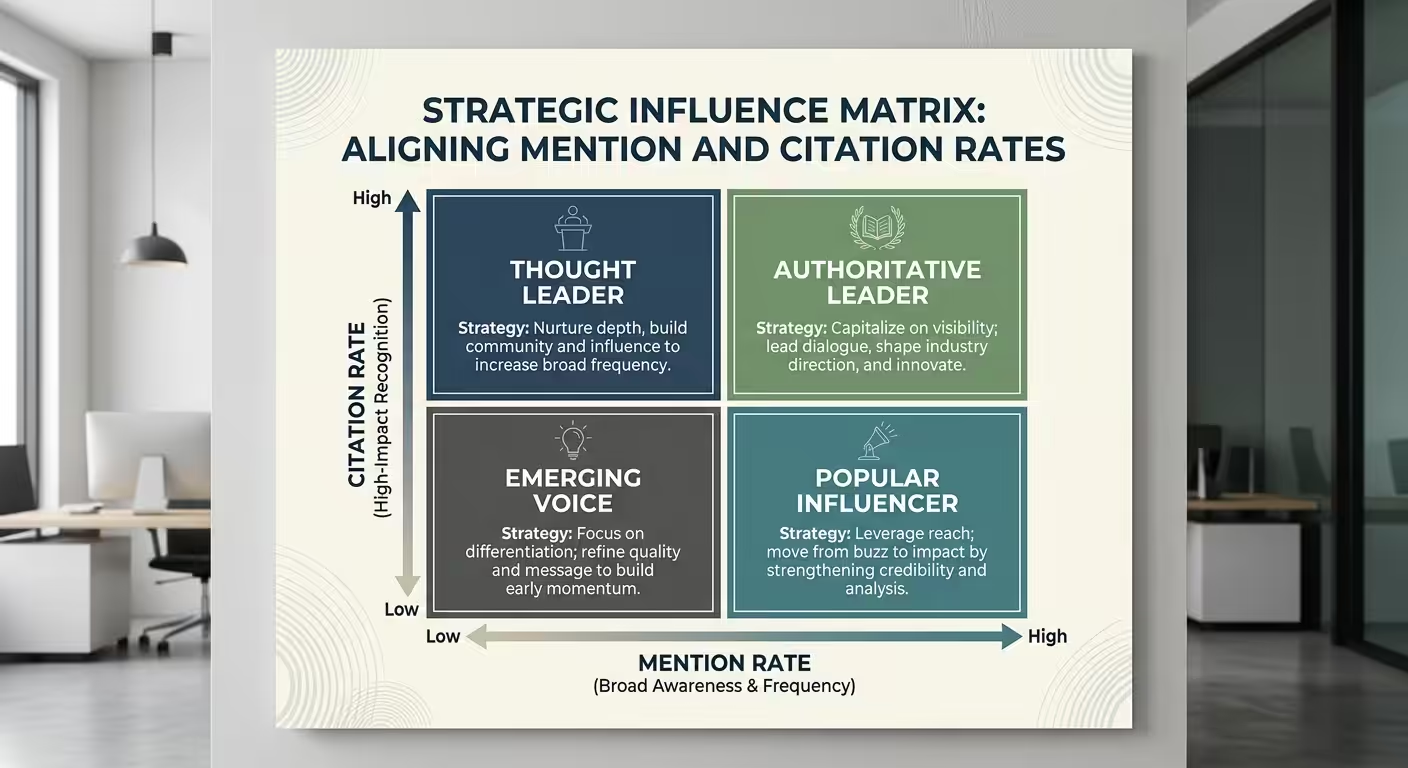
Visibility rate, the percentage of prompts where your brand is mentioned in the answer text. Calculate: (prompts with mention ÷ total prompts) × 100.
Citation rate, the percentage of mentions where your domain appears in the reference list. Calculate: (mentions with citation ÷ total mentions) × 100.
A secondary metric worth tracking: share of voice, your mentions compared to competitor mentions across the same prompt set. This tells you whether you’re gaining or losing ground relative to your category.
For a broader view of tracking across multiple AI platforms, the guide on how to track brand mentions across AI search platforms covers the cross-platform workflow.
When Manual Tracking Breaks Down (and What to Do Next)
Once manual tracking hits its ceiling, the next move is a dedicated AI-monitoring tool. The comparison in our ChatGPT monitoring tools guide covers platforms that track Perplexity, Gemini, and Claude alongside ChatGPT, start there before evaluating Perplexity-only trackers.
Manual tracking is viable for 25-50 prompts with weekly cadence. Beyond that, three problems emerge:
Time Cost Compounds
Running 100 prompts manually takes 2-3 hours per session. At weekly cadence, that’s over 100 hours per year on data collection alone, before any analysis.
Consistency Degrades
Human error creeps in: skipped prompts, inconsistent screenshots, forgotten annotations. Data quality drops, and trend analysis becomes unreliable.
Multi-location Tracking Becomes Impractical
If you operate in multiple regions, you’d need separate VPN sessions for each location, multiplying the workload.
At this point, automated monitoring tools become the practical choice. Several platforms now offer Perplexity-specific tracking, including Keyword.com, SE Ranking, LLM Pulse, and others. These tools run your prompt library on a schedule, capture mentions and citations, and store historical data for trend analysis.
Pro Insight: Don’t skip manual tracking entirely just because automation exists. Run a manual baseline first to understand what the data looks like and which prompts matter most. Then migrate your validated prompt library into an automated tool. This prevents the common mistake of tracking 200 prompts that don’t map to real buyer behavior.
Reading Perplexity Tracking Data Without Overthinking It
Raw data becomes useful only when you map it to specific actions. Here are the four patterns you’ll encounter most often, and what each one means.
Pattern 1: High mention rate, high citation rate
Perplexity recognizes your brand and trusts your content enough to source it. This is the strongest signal. Your priority: maintain momentum by keeping cited pages fresh and expanding into adjacent topic clusters.
Pattern 2: High mention rate, low citation rate
Perplexity knows your brand exists but isn’t using your content as the source. It’s pulling the information from third-party coverage, directories, reviews, news articles, rather than your own pages. Your priority: improve on-site content structure, add original data, and build pages that are easier for RAG systems to extract from.
Pattern 3: Low mention rate across all prompts
Perplexity doesn’t associate your brand with the topics you care about. This is usually an entity authority problem, not a content volume problem. Your priority: build consistent editorial mentions across high-authority publications that AI models draw from, and ensure entity consistency (brand name, positioning, category) across the web.
Pattern 4: Competitor dominates your category prompts
A specific competitor consistently appears where you don’t. Examine which source URLs Perplexity cites for that competitor, often the competitor has stronger coverage on the exact sites Perplexity trusts for your category: industry directories, niche publications, or comparison pages.
Your priority: earn coverage on those same sources and create content that directly answers the prompts where you’re missing.
The Source URLs That Matter Most
Every Perplexity answer includes numbered references. Those reference URLs are the most valuable data in your entire tracking workflow, more valuable than the mention itself.
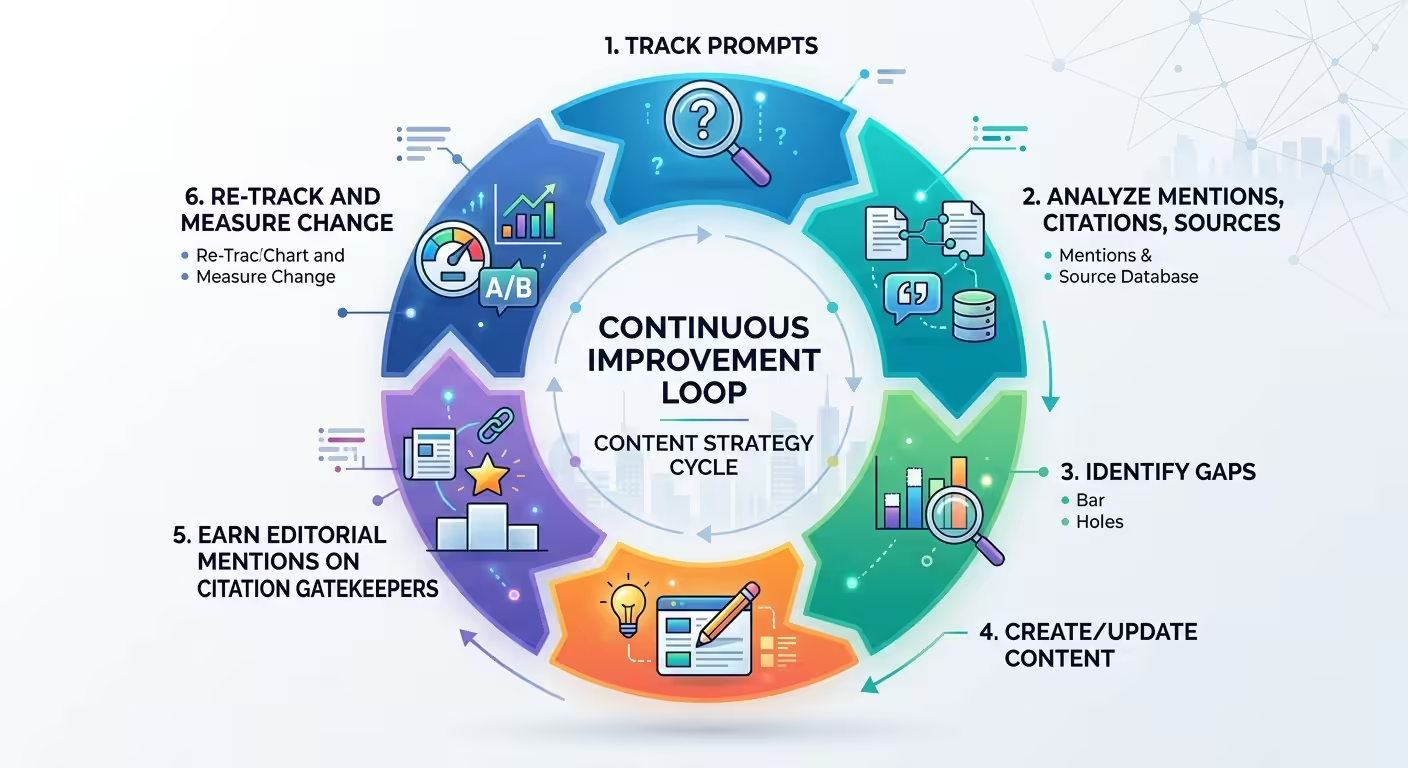
Here’s why: the source URLs reveal Perplexity’s citation supply chain. If Perplexity consistently cites a particular review site, industry directory, or publication for your category, that source is a “citation gatekeeper.” Getting your brand mentioned or reviewed on that source directly influences whether Perplexity includes you in future answers.
Track source URLs across all your prompts and look for patterns:
- Which domains appear most frequently as references?
- Are there sources your competitors appear on that you don’t?
- Which of your own pages get cited, and which never do?
This analysis gives you a concrete content and PR roadmap. Instead of guessing which publications to target, you’re working from evidence of what Perplexity already trusts.
Understanding how these brand mentions in Perplexity function at the source level gives you a clearer picture of what drives inclusion versus exclusion.
Five Mistakes That Corrupt Your Tracking Data
The mistake we see most often isn’t on the listed five, it’s tracking session length. Teams burn through 25 prompts in one 45-minute block because it fits the calendar, and Perplexity starts reusing retrieval patterns from earlier prompts in the same session. Split the run into two shorter blocks, or ideally two separate days, or your last 10 prompts will quietly contaminate each other and look more consistent than they actually are.
Bad data leads to bad decisions. These are the most common errors teams make when tracking Perplexity visibility, and each one is avoidable.
1. Changing multiple variables between runs
If you change the prompt phrasing, model selection, and location in the same week, you can’t attribute any visibility change to a specific cause. Change one variable at a time. If Perplexity updates its default model, note it and keep everything else constant.
2. Only tracking “best of” prompts
Shortlist queries (“best CRM for startups”) get all the attention, but informational queries (“how does CRM integration work”) often determine which sources Perplexity trusts when it later answers commercial questions. Track both.
3. Not saving source URLs
Screenshots alone aren’t enough. Record the full list of cited source URLs for every prompt. These URLs are the foundation of your content improvement and PR targeting strategy.
4. Treating one check as a trend
A single data point is a snapshot, not a signal. You need 4-6 weeks of consistent data before you can identify meaningful patterns. Resist the urge to react to a single week’s results.
5. Blending mentions, citations, and links into one metric
As covered earlier, these three outcomes require separate tracking columns. A composite “visibility score” obscures the specific problem you need to fix.
How to Improve Your Brand’s Perplexity Visibility Based on Tracking Data
Tracking without action is just record-keeping. Here’s how to close the loop between measurement and improvement.
What Perplexity actually weighs when choosing sources
Source-selection research across a large sample of Perplexity queries points to five weighted signals: relevance to the specific query (roughly 30%), reviews and social proof for commercial queries (roughly 25%), domain authority (roughly 20%), content recency (roughly 15%), and entity clarity plus consistent naming (roughly 10%). The weights shift by query type, informational queries lean harder on domain authority and structure, commercial queries lean harder on reviews and recency, but the pattern holds: a page ranking number 15 in Google can still be Perplexity’s primary citation if it answers the query more directly than anything ranking above it.
Create content structured for RAG extraction
Perplexity’s RAG system pulls from pages that make it easy to extract clear, verifiable claims. Structure your content with:
- Question-style headings that match how users phrase Perplexity queries
- Lead paragraphs that directly answer the heading’s question in 1-2 sentences
- Specific, sourced claims rather than vague generalities
- Tables, numbered lists, and comparison matrices that organize information cleanly
Pages designed this way are significantly more likely to be selected as citation sources, because the RAG system can extract a clear, self-contained answer without needing to interpret dense paragraphs.
Build entity authority through consistent editorial mentions
If Perplexity doesn’t mention your brand at all, the issue is usually entity authority, the AI doesn’t have enough signals to associate your brand with a specific category or solution.
Entity authority builds when your brand appears consistently across high-authority editorial content, with the same name, positioning, and category associations. Brand mentions for SEO and AI visibility converge here: the same editorial placements that strengthen your backlink profile also feed the citation graph that AI models rely on.
In our own campaigns, the brands that earn consistent Perplexity citations share one habit: they treat a small set of authoritative category publications as a recurring investment, not a one-off pitch. That steady cadence is what teaches Perplexity’s retrieval layer which sources to trust for your category over time.
Target the citation gatekeepers your tracking data reveals
Your source URL analysis (from the section above) tells you exactly which publications and directories Perplexity trusts for your category. Prioritize earning coverage on those specific sources. A single mention on a site Perplexity already cites for your topic can shift your visibility faster than publishing five new blog posts on your own domain.
Keep cited pages fresh
Perplexity favors recently updated content. If your tracking shows a page was cited last month but dropped off this month, check whether a competitor published fresher content on the same topic. Update your page with current data, new examples, and a visible “last updated” date.
Keeping Perplexity Tracking Running Long-Term
Setting up Perplexity tracking is a one-time task. Keeping it running for the next 12 months is the part that actually determines whether the data drives decisions or quietly stops getting checked.
Weekly cadence fits competitive categories where citations shift fast; monthly is enough for stable, low-competition niches. Too frequent and the review backlog piles up unread, too infrequent and a competitor cements a citation advantage before you notice.
Structure the dashboard around three views only: new mentions since last run, mentions that disappeared, and competitor citations that appeared for the first time. Anything beyond that goes unread within a quarter.
Expand the prompt set when you launch a new product line, enter a new vertical, or notice buyers phrasing category questions your current list does not cover. Prune prompts that return an identical result for three straight cycles, since they consume review time without producing new signal.
A healthy ongoing program typically settles around 15-25 active prompts, not the 50+ some teams start with. Ongoing monitoring is also where internal programs most often quietly lapse: someone owns setup, nobody owns month eight, so assign a named owner for the cadence itself, not just the initial rollout.
Tracking Perplexity Alongside Other AI Platforms
For the equivalent audit on other models, see the ChatGPT brand mention check workflow and brand mentions in Claude, and our LLM monitoring guide covers the cross-platform cadence so the data from each model stays comparable.
Perplexity is one surface in a multi-platform AI search ecosystem. As of 2026, buyers use ChatGPT, Google Gemini, Claude, and Copilot alongside Perplexity, often comparing answers across platforms before making decisions.
Your tracking workflow should extend beyond a single platform when your resources allow. The prompts you build for Perplexity can be reused across ChatGPT and Gemini with minor adjustments. The metrics (mention rate, citation rate, share of voice) apply universally.
Key differences to account for:
- Perplexity cites sources with numbered references on every query. Citations are transparent and measurable.
- ChatGPT draws primarily from training data, with web browsing as a supplement. Mentions are conversational, not citation-linked. See the ChatGPT brand mention check workflow for platform-specific tracking.
- Google Gemini uses a hybrid of training data and live search. Citation behavior varies by query type. The Gemini tracking guide covers its nuances.
A cross-platform view reveals whether your brand’s AI visibility is consistent or fragmented. A brand that appears in Perplexity but not ChatGPT likely has strong web presence but weak training-data signals.
A brand visible in ChatGPT but absent from Perplexity may have historical authority but lacks fresh, structured content. The AI visibility analytics tools overview covers platforms that consolidate multi-model tracking into a single workflow.
For teams choosing between AI engines to track first, the Perplexity vs ChatGPT comparison explains where each model is strongest, citation-wise.
Why Perplexity Rewards Fresh Content Disproportionately
Perplexity’s real-time retrieval model makes it more sensitive to content recency than a traditional search index. Stale source pages drop out of citation rotation faster here than on platforms that lean more heavily on training data, which is the pattern behind the “keep cited pages fresh” priority above.
A tracking cadence built for other platforms can be too slow for Perplexity alone.
Related Perplexity Tracking Resources
Depending on what you need next: see how Perplexity’s two crawlers treat your site if your pages aren’t getting cited, or read about tracking mentions across AI search if Perplexity is one of the engines you track.
FAQ
How do I track brand mentions in Perplexity?
Run a fixed set of 5 to 8 category prompts in Perplexity each week, then record whether your brand appears in the answer text and whether your site shows up in Perplexity’s cited source list. A free Perplexity account plus a tracking spreadsheet is enough to begin; the key is keeping the prompts and the cadence consistent so week-over-week changes are comparable. Log the mention and the citation separately, because they are different signals.
Does Perplexity provide any native analytics for brands?
No. As of 2026, Perplexity doesn’t offer a publisher dashboard, brand analytics, or any reporting on how frequently a domain appears in answers. All tracking must be done externally, either through manual prompt testing or third-party monitoring tools. This is a fundamental difference from Google, which provides Search Console data.
How often should I run Perplexity tracking?
Weekly cadence works well for most brands. This is frequent enough to detect trends without creating an unsustainable time commitment. If you’re running a major campaign or content push, increase to twice weekly for the 2-3 weeks following launch. Monthly tracking is too infrequent to catch fast-moving changes, Perplexity pulls live web data, so visibility can shift within days.
Can I track Perplexity visibility without any paid tools?
Yes. Manual tracking with a spreadsheet, incognito browser, and a structured prompt library costs nothing but your time. This approach works for up to 50 prompts at weekly cadence. Beyond that scale, the time investment typically justifies moving to an automated tool.
What makes a page more likely to be cited by Perplexity?
Perplexity favors pages with clear, direct answers to specific questions, structured formatting (headings, lists, tables), verifiable claims with source attribution, and recent publication or update dates. Domain authority and backlink quality also influence which sources Perplexity selects during its real-time retrieval process.
Is Perplexity tracking relevant for B2B brands specifically?
Particularly relevant. Perplexity’s user base skews toward researchers, technical professionals, and informed buyers, exactly the audience B2B brands need to reach during the vendor evaluation process. When a buyer asks Perplexity “best [category] tools for enterprise” and your brand doesn’t appear, you’ve lost a discovery opportunity that no amount of Google ranking can recover.
What’s a good tool to track Perplexity brand mentions?
A good tool to track Perplexity brand mentions captures three things: the response text, the cited sources, and the cited URLs. Scrunch AI, AthenaHQ, and Peec AI all do this for Perplexity, alongside ChatGPT, Gemini, and Claude. Which one fits best depends on prompt volume, budget, and whether you need cross-platform coverage.
What’s the best Perplexity mention tracker?
Scrunch AI runs prompt sets against Perplexity on a daily or weekly cadence and captures both mentions and citations; AthenaHQ and Peec AI are stronger fits at the enterprise tier. The best Perplexity mention tracker for any specific team is the one whose prompt-volume tier matches the buying context, not the one with the loudest marketing.
How can I track sources mentioned by Perplexity?
To track sources mentioned by Perplexity, your monitoring tool must capture not only your brand mentions but also the source URLs Perplexity cites in each response. The dedicated tools above all do this, the output is usually a per-prompt list of cited URLs ranked by frequency. That list tells you which third-party publications drive Perplexity’s view of your category, which is the input to a smart citation-building program.
What’s a Perplexity visibility tracker and what does it actually track?
A Perplexity visibility tracker is a tool that runs a fixed prompt set against Perplexity AI on a regular schedule and captures every brand mention plus the source URLs cited in each response. The output is your prompt-level visibility, your share of voice versus tracked competitors, and the source domains driving Perplexity’s answers in your category. Tools to track Perplexity mentions all share this core function, the differences are in pricing, prompt volume, and dashboard depth.
How can I see mentions in Perplexity?
To see mentions in Perplexity, the simplest path is a 5-minute manual audit: open Perplexity AI, run 10 category-relevant queries, and note which brands the responses name. For ongoing tracking, switch to a perplexity mentions tool that automates the run on your prompt set. The dedicated tools listed above all serve this purpose.
How can I monitor Perplexity brand mentions automatically?
Set up a monitoring tool with your prompt set, lock in a daily or weekly cadence, and route the dashboard alerts to the right team. Scrunch AI, AthenaHQ, and Peec AI cover the typical mid-market and enterprise needs, and the platform you pick should depend on your prompt volume.
Track mentions continuously rather than as a one-time check, since the model updates frequently.
Can I automate reports on brand visibility trends in Perplexity?
Yes. Dedicated Perplexity tracking tools automate reports on brand visibility trends, including week-over-week mention counts, citation rates, share of voice versus competitors, and source-URL frequency. You can also pipe the raw API output into a data warehouse and build the dashboards yourself if your reporting stack already exists.
What about Perplexity AI keywords tracking?
Perplexity AI keywords tracking is a related discipline, instead of (or alongside) brand-level monitoring, you track which queries trigger Perplexity to return your content as a citation. The mechanic is the same: a fixed query set, a regular cadence, and a tool that captures the cited URLs. Most teams need both, the brand view tells you whether you’re in the answer, the keyword view tells you which prompts surface you.
Running Your First Perplexity Tracking Session
Start with a focused prompt library of 25 queries mapped to your most revenue-relevant buyer questions. Run your first manual tracking session this week: incognito browser, structured spreadsheet, all three metrics (mentions, citations, links) recorded separately. After four weeks of consistent data, you’ll know which queries Perplexity already surfaces you for, which sources it’s citing, and where your competitors are winning that you’re not.
If you want a baseline before committing to a tracking tool, book a short strategy call. We’ll run 25 category-relevant prompts across Perplexity, ChatGPT, and Gemini so you know exactly which sources Perplexity currently trusts for your category, and which ones your competitors are winning that you’re not.
Once you can see your mentions, the next question is what actually earns those Perplexity citations in the first place.