
If your Google rankings dropped dramatically, treat it like an incident, not a mystery. A sudden decline almost always traces back to a specific trigger you can find, and the fastest recovery starts with confirming the drop is real before you touch anything.
The right first move is to verify the loss in Google Search Console and GA4, then scope which pages and queries fell, so you diagnose the actual cause instead of guessing. This guide walks you through that sequence step by step: verify, scope, diagnose recent changes and technical faults, check for algorithm or SERP shifts, audit content and links, benchmark competitors, apply the right fix, and monitor the rebound.
What a Dramatic Ranking Drop Usually Means and What to Gather First
A dramatic drop feels like a crisis, but it’s usually one traceable event, not random bad luck. The first job is to avoid a false alarm, because reacting to the wrong signal wastes days you don’t have.
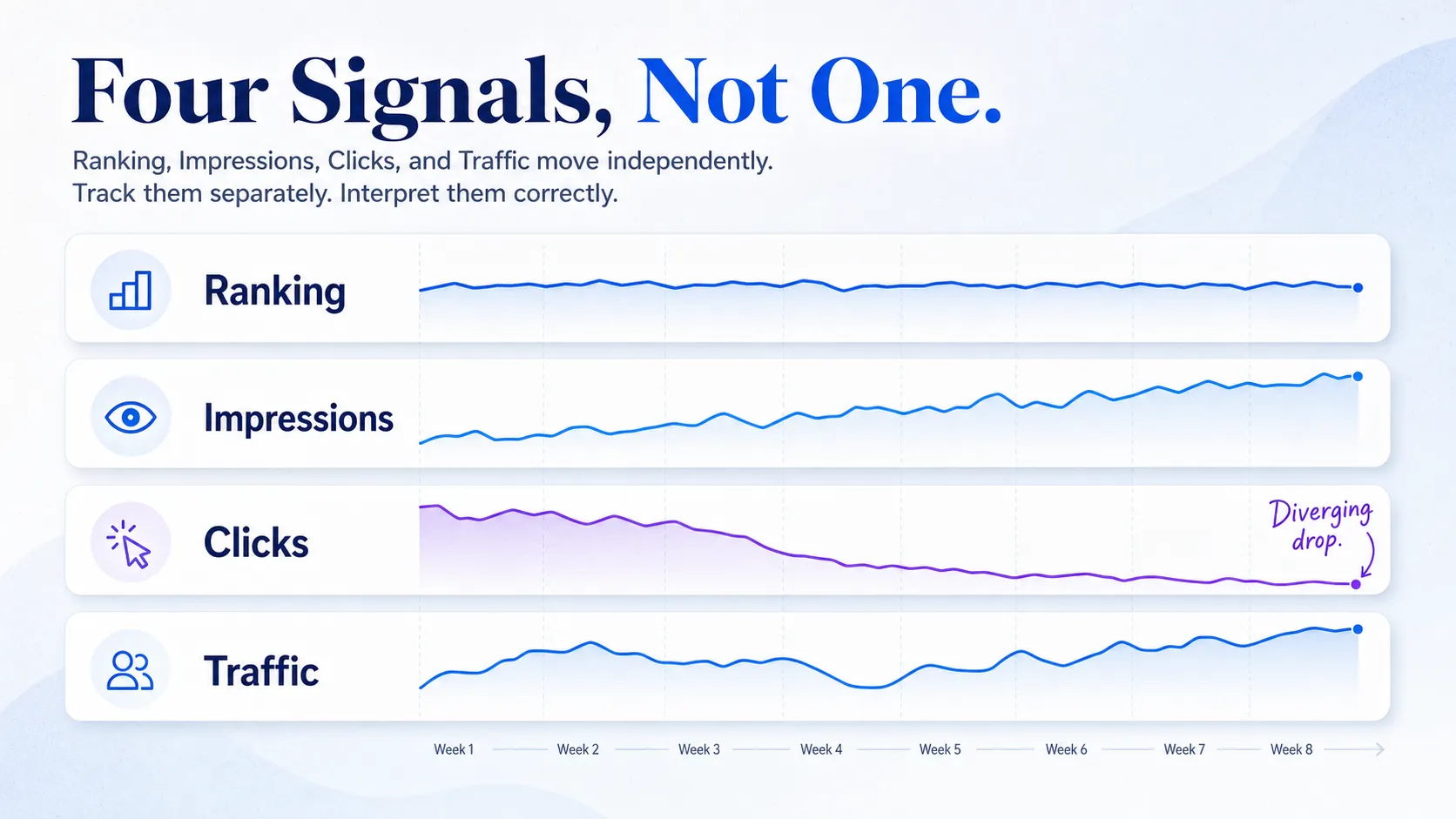
Start by separating four things people constantly blur together. A ranking drop is your position falling in the results. A traffic drop is fewer visitors arriving. A click drop is fewer people clicking your listing. An impression drop is your page showing up in fewer searches. These move independently. Your average position can hold steady while clicks collapse, and that points somewhere completely different than a true ranking loss.
Before you change a single line of code or content, collect your evidence. Chasing a fix without baseline data means you’ll misread normal seasonality or a tracking glitch as an SEO emergency.
- Google Search Console access, for position, click, and impression data straight from Google
- GA4, to see whether sessions and conversions actually fell
- A rank tracker, for daily keyword movement
- A crawl tool, to catch technical faults across the site
- CMS and server access, to review recent deployments
- Backlink data, to spot lost referring domains
- A recent change log, so you know what shipped and when
Baselines matter because they tell you what normal looks like. Without pre-drop numbers, you can’t prove anything moved. And here’s the discipline most teams skip: freeze all nonessential changes until you’ve identified the cause. Every new edit you push during a live incident adds a variable and makes the real problem harder to isolate. The most common operator mistake is panicking over a traffic dip when rankings never moved, because the SERP layout changed under you. That’s why you separate the signals first.
Confirm the Drop Is Real, Then Map the Pattern
Two steps come before any fix: prove the decline happened, then narrow it to a sitewide, section-wide, or page-level issue. Skip these and you’ll fix the wrong thing.
Step 1: Confirm the Drop in Search Console and GA4
Use Google Search Console and GA4 as your source of truth, not a screenshot from a third-party tool alone. Third-party trackers sample keywords and locations, so they drift from what Google actually served. Open the GSC Performance report and compare a clean date range before the suspected drop against the days after it.
Split the four metrics apart in that comparison: clicks, impressions, average position, and CTR. If average position held but clicks fell, you’re likely looking at a SERP or CTR problem, not a ranking loss. If impressions and position both collapsed, the ranking genuinely dropped. Then segment the loss. Check whether it hits branded queries only, non-branded only, one device, or one country. A drop confined to mobile or to a single market points somewhere far more specific than a sitewide crash.
Step 2: Map Which Pages and Queries Fell
Now build a pattern. Identify which pages, query groups, and content clusters lost visibility first, because the shape of the loss names the likely cause. Pull the GSC Pages and Queries reports for the same date comparison and sort by lost clicks.
Put the results in a simple table so the pattern jumps out.
| Page type | Query type | Device | Country | Severity |
|---|---|---|---|---|
| Blog cluster | Non-branded | All | US | Sharp |
| Product pages | Branded | Mobile | All | Mild |
| Sitewide | All | All | All | Severe |
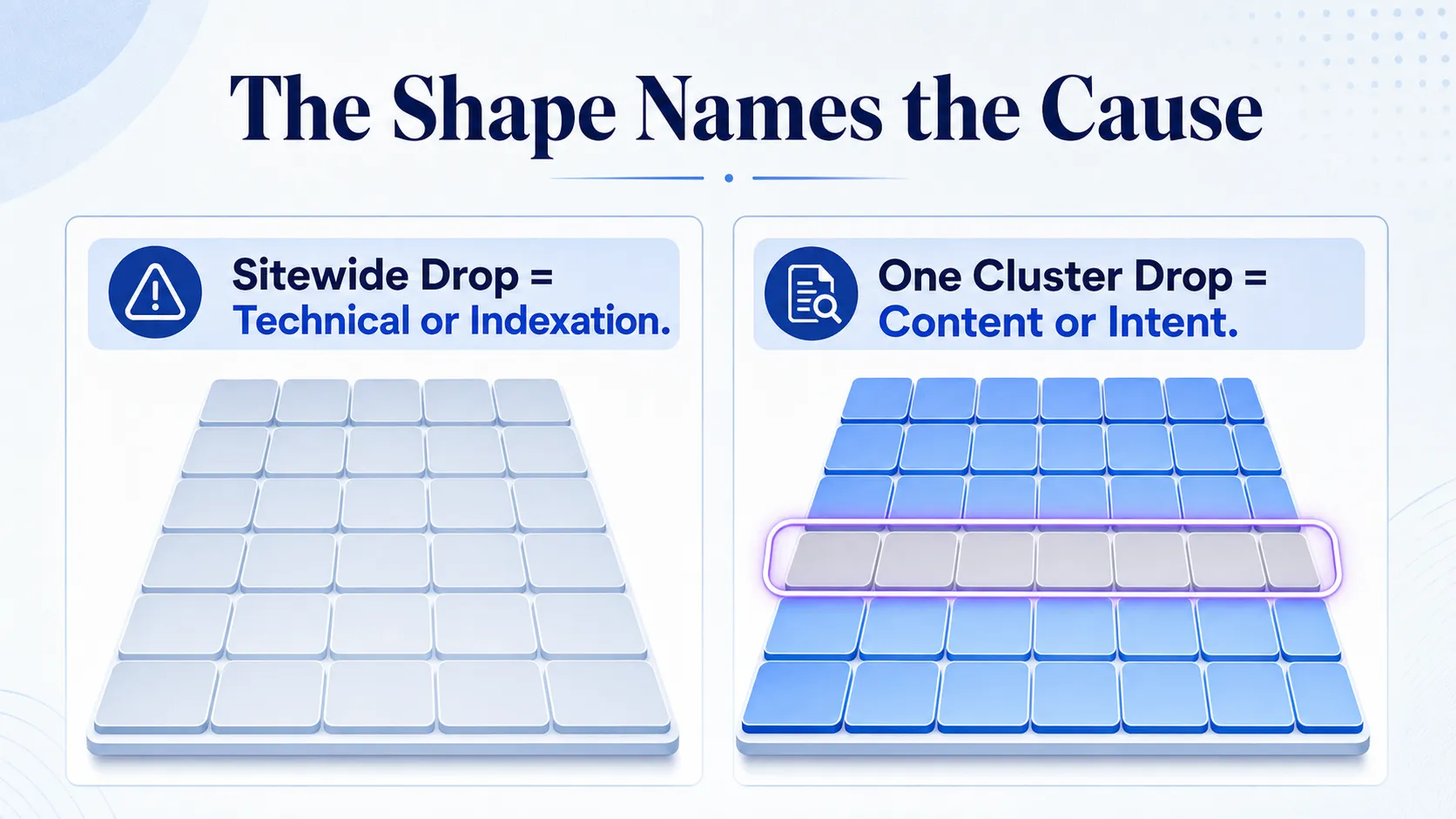
Read the pattern like this. A page-specific loss usually points to content or a technical fault on those URLs. A sitewide loss often points to a deployment error, an indexation event, or an algorithm hit. When everything drops at once, look at technical and indexation causes first. When one cluster falls while the rest hold, look at content decay or intent mismatch on that cluster. This one read saves hours, because it tells you which of the next sections to open first.
Check Recent Changes First, Then Technical SEO and Indexation
The fastest root causes are almost always internal and recent. Before you blame Google, blame your last deployment. This is where most dramatic drops actually come from, and it’s the quickest to confirm.
Step 3: Review the Internal Change Log
Pull up everything that shipped in the two weeks before the drop: content edits, template changes, redirects, internal link changes, plugin or theme updates, CMS deployments, migrations, and staging pushes. Ask the team directly, because the person who changed a template rarely connects it to a ranking loss a week later.
The highest-risk accidents hide in routine work. A theme update that adds a noindex tag sitewide can vanish your pages within days. So can a robots.txt rule that blocks a whole directory, a canonical tag pointing every page at the homepage, a redirect chain that loops, or a URL structure change that orphans your best content. A harmless-looking plugin update is one of the most common triggers of a sudden, unexplained drop.
Step 4: Run Technical Checks in Priority Order
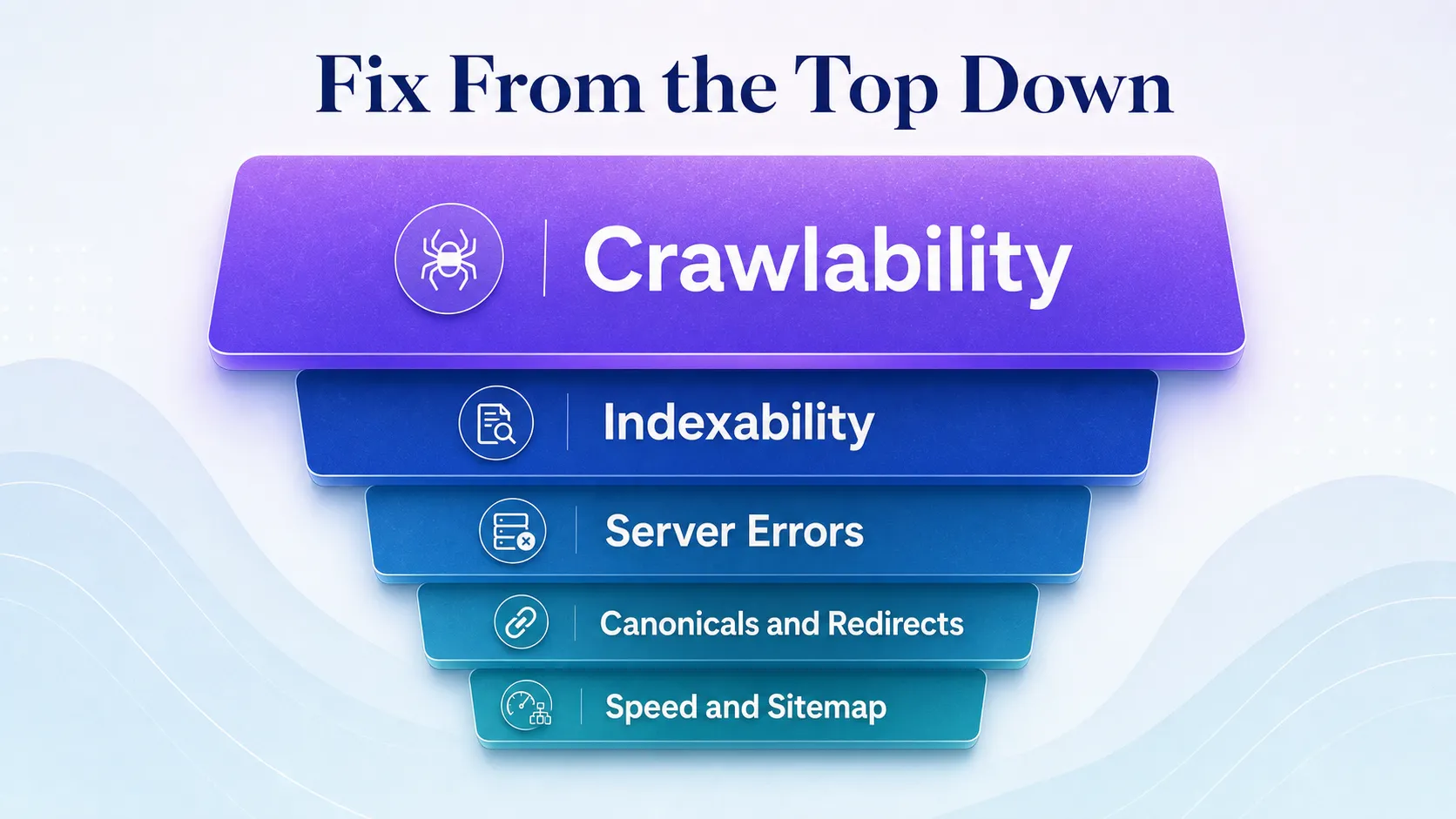
Once you’ve ruled out or found a recent change, work the technical checks from highest impact down. Even one sitewide technical fault can suppress rankings fast, so fix the highest-confidence issue first, then recrawl.
Check crawlability first: can Googlebot reach your pages at all, or is robots.txt blocking them? Then indexability: are your pages actually in Google’s index, or has a noindex directive pulled them? Next, server errors, because a run of 5xx responses makes Google slow its crawling, and pages that keep returning them eventually drop out of the index. After that, canonicalization, redirect behavior, page speed, mobile usability, rendering, broken pages, and sitemap health.
Search Console shows most of this directly. The Pages report under Indexing shows which URLs aren’t indexed and why, from server errors to noindex tags. The URL Inspection tool tells you whether a specific page is indexed, how Google renders it, and whether a live test passes. The Manual Actions and Security Issues panels flag penalties and hacks. Sitemap status confirms Google is reading your submitted URLs. Fix the clearest fault, then use URL Inspection to request a recrawl so Google reprocesses the page.
Check for Google Updates, SERP Volatility, and AI-Driven Layout Shifts
If the site is clean, look outward. The drop may not be your fault at all. Separate a true ranking loss from an external SERP change here, because the fixes are completely different.
Step 5: Cross-Check the Drop Date Against Known Volatility
Match the day your rankings fell against the Google Search Status Dashboard, which lists confirmed core and spam updates with their rollout dates. Cross-reference SearchLiaison announcements for context, and check volatility trackers like Semrush Sensor and MozCast to see whether the whole SERP shook or just your site. If your drop lines up exactly with a confirmed update rollout, you’re looking at an algorithmic cause, and the fix is quality improvement plus patience, not a quick technical patch.
Know what each update type means. A core update reassesses overall quality and relevance across the board. A spam update targets manipulative tactics. There’s no separate helpful-content update anymore: since March 2024, the system that demotes pages written for engines rather than people has been part of Google’s core ranking systems. A normal volatility spike is short-lived noise that settles on its own within days.
The Difference Between a Ranking Drop and a SERP Change
A ranking drop means your position fell. A SERP change means the page around you changed while your position held. These demand opposite responses, and confusing them sends teams down the wrong path.
| Signal | Ranking drop | SERP change |
|---|---|---|
| Average position | Falls | Holds steady |
| Impressions | Fall | Hold or rise |
| Clicks | Fall | Fall |
| Likely cause | Algorithm, technical, content | AI Overviews, new SERP features |
AI Overviews, richer answer boxes, expanded local packs, and video carousels all push organic listings down the page or answer the query before the user scrolls. Your position can be identical to last month while clicks collapse, because the searcher got their answer above your result. Look at CTR before you assume the page lost relevance.
When position holds and CTR drops on informational queries, the SERP changed, not your ranking. This gap between position and clicks is why teams should also watch how their brand surfaces in generative results, not just classic blue links. Our take on tracking AI visibility alongside SEO metrics covers what to measure when the SERP answers before the click.
Audit Content Quality, Search Intent, Backlinks, and Trust Signals
When technical and external causes are ruled out, the problem is on the page: relevance or authority. These two steps diagnose the page-level issues that cause a lasting loss.
Step 6: Audit Content Quality and Intent Fit
Review the pages that lost visibility for thin content, duplication, outdated facts, weak topical coverage, and cannibalization, where two of your own pages compete for the same query. Then check the hardest problem to spot: intent mismatch. A page can be well-written and still wrong for the query if the search intent shifted.
Compare your page against the current SERP for that keyword, not the version that ranked last year. If the results now show comparison tables and your page is a long essay, the intent moved toward quick comparison and your format no longer fits. That’s not a quality problem. It’s a format-and-intent problem, and rewriting the same essay longer won’t fix it.
Pick the recovery move based on what you found.
| What you found | Recovery move |
|---|---|
| Stale facts, still relevant | Refresh |
| Thin coverage of the topic | Expand |
| Two pages competing | Consolidate |
| Wrong format for the intent | Rewrite to match the SERP |
Step 7: Check Backlinks, Manual Actions, and Security
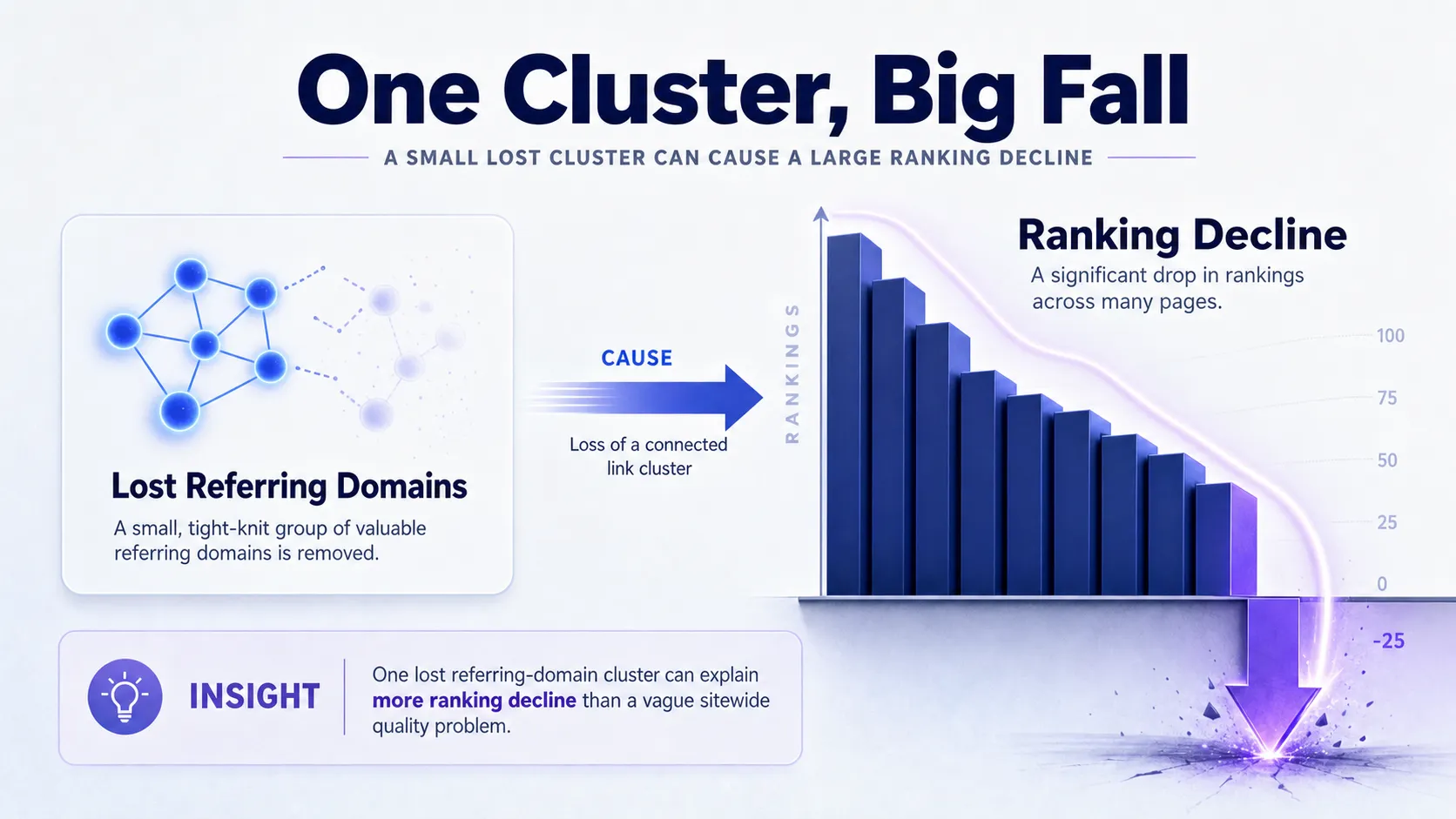
Authority loss is the other page-level cause. Look for a sudden drop in referring domains, which your backlink data will show as a cliff rather than a slow decline. Losing a cluster of high-value links, say a batch from one strong publisher that redesigned and dropped your citations, can explain a much larger ranking decline than any vague “quality problem.” Review harmful link patterns only as a targeted diagnostic here, not as a cue to go build more links.
Then check the two things that cause the most severe drops. Open the Manual Actions panel in Search Console: a manual action means a human reviewer penalized your site, and rankings won’t recover until you resolve it and pass a reconsideration review. Open Security Issues in the same place, because hacked content, injected spam pages, and malware warnings tank rankings and trust instantly.
Treat E-E-A-T and trust signals as diagnostic clues, checking whether the affected pages lost author attribution or citations, not as generic advice to “build authority.” Knowing which of your pages carry real off-site citations helps, and a proper SEO competitor analysis shows where rivals gained the links you lost.
Benchmark Competitors, Apply the Right Fix, and Monitor Recovery
Diagnosis is done. Now turn it into action, then confirm the fix worked. This is where methodical beats frantic, because the fastest recoveries come from one surgical fix, not a broad overhaul.
Step 8: Benchmark the Pages Now Outranking You
Compare the pages that took your spot against your own on freshness, depth, structure, internal links, backlinks, schema, and SERP features. This distinguishes self-inflicted loss from competitive erosion. If a rival simply published something deeper, better linked, and more current, that’s erosion, and the fix is to out-cover them, not to hunt for a technical fault that doesn’t exist. Tracking rival movement over time makes this faster, and an SEO keyword monitor flags when a competitor climbs on the terms you lost.
Step 9: Apply the Fix That Matches the Cause
Match your action to the diagnosis and work by likelihood and speed.
| Cause | Fix | Speed |
|---|---|---|
| Technical fault | Fix it, then request recrawl | Fast |
| Content decay | Refresh, expand, or consolidate | Moderate |
| Algorithm update hit | Improve page quality, wait for reprocessing | Slow |
| Backlink loss | Reclaim or rebuild links | Moderate |
| Manual or security issue | Resolve, then request review | Varies |
Change one thing at a time. If you fix a noindex tag, refresh three articles, and rebuild links all in one week, you’ll never know which move recovered the site, and you won’t be able to repeat it next time.
Step 10: Validate the Rebound and Set a Monitoring Cadence
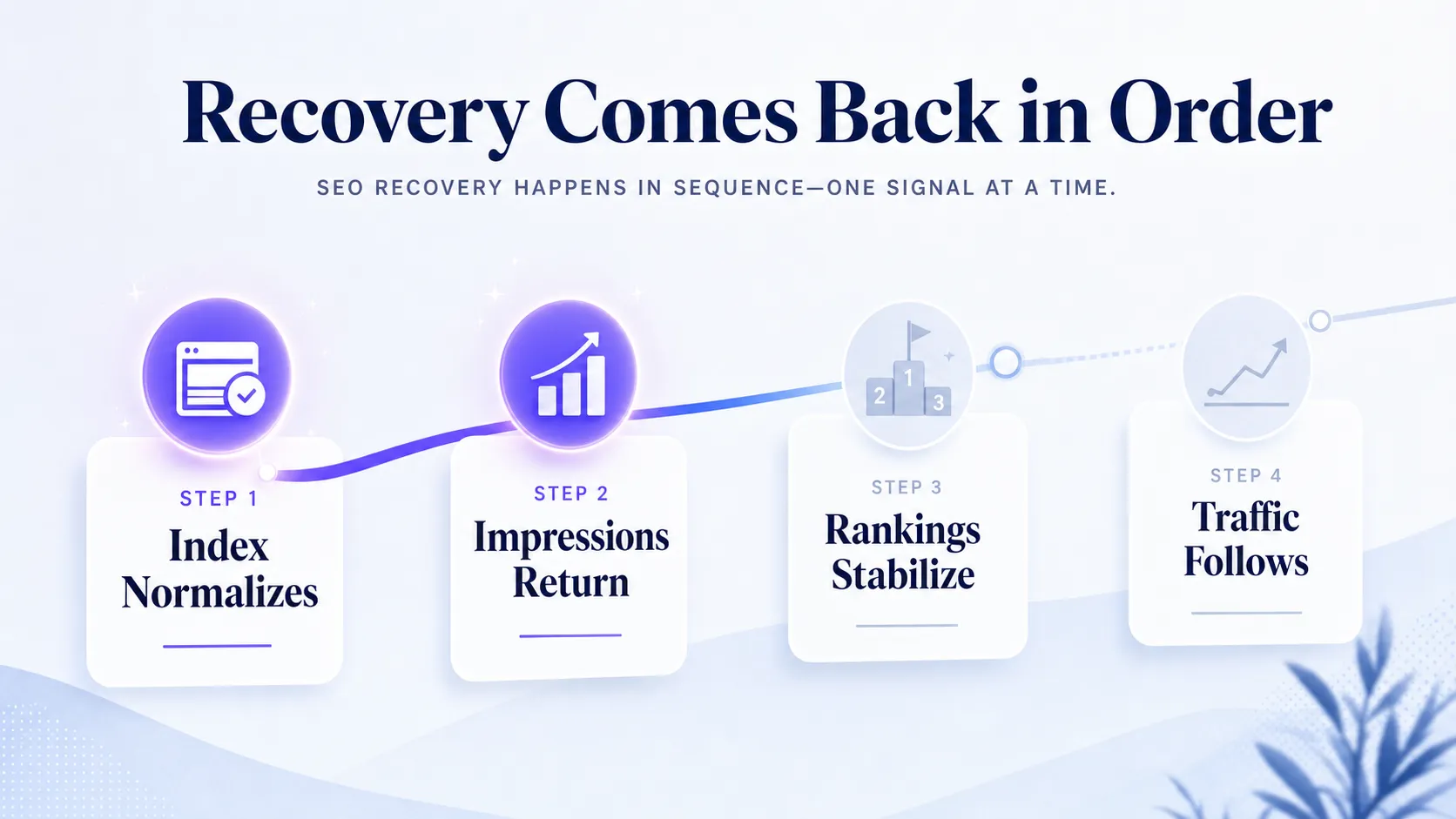
Know what recovery looks like so you don’t panic-fix a site that’s already healing. The signals return in order: crawl and index status normalize first, impressions come back next, rankings stabilize after that, and traffic with CTR follows last. Impressions returning before rankings is normal and good, not a false start.
Set a cadence and stick to it. Check Search Console daily for the first week after a fix, then twice a week as it stabilizes. Wait through at least one full crawl cycle before touching anything else. Iterate only if the signals flatline after a fix has had time to process. Escalate to deeper investigation if a resolved manual action or a clean technical fix shows no movement after several weeks.
Avoid the pitfalls that stretch a two-day recovery into a two-month one: changing too many things at once, chasing normal daily noise, skipping Search Console for a third-party tool, and assuming every drop is a penalty when penalties are actually rare. Timelines vary by cause.
Technical fixes and recrawls rebound in days to a few weeks. Content refreshes take weeks. Algorithm-related recovery is the slowest, often needing multiple crawls or the next update cycle to fully reprocess. The diagnostic discipline here mirrors the structured approach in our AI visibility diagnostic framework, which applies the same verify-scope-fix logic to citation loss.
Frequently Asked Questions
How do I know if my ranking drop is from a Google update?
Match the exact date your rankings fell against the Google Search Status Dashboard and volatility trackers like Semrush Sensor. If your drop lines up with a confirmed core or spam update rollout, and volatility trackers show the whole SERP shaking on that day, the update is your likely cause. A drop that hits only your site while the SERP stays calm points to a technical or content problem instead, not an algorithm.
How do I know if I’ve received a Google manual penalty?
Open the Manual Actions panel in Google Search Console, which tells you directly. Manual actions are rare, and Google always notifies you there when a human reviewer penalizes your site, along with the reason and the affected scope. If that panel is empty, your drop is not a manual penalty, and you should keep working through the technical, content, and algorithm checks instead.
How long does it take to recover from a dramatic Google ranking drop?
Recovery time depends entirely on the cause. A technical fault you fix and recrawl can rebound within days to a few weeks, since Google just needs to reprocess the corrected pages. Content refreshes take several weeks to show movement, and algorithm-related losses are the slowest, often needing multiple crawls or the next core update cycle before rankings fully return.
Should I delete thin content that lost rankings?
Not automatically. Deletion only makes sense when a page has no traffic potential, no useful information, and nothing worth consolidating elsewhere. In most cases, a better move is to expand thin content with real depth, or consolidate several weak pages into one strong resource that consolidates their ranking signals. Delete as a last resort, after you’ve ruled out refreshing or merging.
Does a Google ranking drop affect Google Ads performance?
No. Organic rankings aren’t an Ad Rank factor, so an organic drop does not directly lower your ad positions or raise your ad costs. Google Ads does judge landing pages partly on Search quality signals, so the systems aren’t fully separate. Your paid campaigns keep serving on their own bidding and quality signals. The connection is indirect: if organic traffic falls, some teams lean harder on paid to hold total visibility while they recover the organic side.
Diagnose Before You Change Anything
The fastest recovery comes from methodical troubleshooting, not a frantic SEO overhaul. Verify the drop is real, scope which pages and queries fell, rule out recent changes and technical faults, then check updates, content, and links before you touch a thing. Start with Search Console, follow the checks in order, and fix the highest-confidence cause before you change anything else. If you also want to know whether your brand is losing ground in AI answers, not just classic search, book a short strategy call to see where you stand.