
A media alert is a short, fact-driven document sent to journalists to invite coverage of a specific, time-bound event, a press conference, product launch, grand opening, or public rally. It answers the five Ws (who, what, when, where, why) in a scannable format designed to land on a reporter’s desk and immediately earn a spot on the assignment calendar.
If you’ve been confusing media alerts with press releases, or skipping them entirely, you’re likely leaving earned media coverage on the table. As of 2026, the media landscape has shifted dramatically: newsrooms are smaller, journalists juggle more beats, and AI-powered newswires filter pitches before a human ever sees them. A well-crafted media alert cuts through that noise.
This article walks you through how media alerts work, when to send one, how to structure it for maximum pickup, and what’s changed in 2026 that makes the format more important, and more competitive, than ever.
- What a media alert is and how it differs from a press release
- The exact structure and formatting journalists expect in 2026
- When to send a media alert, and when a different format works better
- How to distribute alerts so they reach assignment editors and AI-curated newsfeeds
- Common mistakes that get media alerts deleted unread
- A ready-to-use media alert template with annotations
- How media alerts connect to broader brand visibility, including AI search discoverability
A great media alert earns one story. A programme earns the coverage AI keeps citing.
Knowing how to write the alert is step one. Placing enough authoritative coverage that ChatGPT, Gemini, Perplexity and Claude start naming you is the ongoing work, pitched to real editors, done for you, no spun content.
Book a strategy callWhat Is a Media Alert?
A media alert (also called a media advisory) is a one-page notification sent to journalists, editors, and assignment desks to inform them about an upcoming event or press opportunity. Its sole purpose is to secure attendance, not tell the full story.
Think of a media alert as a calendar invitation for the press. It communicates the essential logistics: who is involved, what is happening, when and where it takes place, and why the media should care. It doesn’t include background paragraphs, executive quotes, or detailed narratives. Those belong in a press release.
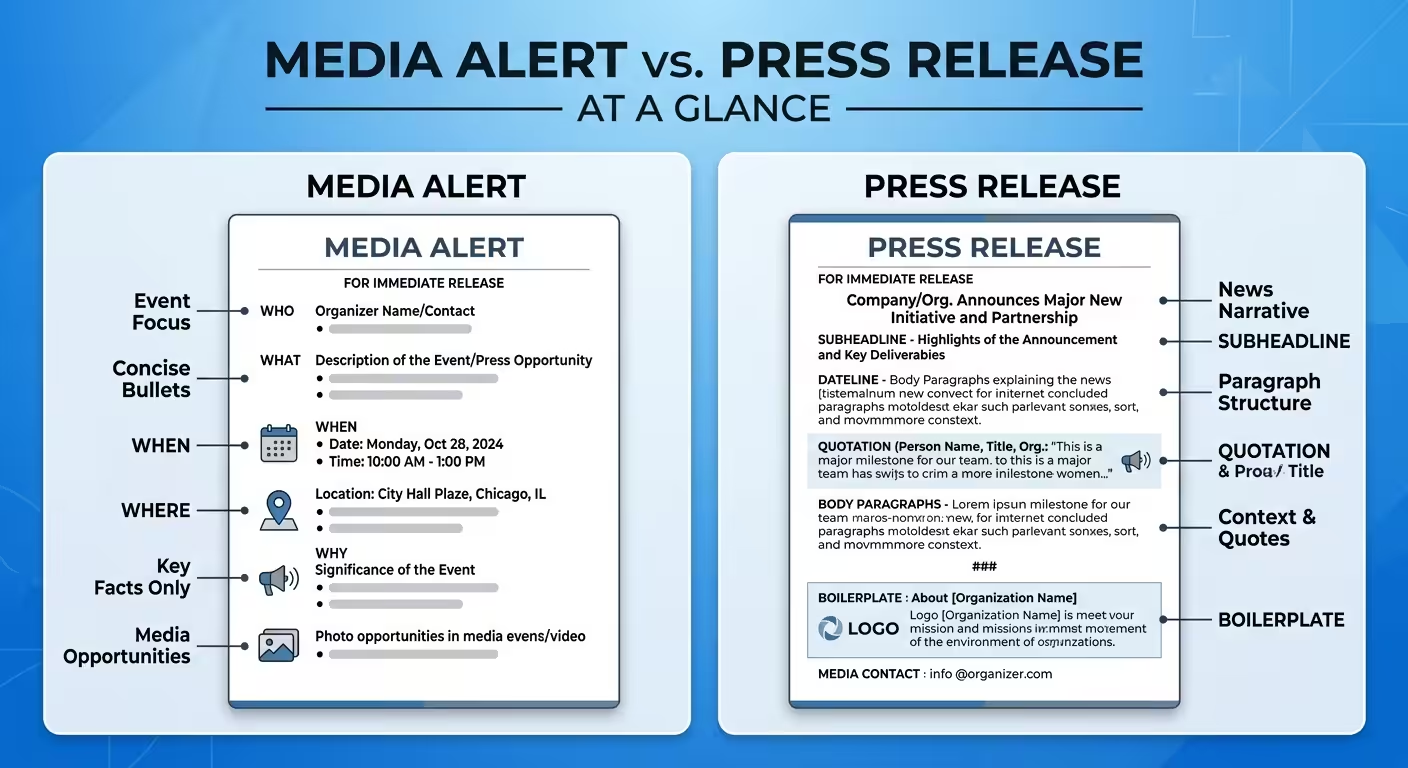
Media alerts are typically sent 5-7 days before an event, with a follow-up 24-48 hours out. Organizations that handle media relations regularly, PR agencies, government communications offices, corporate affairs teams, treat media alerts as a core workflow tool for driving earned coverage.
Media Alert vs. Press Release: What’s the actual difference?
These two PR formats are often confused, but they serve distinct purposes at different points in the media engagement timeline.
| Characteristic | Media Alert | Press Release |
|---|---|---|
| Purpose | Invite press to attend an event | Announce news or provide a complete story |
| Length | One page (150-300 words) | 1-2 pages (400-800 words) |
| Format | Bullet-style 5 Ws | Narrative with headline, body, quotes, boilerplate |
| Timing | Sent before the event | Sent before, during, or after a news event |
| Tone | Factual, logistical, direct | Narrative, persuasive, quotable |
| Goal | Secure physical or virtual attendance | Generate coverage, syndication, or quotes |
The simplest way to decide: if you need a journalist at an event, send a media alert. If you need a journalist to write about a development, whether or not they attend anything, send a press release.
Many PR campaigns use both. A media alert goes out a week before a press conference. The press release goes out the same day as the event (or immediately after), giving journalists the full story with quotes and data they can publish directly.
When Should You Send a Media Alert?
Media alerts work best for events where journalist presence adds value, either through live reporting, photography, video, or interviews. If there’s nothing for a reporter to physically (or virtually) attend, a media alert is the wrong format.
Strong use cases for media alerts:
- Press conferences and media briefings
- Product launches with a live demonstration
- Ribbon cuttings, grand openings, and facility tours
- Community events, rallies, and public forums
- Executive appearances, keynote speeches, and panel discussions
- Charity events and fundraisers with a public component
- Government or municipal public safety announcements
- Award ceremonies and milestone celebrations
When a media alert isn’t the right tool:
- Announcing quarterly earnings (use a press release)
- Sharing survey results or research findings (use a press release or data brief)
- Responding to a crisis (use a press statement)
- Pitching a feature story (use a personalized pitch email)
How to Structure a Media Alert That Gets Read
A media alert follows a predictable structure because journalists rely on that predictability. They scan alerts in seconds. If the logistics aren’t immediately clear, the alert goes in the trash.
Header: “MEDIA ALERT” or “MEDIA ADVISORY”
Place the words MEDIA ALERT (or MEDIA ADVISORY) at the top of the document. This tells the recipient exactly what they’re looking at. Include your organization’s logo if you’re sending as a PDF or formatted email.
Headline
Write one compelling, factual headline that summarizes the event. Keep it under 15 words. Avoid clickbait, reporters dismiss it. Focus on what makes the event newsworthy.
Good: “Mayor Chen to Announce $40M Downtown Revitalization Plan at City Hall”
Weak: “Exciting Things Happening in Our City, You Won’t Want to Miss This!”
The 5 Ws (Body)
The body of a media alert is structured around five clearly labeled fields:
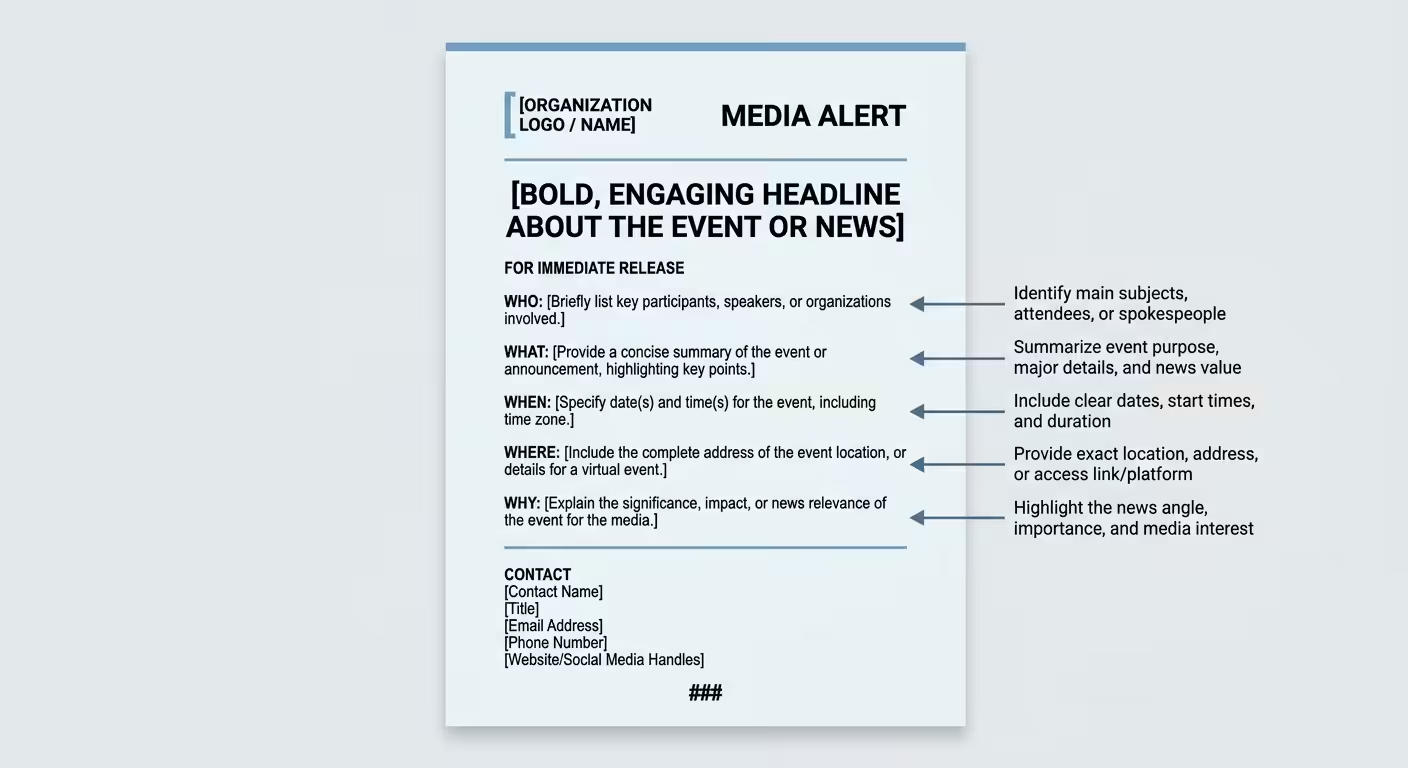
- WHO: The individuals, organizations, or officials involved. Name the most newsworthy participants first.
- WHAT: A concise description of the event. One to three sentences. Focus on what journalists will see, hear, or be able to report on.
- WHEN: Date and time, including time zone. If there’s a media-only window (e.g., early access before public doors open), note it.
- WHERE: Full address, venue name, and any access instructions (parking, security check-in, media entrance).
- WHY: The news hook. Why should a reporter care? Connect the event to a broader trend, policy impact, or public interest angle.
Contact Information
Include a full name, title, phone number, and email address for the media contact. Reporters need to confirm details, request interviews, and coordinate logistics. Make this easy to find, place it at the top and bottom of the alert.
Closing Marks
End the alert with ### centered on a separate line. This is a standard journalism convention indicating the end of the document.
Optional: Boilerplate
A one- to two-sentence description of your organization, centered in italics below the ### marks. Keep it short, this isn’t the place for your full company history.
Media Alert Template (Annotated for 2026)
Below is a ready-to-adapt template. Replace bracketed text with your event details.
MEDIA ALERT
FOR PLANNING PURPOSES, NOT FOR PUBLICATION
Date: [Month Day, Year]
Contact: [Full Name] | [Phone] | [Email]
[HEADLINE: One line summarizing the newsworthy event]
[Optional subtitle providing additional context]
WHO: [Names, titles, and organizational affiliations of key participants]
WHAT: [Brief description of the event. What will journalists see or be able to report on? Include interview and photo opportunities.]
WHEN: [Day of week, date, time, time zone. Include media check-in time if different from public access.]
WHERE: [Venue name, full address, room/floor details, parking instructions, virtual access link if applicable]
WHY: [The news hook. Connect the event to a trend, policy impact, or public interest angle that gives a reporter a reason to attend.]
###
[One- to two-sentence organization boilerplate]
How to Distribute a Media Alert Effectively
A perfectly written media alert fails if it never reaches the right inbox. Distribution strategy matters as much as content in 2026.
Build a Targeted Media List
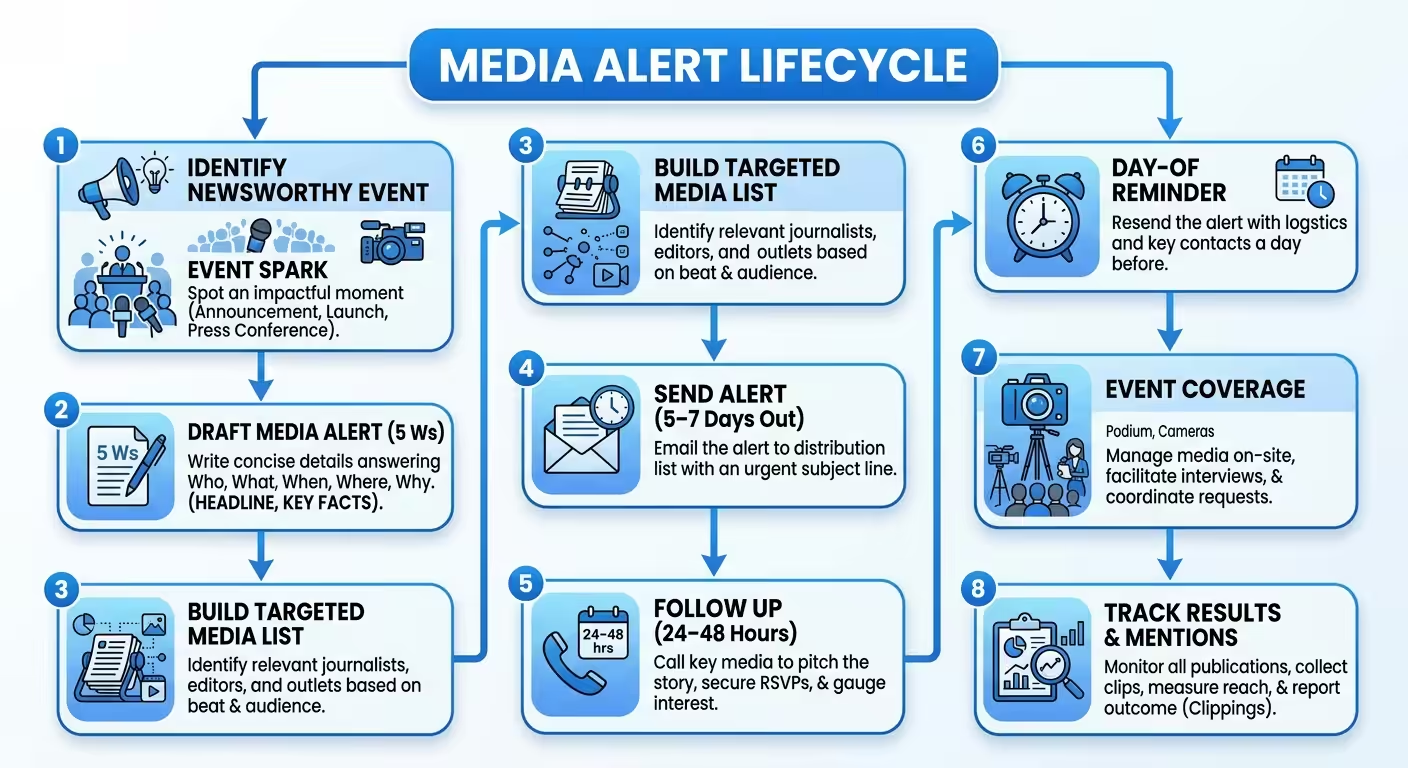
Send your alert only to reporters, editors, and assignment desks who cover the relevant beat. A tech product launch alert sent to a food editor wastes both your time and theirs.
Maintain an up-to-date media list segmented by beat, outlet type (TV, print, digital, radio, podcast), and geographic market. Tools like Muck Rack, Cision, and Meltwater offer journalist databases, but manual relationship-building still produces the highest response rates.
Time Your Sends Strategically
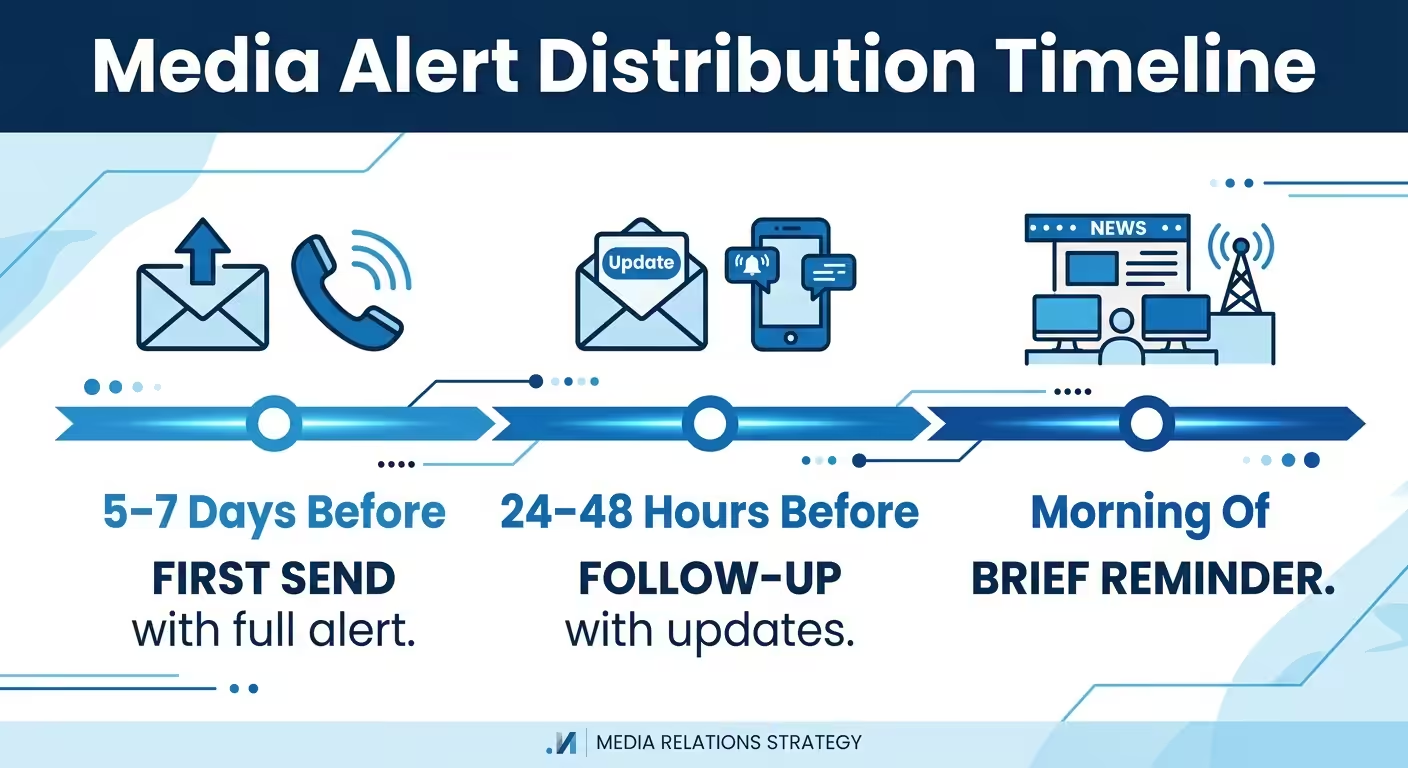
- First send: 5-7 days before the event. This gives assignment editors time to plan coverage.
- Follow-up: 24-48 hours before the event. Update with any new speakers or details.
- Day-of reminder: A brief email the morning of the event, especially for breaking or fast-moving stories.
Send emails Tuesday through Thursday between 9:00 AM and 11:00 AM in the recipient’s local time zone. According to a 2024 Cision State of the Media Report, journalists ranked email as their preferred method for receiving story pitches and advisories, but also noted that irrelevant and poorly timed emails were their top frustration.
Follow Up by Phone
For high-priority events, call the assignment desk or reporter directly after sending the alert. Keep the call under 60 seconds: confirm they received the alert, offer to answer questions, and confirm logistics. Don’t read the alert aloud.
Post to Your Online Newsroom
Publish the media alert on your organization’s press page or newsroom. This improves discoverability for journalists who search your brand independently and creates an indexable record for search engines.
5 Mistakes That Get Media Alerts Ignored
The media-alert mistake we catch most often in PR audits is the assumption that a bigger list equals better coverage. Blasting 800 journalists at once almost always produces worse results than a 25-name list of reporters who actually cover your category. Make the targeted list first, draft the alert second, and only broaden distribution once you’ve confirmed the top-tier targets can’t attend.
Most media alerts fail not because the event isn’t newsworthy, but because the execution is poor. Avoid these common errors:
1. Burying the News Hook
Journalists scan. If the “why should I care” is in the fourth paragraph, they’ll never see it. Lead with your strongest angle, the high-profile speaker, the policy impact, the exclusive access.
2. Writing a Press Release in Disguise
A media alert shouldn’t include long narrative paragraphs, executive quotes, or product descriptions. If your alert runs longer than one page, you’ve likely written a press release. Strip it back to the 5 Ws.
3. Missing or Incomplete Logistics
Every media alert must include the exact time, full address, and contact person’s phone number. Omitting any of these forces a journalist to do extra work, and they won’t. A 2024 Muck Rack State of Journalism survey found that 68% of journalists said they would skip coverage if logistics were unclear or incomplete in the pitch material.
4. Sending to the Wrong Reporters
Mass-blasting your alert to every journalist in a database signals that you haven’t done your homework. Reporters respond to alerts that are clearly relevant to their beat. Segment your list.
5. Sending Too Late
An alert that arrives the day before an event rarely leads to coverage. Assignment editors plan their week in advance. Give them adequate lead time, at least five business days for non-breaking events.
What’s Changed About Media Alerts in 2026
The media alert format itself hasn’t changed much, the 5 Ws structure remains the standard. What has changed is the environment around it.
Smaller Newsrooms, Higher Standards
According to the Pew Research Center’s 2024 State of the News Media report, U.S. newsroom employment has declined roughly 26% since 2008. Fewer reporters cover more beats. Your alert competes against a higher volume of pitches per journalist. Precision and relevance matter more than ever.
AI-Filtered Inboxes and Newsfeeds
Many newsrooms and journalists now use AI-powered tools to triage incoming pitches. Email clients prioritize messages based on relevance signals. If your subject line is vague or your sender reputation is low, your alert may never surface in the reporter’s primary inbox.
To improve deliverability in 2026:
- Use clear, specific subject lines (e.g., “Media Alert: Governor to Sign Education Bill at Lincoln HS, Oct 14”)
- Send from a recognized organizational domain, not a personal Gmail account
- Avoid attachments in the initial email; paste the alert in the body
- Include structured data (date, location, contact) in a consistent format that filtering tools can parse
Virtual and Hybrid Events Are Permanent
Post-pandemic norms have solidified. Reporters expect a virtual attendance option for most briefings and press conferences. If your event is in-person only, state that clearly, but also consider whether a livestream or recorded session could expand coverage opportunities.
Media Alerts and AI Discoverability
Media alerts published on organizational newsrooms, wire services, and high-authority publications create indexed content that AI search engines and language models can reference. While a single media alert won’t drive AI visibility on its own, consistent editorial presence across authoritative channels builds the kind of brand mention signals that strengthen both SEO and AI discoverability over time.
Organizations that publish alerts, press releases, and event coverage across multiple reputable outlets create a broader digital footprint. That footprint feeds into the training data and retrieval sources that AI platforms, including ChatGPT, Gemini, and Perplexity, use when answering brand-related queries.
How to Make Your Media Alert More Newsworthy
Format alone doesn’t earn coverage. The content of your alert needs to give a journalist a reason to show up. Here’s how to strengthen the news hook:
Attach the Event to a Larger Story
Reporters don’t cover events in isolation. They cover trends, conflicts, and public interest stories. If your ribbon cutting coincides with a citywide economic development push, say so in the “WHY” section. Connect your event to something the reporter is already tracking.
Name the Newsmakers
An alert featuring the city mayor, a well-known industry executive, or a public figure carries more weight than one listing generic “company representatives.” If a notable person will be available for interviews, highlight that prominently.
Offer Visual Opportunities
TV and digital outlets need visuals. If your event includes a demonstration, unveiling, or large public gathering, describe what cameras will capture. Phrases like “photo and video opportunity available” and “live demonstration of [specific thing]” attract visual media.
Include Exclusive or First-Access Elements
If reporters get early access, a first look, or an exclusive interview window, that increases attendance. Note these opportunities directly in the alert.
Tracking Results: Did Your Media Alert Work?
Sending a media alert without tracking its impact means you can’t improve future efforts. Measure these outcomes:
- Open and reply rates: If you’re sending via email, track opens and responses. Low open rates may signal subject line or timing issues.
- Event attendance: Count how many journalists attended. Track which outlets showed up and what they published.
- Coverage generated: Monitor resulting articles, broadcast segments, and social posts. Use brand monitoring tools to capture mentions across digital media.
- Syndication and reach: Did the coverage get syndicated to other outlets? Was it picked up by wire services?
Over time, track which reporters consistently respond to your alerts and which outlets provide the most valuable coverage. This data helps you refine your media list and improve future alert performance.
For organizations looking to track how brand coverage from media alerts and editorial placements shows up in AI search results, tools designed for monitoring brand mentions across AI platforms can reveal whether your earned media is reaching the datasets that power AI recommendations.
Media Alerts and Broader Brand Visibility Strategy
For the AI-search side of that broader strategy, see auditing your ChatGPT presence and the LLM monitoring playbook, which walk through how editorial coverage from media alerts feeds the AI-citation layer.
Media alerts are one tool within a larger earned media ecosystem. Their value compounds when combined with ongoing PR activities, press releases, bylined articles, thought leadership placements, and consistent editorial mentions on high-authority publications.
Every editorial placement and brand mention on authoritative outlets reinforces entity recognition in both traditional search engines and AI models. A single media alert generates short-term coverage. A sustained pattern of mentions on category-relevant publications builds the kind of authority that shapes how AI assistants describe your brand in category queries.
If your brand is investing in media alerts as part of a broader communications strategy, consider how each coverage instance contributes to long-term brand visibility in AI search. The newsrooms, trade publications, and wire services where your alerts generate coverage are often the same sources that AI platforms index and cite. If Google News is one of the channels you monitor, see our guide on setting up a Google News alert.
Frequently Asked Questions
What is the difference between a media alert and a media advisory?
A media alert and a media advisory are the same document. Both terms refer to a short, fact-based notification inviting journalists to cover an upcoming event. “Media advisory” is slightly more common in government and institutional communications. “Media alert” is more widely used in corporate PR and agency settings. The format and purpose are identical.
How long should a media alert be?
A media alert should fit on a single page, typically 150 to 300 words. The 5 Ws format keeps the content concise. If your alert exceeds one page, you’ve likely included content that belongs in a press release instead.
Can I send a media alert for a virtual event?
Yes. Virtual events are standard in 2026. Include the platform name, access link or registration URL, and whether the session will be recorded. Make it clear if the event is open to the public or restricted to credentialed press.
Should I include images or attachments in a media alert?
Avoid attachments in the initial email, they trigger spam filters and slow down inbox loading. Paste the full alert text in the email body. If you’ve supporting images, host them on your newsroom page and include a link. Mention “high-resolution images available upon request” if relevant.
How do I set up a Google Alert to monitor coverage after sending a media alert?
After your event, create a Google Alert for your organization name, event name, and key speakers to track resulting coverage. For more comprehensive monitoring, including social media and AI search mentions, consider dedicated brand monitoring services that cover a wider range of sources.
Do media alerts help with SEO or AI search visibility?
A single media alert has minimal direct SEO impact. However, media alerts that generate coverage on high-authority news sites create indexed brand mentions. Over time, consistent earned media placements strengthen your brand’s entity authority in both Google’s index and the training data used by AI models like ChatGPT and Gemini. The alert itself is a catalyst, the resulting coverage is what builds lasting visibility.
Running Your First Media Alert and Measuring It
A media alert is one of the most efficient tools in your communications toolkit, when used correctly. Match the format to situations where journalist attendance adds value. Structure the alert around the 5 Ws. Distribute to a targeted list with appropriate timing. Track results and refine.
For teams that want to extend the impact of a single media alert into compounding authority, building a steady editorial presence on category-relevant publications is the lever that matters most.
If you want a baseline before committing to a tool or process, book a short strategy call. We’ll run 25 category-relevant prompts across ChatGPT, Perplexity, Gemini, and Google AI Overviews so you can see exactly which sources each platform trusts for your category, and which competitors are capturing citations you’re not.