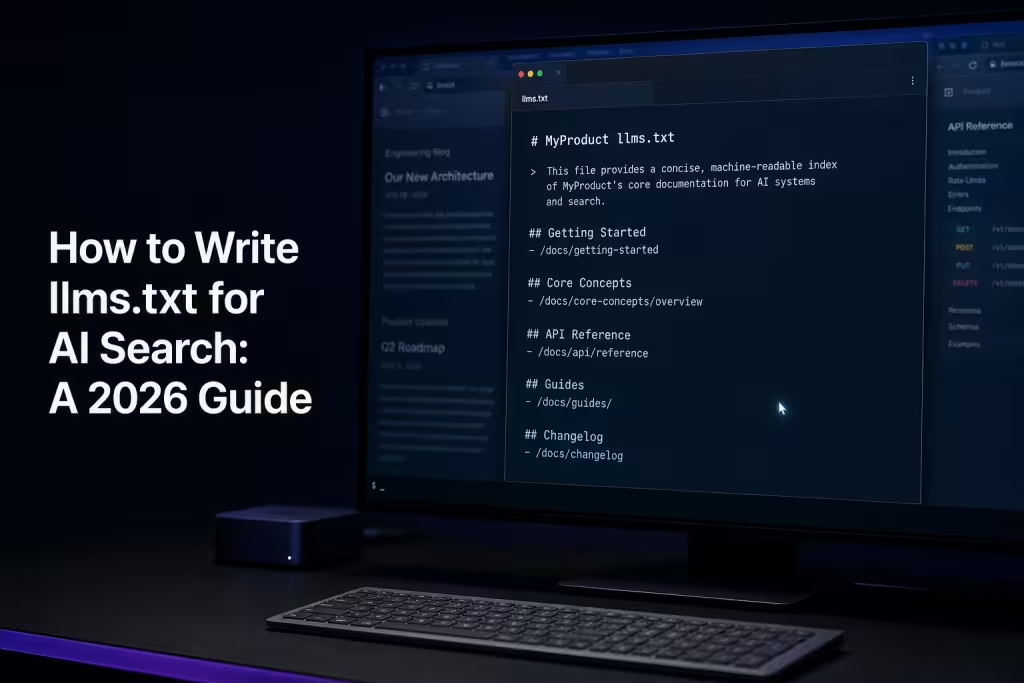

How to write llms.txt for ai search, An llms.txt file is a markdown document at your site’s root that points AI systems toward the content you actually want them to read, summarize, and cite. Writing one well takes about 30 minutes. Writing one that earns citations takes more thought, because most published llms.txt files are bloated, generic, or built like a sitemap dump that no LLM will benefit from.
Here’s the part nobody admits: the file itself isn’t magic. Major LLMs don’t yet automatically discover or parse llms.txt the way crawlers parse robots.txt. What llms.txt does well right now is help AI agents, retrieval systems, and developer tools that do consume it find your highest-value content quickly, and shape how your site gets ingested when those systems mature. The structure you choose today determines whether your file is useful or noise.
This guide walks through how to write an llms.txt file that actually serves AI retrieval, what to include, what to cut, how to format each section, and the mistakes we see most often when auditing client files.
What You’ll Learn
- The exact markdown structure llms.txt requires, and why deviation breaks parsing
- How to decide which URLs belong in your file (most teams include 4x too many)
- The difference between llms.txt and llms-full.txt, and when you need both
- How to write link descriptions that AI systems actually use
- Common formatting mistakes that make your file useless to retrieval systems
- Where to host the file and how to validate it
Start With the Format Spec. Don’t Improvise
The llms.txt proposal, originally drafted by Jeremy Howard in September 2026, defines a strict markdown structure. AI systems and tools that consume the file expect that structure. If you invent your own format, you get inconsistent parsing, and in many cases, the file gets ignored.
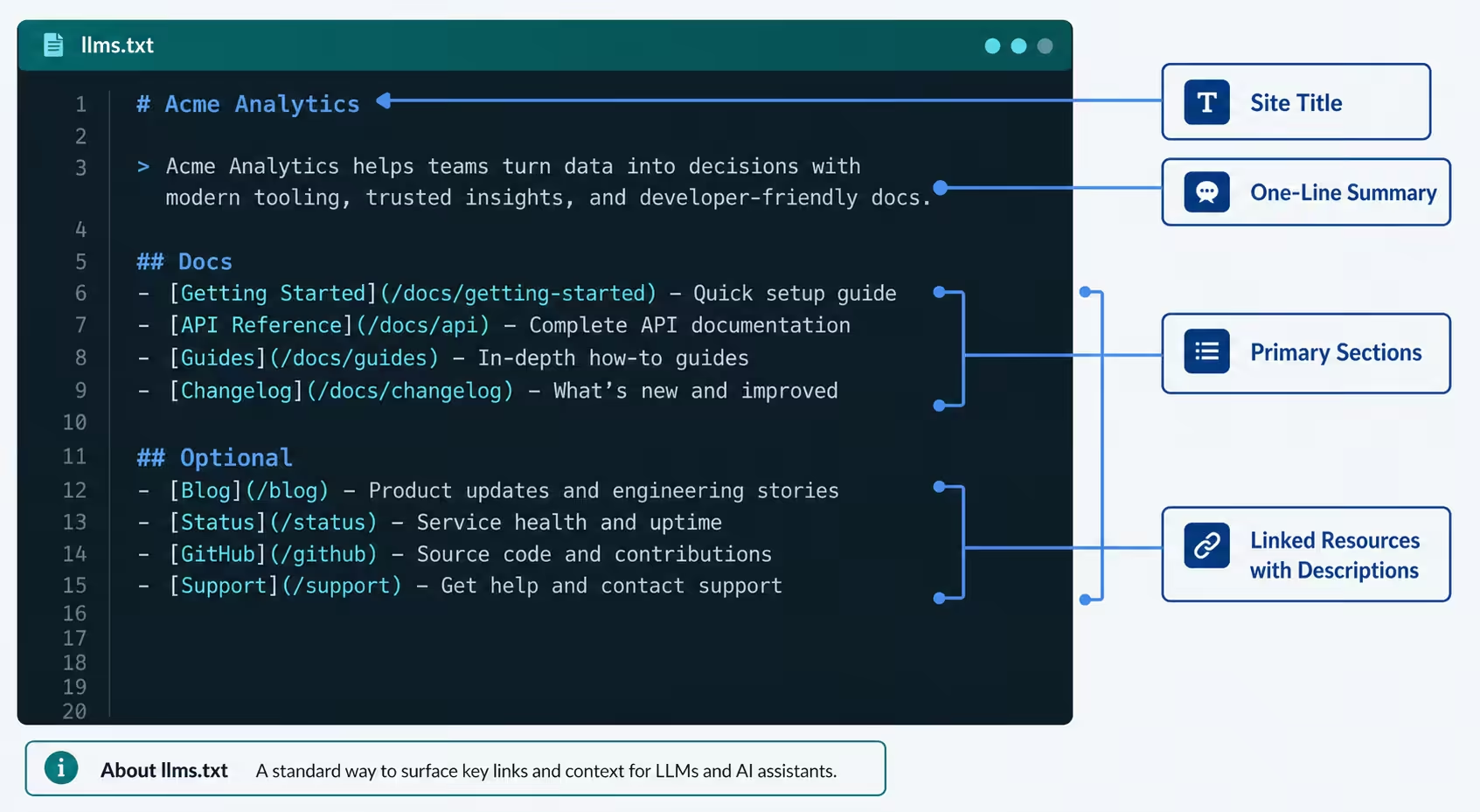
Here’s the canonical structure, in order:
- An H1 with the name of the project, product, or site (required, exactly one)
- A blockquote with a one-line summary describing what the site is and who it serves (required)
- Optional paragraphs of additional context, kept short
- H2 sections grouping linked resources by category
- Markdown link lists under each H2, with each link followed by a short description after a colon
- An optional final H2 labeled “Optional” containing secondary URLs that can be skipped if context is limited
That last point matters. The “Optional” section is how you tell AI systems with limited context windows what to drop first. Most teams skip this section entirely, and lose the one piece of prioritization the spec actually offers.
The Minimum Viable Structure
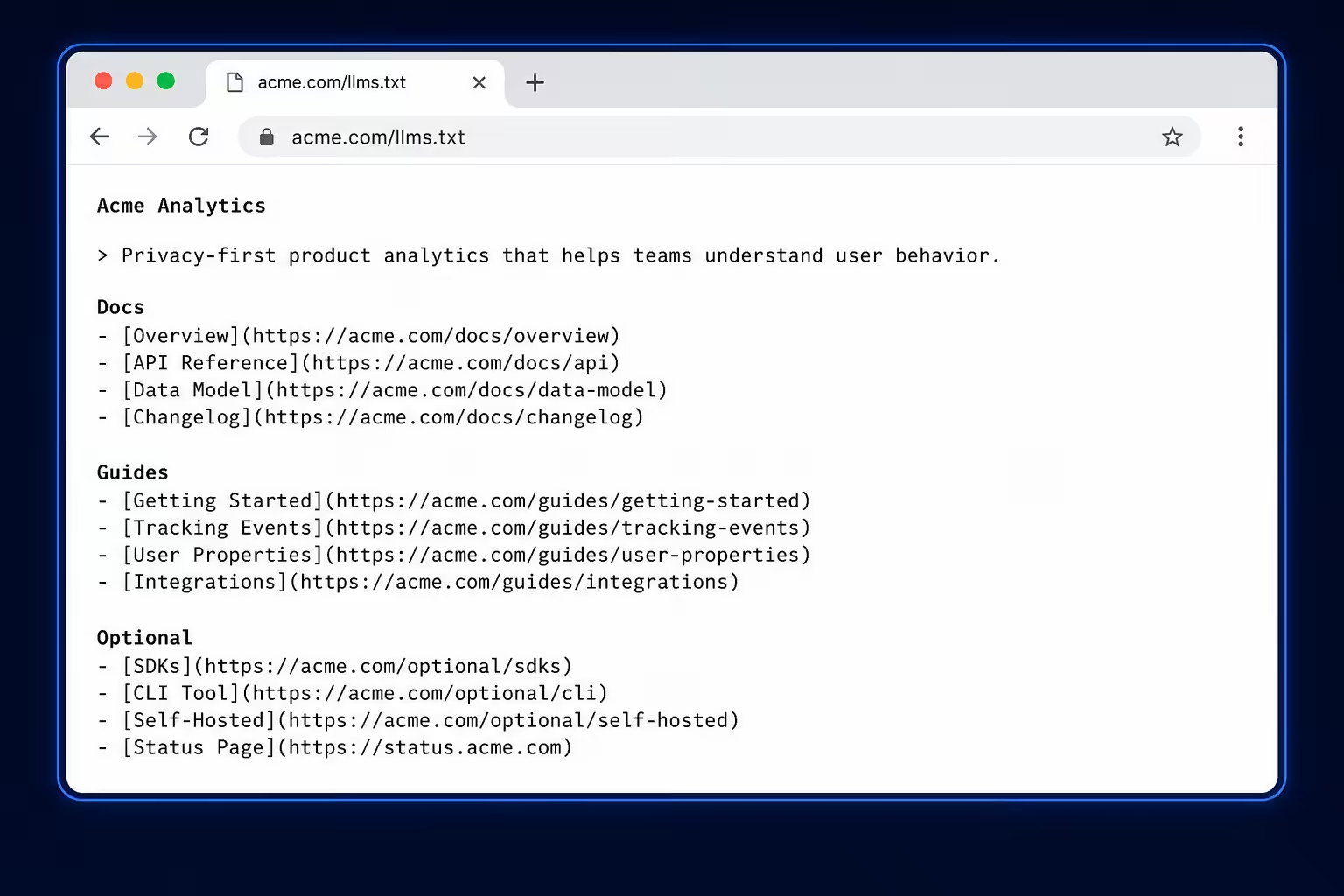
Here’s what a working file looks like for a fictional B2B analytics company:
# Acme Analytics

> Acme Analytics is a product analytics platform for B2B SaaS teams tracking activation, retention, and feature adoption.

## Docs

- [Getting Started](https://acme.com/docs/getting-started.md): Install the SDK and send your first event in under 10 minutes.
- [Event Tracking Reference](https://acme.com/docs/events.md): Complete reference for the event API, including custom properties and identity stitching.
- [Cohort Analysis](https://acme.com/docs/cohorts.md): How to build retention cohorts and measure activation curves.

## Guides

- [Activation Metrics for SaaS](https://acme.com/guides/activation.md): Framework for defining your aha moment and measuring time-to-value.
- [Retention Benchmarks 2026](https://acme.com/guides/retention-benchmarks.md): Median retention curves across 400+ B2B SaaS companies.

## Optional

- [Changelog](https://acme.com/changelog.md): Release notes for product updates.
- [Brand Guidelines](https://acme.com/brand.md): Logo usage and color palette.
That’s it. Roughly 15 lines. A reader, human or AI, can scan it in 10 seconds and know exactly what this company does, what content matters most, and what’s secondary.
How to Choose What Goes in the File
This is where most llms.txt files fall apart. Teams treat the file like a sitemap and dump 200 URLs into it. That defeats the entire purpose.
The whole point of llms.txt is curation. You’re telling AI systems: of all the pages on this site, these are the ones worth ingesting. If everything is included, nothing is prioritized, and the file delivers no signal.
The Inclusion Test
For every URL you’re considering, ask three questions:
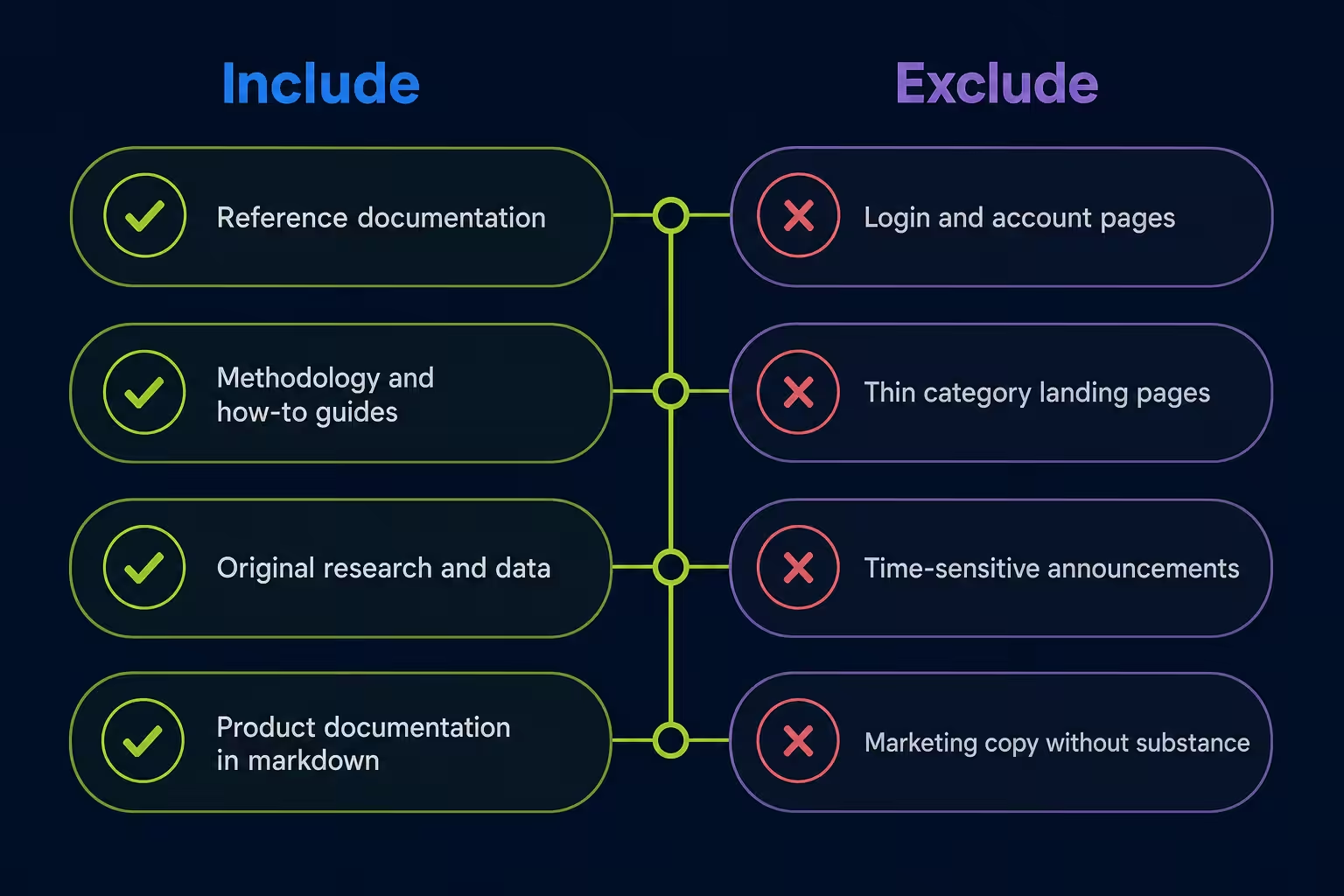
- Would I be proud if an AI assistant cited this page in an answer? If the page is thin, outdated, or just a category landing page, the answer is no.
- Does this page contain self-contained, durable information? Time-sensitive announcements, login pages, and shopping cart flows don’t belong.
- Would this page reduce hallucinations if an AI used it as context? Reference docs, technical guides, methodology pages, and authoritative explainers all qualify. Marketing-speak landing pages don’t.
If a URL fails any of these tests, leave it out. A 30-link llms.txt of high-signal pages outperforms a 300-link file every time.
How Many URLs Is Right?
There’s no fixed number, but a useful range based on site type:
| Site Type | Reasonable Range | Notes |
|---|---|---|
| Documentation site | 30-80 URLs | Group by product area or API surface |
| SaaS product site | 15-40 URLs | Docs, methodology, key guides only |
| Editorial / publisher | 20-50 URLs | Cornerstone content, not the full archive |
| Ecommerce | 10-25 URLs | Buying guides, sizing, policies, not products |
| Personal site / blog | 5-20 URLs | Best work, not everything |
If your file goes over 100 URLs, you’ve probably stopped curating and started cataloging. Cut.
Write Descriptions That Actually Help AI Systems
The text after each link’s colon is doing real work. It’s the description AI systems use to decide whether to fetch the full page. Most teams write descriptions that read like meta descriptions written for Google, which is exactly the wrong instinct.
Compare:
Useless: [Pricing](https://acme.com/pricing): Our pricing page.
Useful: [Pricing](https://acme.com/pricing): Three plans (Starter $99, Growth $499, Enterprise custom). All plans include unlimited events and 12-month data retention.
The second version gives an AI system enough information to answer a pricing question without fetching the page at all. That’s the goal. The description isn’t a teaser, it’s a self-contained micro-summary that captures the substantive content.
Description Writing Rules
- Lead with the substantive content, not what the page is
- Include specific numbers, names, or facts when they exist
- Keep it under 25 words, descriptions are not the place for prose
- Write in plain declarative sentences, not marketing language
- Avoid pronouns without antecedents, each description must stand alone
One client we worked with rewrote 40 descriptions in their llms.txt this way. The file went from generic (“Documentation for our analytics platform”) to substantive (“Event tracking reference covering identify, track, group, and alias methods with property schemas”). It made the file useful instead of decorative.
Markdown Versions: When You Need .md Mirrors
Here’s a piece of the spec that frequently gets missed: links inside llms.txt should ideally point to markdown versions of pages, not the HTML versions.
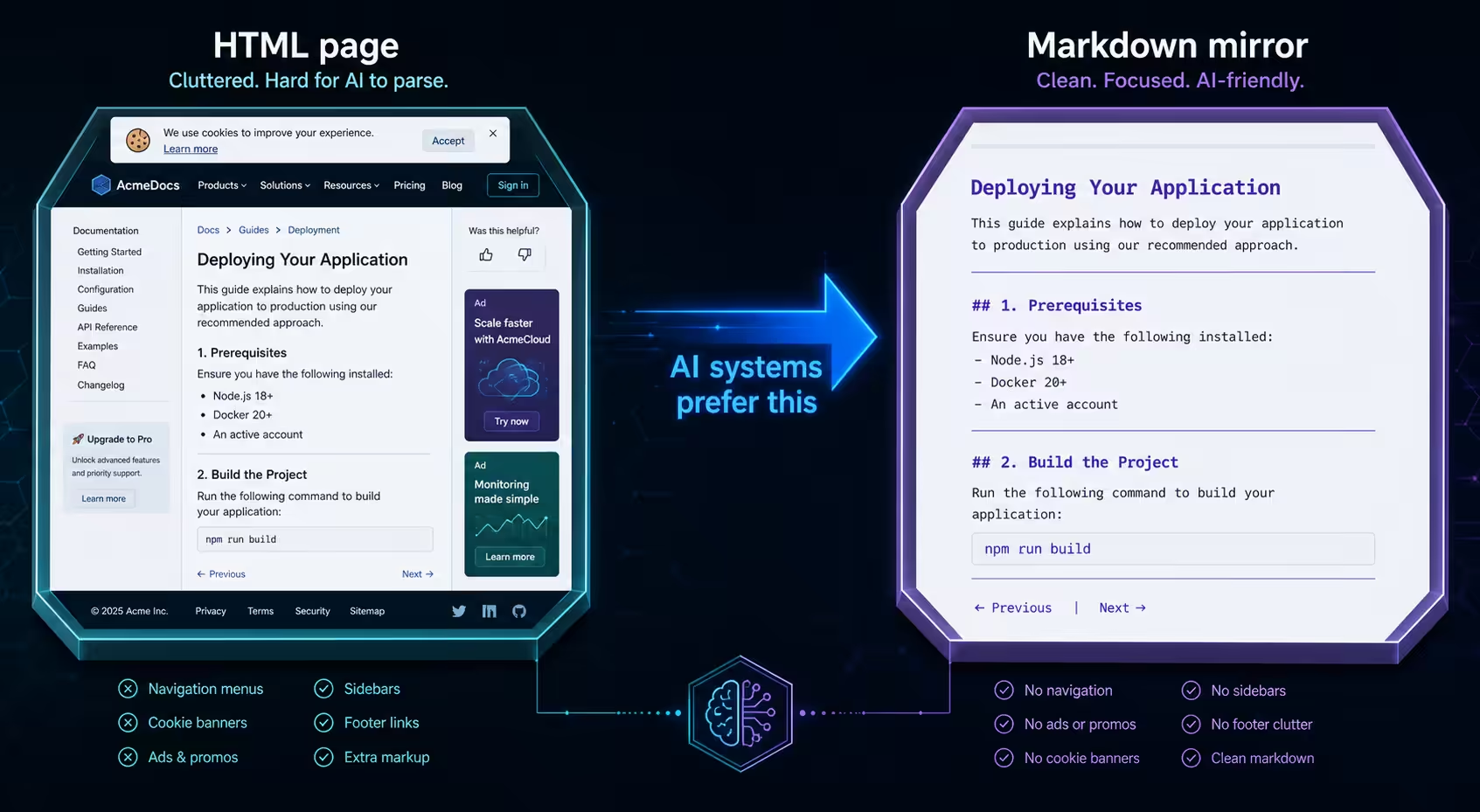
The reason is simple. AI systems consuming your content want clean markdown, no navigation, no scripts, no analytics tags, no cookie banners. If you link to https://acme.com/docs/getting-started, the AI has to crawl HTML and strip it. If you link to https://acme.com/docs/getting-started.md, it gets clean content directly.
You have a few options for serving markdown versions:
- Append
.mdto URLs and configure your server to return markdown for those requests - Host a parallel
/llms/directory containing markdown copies of key pages - Use a static site generator that outputs both HTML and markdown
- Serve markdown via a content negotiation header for AI user agents
If serving markdown isn’t feasible right now, link to the HTML pages, but understand you’re losing some of the value the format was designed to deliver.
llms.txt vs. llms-full.txt: When to Use Each
The proposal includes a second file: llms-full.txt. Different file, different purpose.
llms.txt is the index. It’s structured, curated, and short. AI systems use it to navigate.
llms-full.txt is the consolidated content. It’s the actual markdown text of your most important pages, concatenated into a single file that AI systems can ingest in one fetch, useful for scenarios where the model wants the full content without making dozens of separate requests.
You don’t need both. Most sites should publish llms.txt first and add llms-full.txt only if your content is genuinely valuable in consolidated form, typically documentation sites, technical references, and structured guides where a model benefits from having everything in context.
If you publish llms-full.txt, keep it under 100,000 tokens (roughly 75,000 words). Larger files exceed many model context windows and get truncated unpredictably.
Where to Host the File
llms.txt goes at the root of your domain: https://yourdomain.com/llms.txt. Same convention as robots.txt and sitemap.xml.
A few hosting rules worth following:
- Serve it with
Content-Type: text/markdownortext/plain - Make it publicly accessible, no authentication, no paywalls, no JavaScript rendering required
- Keep the URL stable, if you move it, you’ll silently lose any AI systems that cached the original location
- If you have multiple subdomains with distinct content, consider a separate llms.txt for each
- Don’t block AI user agents from accessing it, that defeats the entire purpose
For WordPress sites, plugins like AIOSEO and dedicated llms.txt plugins can generate the file automatically. For custom sites, write it manually, it’s a 30-minute task and you’ll end up with a better file than any generator produces.
Mistakes That Make llms.txt Files Useless
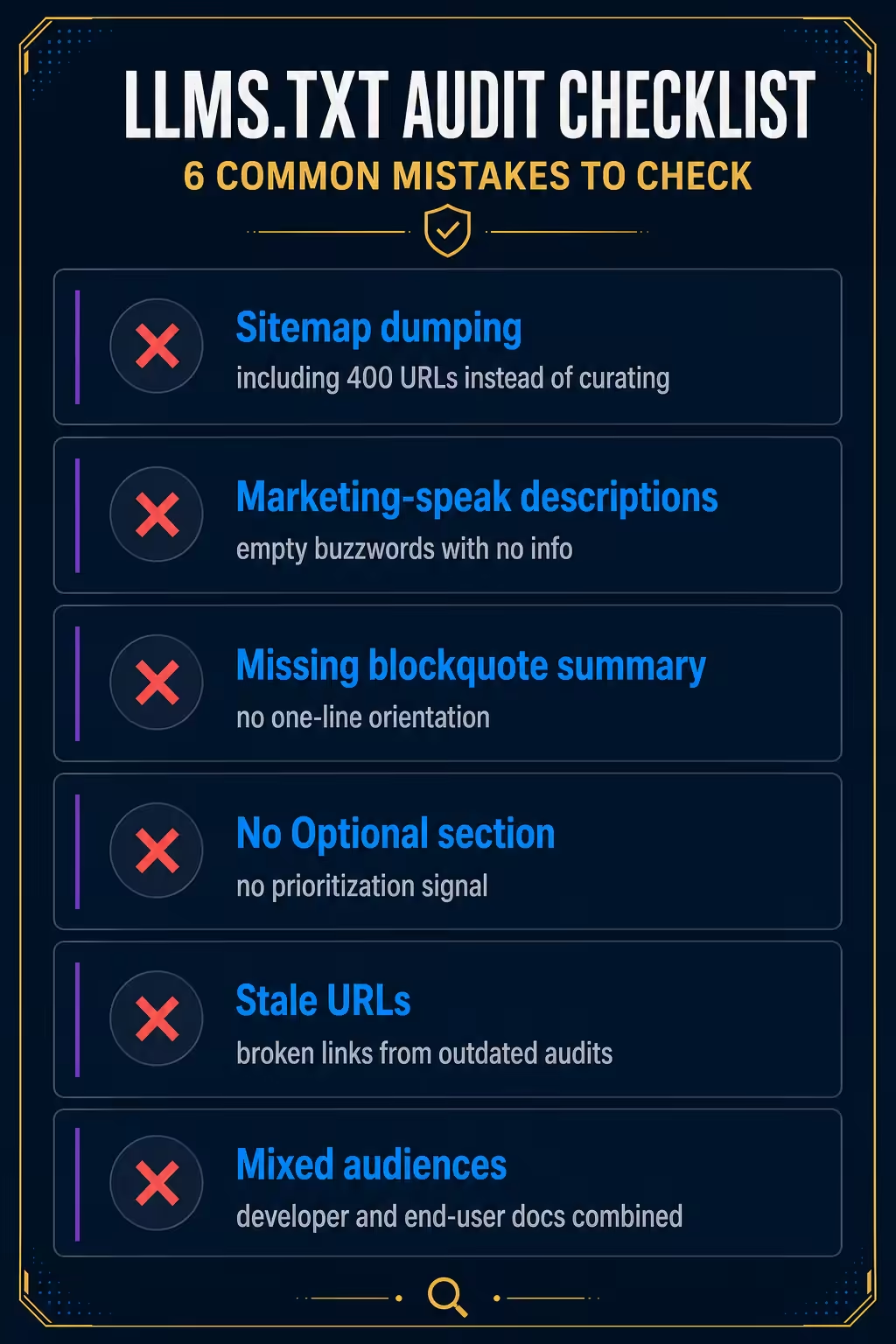
After auditing dozens of llms.txt files in the wild, the same mistakes show up repeatedly. Here are the ones to avoid.
Mistake 1: Treating It Like a Sitemap
If your llms.txt has 400 URLs grouped by URL pattern instead of topic, you’ve built a sitemap and labeled it llms.txt. Curate or skip it.
Mistake 2: Marketing-Speak Descriptions
“Discover the power of our modern platform” tells an AI system nothing. Write descriptions that contain actual information.
Mistake 3: Skipping the Blockquote Summary
That one-line blockquote under the H1 is the most-read part of the file. It’s how an AI system gets oriented in a single sentence. If yours says “Welcome to our website,” rewrite it to describe what the site is and who it’s for.
Mistake 4: No Optional Section
The Optional section is the one prioritization signal the spec gives you. Use it. Move secondary content, changelogs, brand guidelines, legal pages, into Optional so AI systems with limited context know what to drop first.
Mistake 5: Stale URLs
llms.txt is not a “set it and forget it” file. URLs change, content gets retired, new guides ship. Audit the file every 90 days. Broken links signal neglect to any system that fetches it.
Mistake 6: Mixing Languages or Audiences
If your site has English and Spanish docs, or separate developer and end-user content, don’t mash them into one file. Either separate by section clearly, or publish multiple llms.txt files at appropriate paths.
How to Validate Your File
Once you’ve written the file, validate it before publishing. A few quick checks:
- Markdown parsing test: Paste the file into any markdown renderer. If the structure breaks, AI parsers will struggle too.
- Link audit: Run a link checker against every URL in the file. Broken links discredit the rest of the file.
- Reachability check: Curl the URL from outside your network:
curl -I https://yourdomain.com/llms.txt. Confirm a 200 response and the right content type. - Read-aloud test: Read the file top to bottom. If the structure tells a coherent story about what your site is and what matters most, it works. If it reads like a database dump, rewrite.
- External validators: Tools like llmstxtchecker.net can flag obvious format issues.
See where AI answers put your brand
Twenty minutes with a senior strategist: where the major engines point buyers in your category, who gets named instead of you, and a straight read on what a programme would change.
Book a strategy callWhat llms.txt Won’t Do for You
Honest assessment: writing a great llms.txt file won’t, by itself, make ChatGPT or Gemini cite your brand. The major LLM providers haven’t officially confirmed they parse llms.txt during training or retrieval at scale. Adoption is real but uneven, strongest among AI agents, developer tools, and RAG systems, weakest among the consumer-facing AI assistants most brands care about.
What llms.txt does well today:
- Helps AI agents and coding assistants navigate your site efficiently
- Reduces hallucinations when developers use AI tools to interact with your docs
- Signals to AI systems that adopt the spec which content you consider authoritative
- Forces a useful internal exercise: what content on this site is actually worth citing?
That last point is underrated. The act of writing a tight llms.txt forces a brutal audit of your own content. Most teams discover their site has 8 pages worth showing an AI, and 200 pages they should probably retire.
For brands focused on AI search visibility specifically, getting cited in ChatGPT, Perplexity, and Gemini answers, llms.txt is one input among many. Editorial mentions in publications AI models train on, structured data, and entity authority all carry more weight today. Treat llms.txt as part of a complete approach to how llms.txt fits into AI search, not as the strategy itself.
A Working Template You Can Adapt
Here’s a template that follows every rule in this guide. Copy it, swap in your content, and you’ll have a working file in 30 minutes.
# [Your Site or Product Name]

> [One sentence: what this site is, who it serves, and what makes it useful. No marketing language. Plain declarative.]

[Optional: 1-2 sentences of additional context. Skip if not needed.]

## [Primary category, usually "Docs" or "Guides"]

- [Page Title](https://yoursite.com/page.md): [25-word substantive description with specifics, numbers, or named concepts.]
- [Page Title](https://yoursite.com/page.md): [Description.]
- [Page Title](https://yoursite.com/page.md): [Description.]

## [Secondary category, e.g., "Reference" or "Methodology"]

- [Page Title](https://yoursite.com/page.md): [Description.]
- [Page Title](https://yoursite.com/page.md): [Description.]

## [Third category if needed]

- [Page Title](https://yoursite.com/page.md): [Description.]

## Optional

- [Changelog](https://yoursite.com/changelog.md): [Description.]
- [Brand assets, legal, secondary pages]: [Description.]
Save it as llms.txt. Upload to your site root. Validate. Done.
Related: what is llms.txt · track which AI bots crawl your site · how AI crawlers pick sources
Frequently Asked Questions
Do I need llms.txt if I already have robots.txt and sitemap.xml?
Yes, they serve different purposes. Robots.txt controls crawler access. Sitemap.xml lists every indexable URL. llms.txt curates a small set of high-value pages with descriptions, designed for AI systems to ingest efficiently. The three files are complementary, not redundant. Publishing all three is the current best practice for sites that want to be useful to both search engines and AI systems.
How long should an llms.txt file be?
For most sites, somewhere between 15 and 80 URLs is the right range. Documentation-heavy sites can go higher; product marketing sites should stay lower. If your file exceeds 100 URLs, you’ve likely stopped curating and started cataloging, which defeats the purpose. The goal is signal, not coverage.
What’s the difference between llms.txt and llms-full.txt?
llms.txt is a structured index of links with descriptions, kept short and curated. llms-full.txt is the actual concatenated markdown content of your key pages in a single file, designed for AI systems that want full context in one fetch. Most sites only need llms.txt. Add llms-full.txt only if your content is genuinely valuable in consolidated form, typically technical documentation or reference material.
Will writing llms.txt help me rank in ChatGPT or Gemini?
Not directly. Major consumer-facing LLMs haven’t officially confirmed they use llms.txt during training or retrieval at scale. Where the file helps today is with AI agents, coding assistants, and RAG systems that explicitly look for it. For ChatGPT and Gemini visibility specifically, editorial mentions in publications those models train on carry far more weight than a well-formatted llms.txt file. Treat it as one input, not the whole strategy.
Where do I host the llms.txt file?
At the root of your domain, https://yourdomain.com/llms.txt. Same convention as robots.txt and sitemap.xml. Serve it with content type text/markdown or text/plain, make it publicly accessible without authentication, and don’t block AI user agents from fetching it.
How often should I update my llms.txt file?
Audit it every 90 days at minimum, and any time you ship significant new content or retire old pages. The most common neglect mistake is letting URLs go stale, broken links signal to AI systems that the file isn’t maintained, which discredits the rest of it.
Can I include the same URL in both the main section and Optional?
No, list each URL once. The Optional section is for content that’s lower priority, not duplicates of higher-priority content. If a URL is genuinely important, put it in a primary section. If it’s secondary, put it in Optional. The structure communicates priority through placement.
Spend 30 minutes writing your llms.txt this week. Audit your existing content while you write it, you’ll learn more about what’s actually worth showing the world than any analytics dashboard will tell you. When AI systems start consuming the file at scale, your work is already done. For more on how llms.txt fits into the broader AI search picture, read our deeper take on what llms.txt is and whether it lives up to the hype.