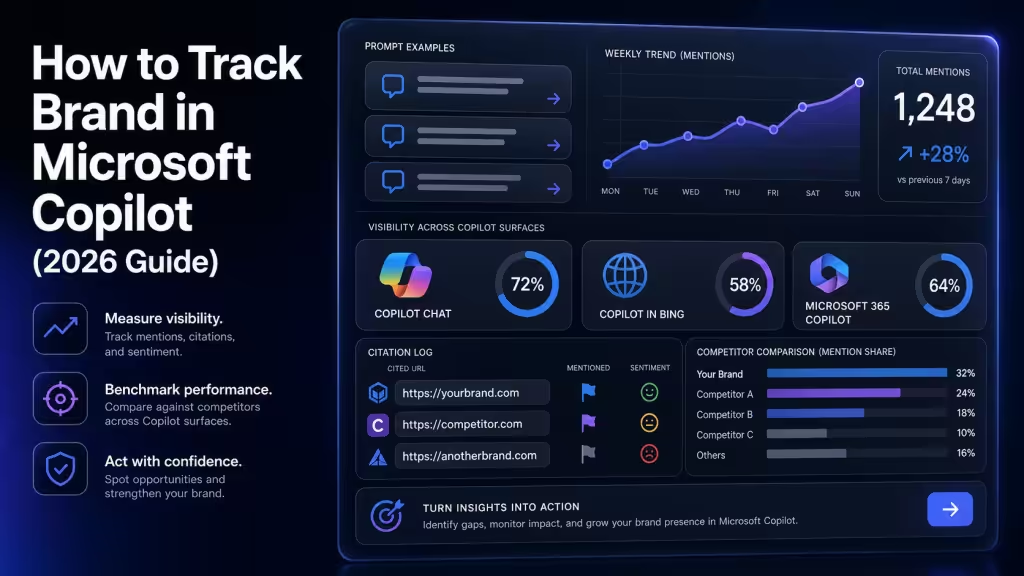

To track brand in Microsoft Copilot, you run a fixed prompt set against Copilot weekly, log which answers mention your brand, capture the cited URLs behind each answer, and compare share of voice against three named competitors. That’s the workable version. Most “Copilot tracking” advice skips the prompt design and the citation log, which is where the signal lives. This guide gives you the prompt structure, the logging schema, and the weekly review cadence we use across client accounts.
What Tracking Brand in Microsoft Copilot Actually Means
Copilot tracking is the practice of measuring how often your brand appears in Copilot answers, which prompts trigger those mentions, what sources Copilot cites, and how your share of voice shifts against competitors over time.
Copilot is not one surface. It’s at least three: Microsoft 365 Copilot inside Word, Outlook, and Teams, Copilot Chat on copilot.microsoft.com, and Copilot in Bing search. Each pulls from a different blend of training data, grounded web results, and your tenant’s internal data when applicable. For brand tracking, the public-facing surface that matters is Copilot Chat, because that’s where buyers, analysts, and journalists ask discovery questions about categories you compete in.
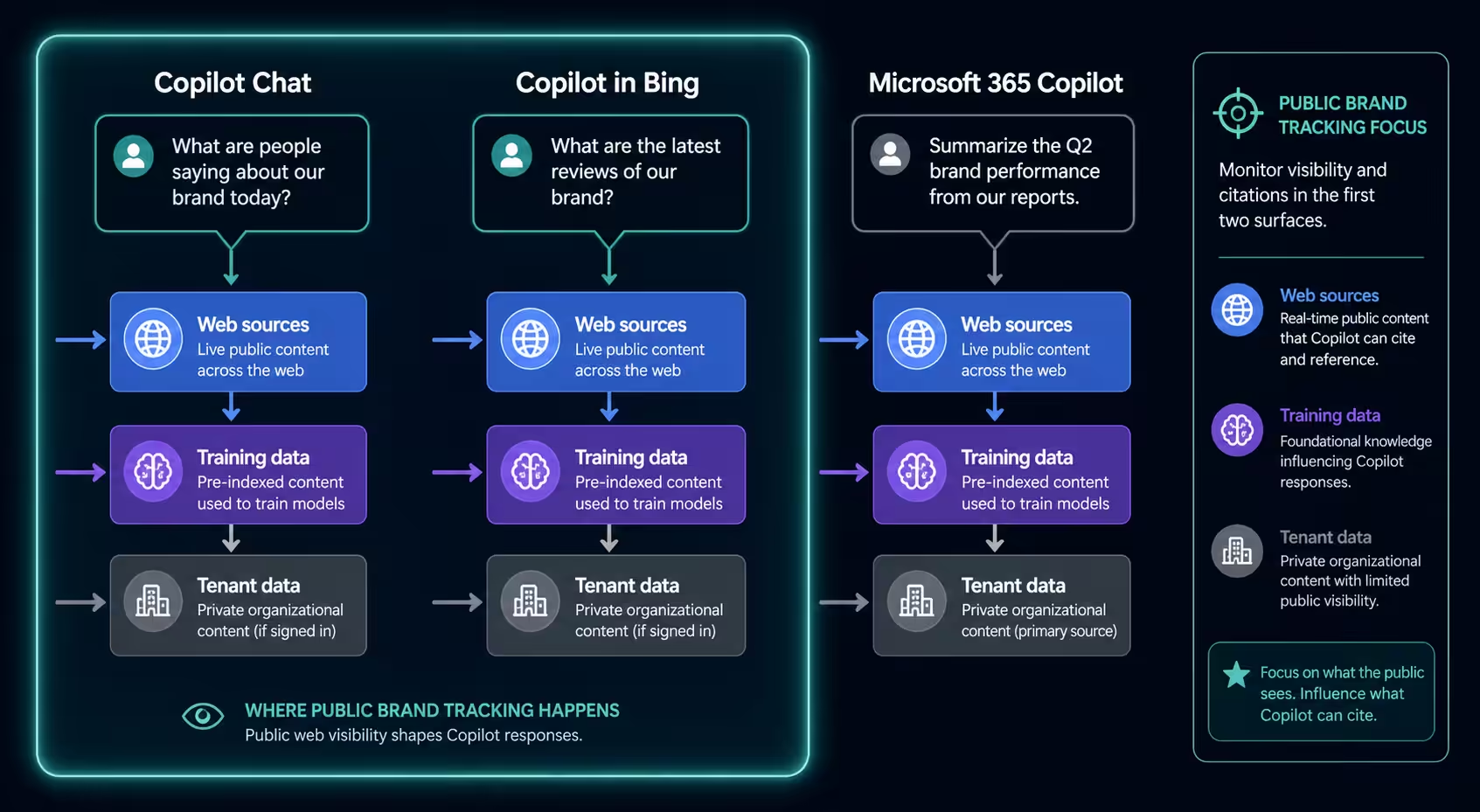
The thing buyers and tools get wrong: they treat Copilot like a search engine and watch keyword rankings. Copilot doesn’t return ten blue links. It returns a synthesized answer with a small number of cited sources. Your job is to be one of those cited sources, or to be named in the answer text even when you’re not the citation.
Build the Prompt Set First
Your tracking only works if your prompts mirror how real buyers ask Copilot about your category. Generic prompts give generic answers, and generic answers rarely cite anyone specific.
| Prompt layer | What it asks Copilot | Example prompt | What it reveals |
|---|---|---|---|
| Category | Recommend or compare options in your space without naming any brand | “What are the best tools for tracking brand mentions in AI search?” | Whether you surface unprompted when buyers ask Copilot about the category cold |
| Comparison | Pit two or three named competitors against each other | “Compare [Competitor A] and [Competitor B] for monitoring ChatGPT citations.” | How Copilot frames you against rivals, and whether you get pulled into the answer at all |
| Problem | Describe a buyer pain and ask for tools or approaches | “How do I find out if AI tools recommend my SaaS product to buyers?” | Whether Copilot connects your brand to the jobs-to-be-done your buyers actually search |
| Direct | Name your brand and ask Copilot what it knows | “What is [Your Brand] and who uses it?” | What Copilot believes about you and which sources it cites to say it |
A working prompt set has four layers. Category prompts ask Copilot to recommend or compare options in your space without naming any brand. Comparison prompts pit two or three named competitors against each other. Problem prompts describe a buyer pain and ask for tools or approaches. Direct prompts name your brand and ask Copilot what it knows.
For a mid-market AI visibility tool, the set looks like this:
- Category: “What are the best tools for tracking brand mentions in AI search?”
- Comparison: “Compare [Competitor A] and [Competitor B] for monitoring ChatGPT citations.”
- Problem: “How do I find out if AI tools recommend my SaaS product to buyers?”
- Direct: “What is [Your Brand] and who uses it?”
Aim for 25 to 40 prompts in the first set. Fewer and you’ll miss surface variance. More and the weekly review becomes a chore nobody does. Run each prompt twice per session, because Copilot’s answers vary even on identical inputs, and you need both variants in your log.
Where Buyers Actually Ask These Questions
Skim the Reddit authority playbook for AI citations and pull the exact phrasing buyers use in r/sales, r/marketing, and the subreddits closest to your category. Those phrasings become your prompts. The closer your prompt mirrors a real buyer question, the more representative your tracking data.
Capture Citations, Not Just Mentions
Most Copilot tracking tools count mentions. That’s half the picture. The other half is which URLs Copilot cited to produce the answer, because those are the sources earning real visibility, not the brands named in passing.
When you run a prompt in Copilot Chat, the response footer shows numbered citations. Open the side panel and you’ll see each source URL, the publication, and which sentence in the answer pulled from it. Log every citation, not just the ones that mention you. The pattern over time tells you which publications, review sites, and community threads Copilot trusts for your category.
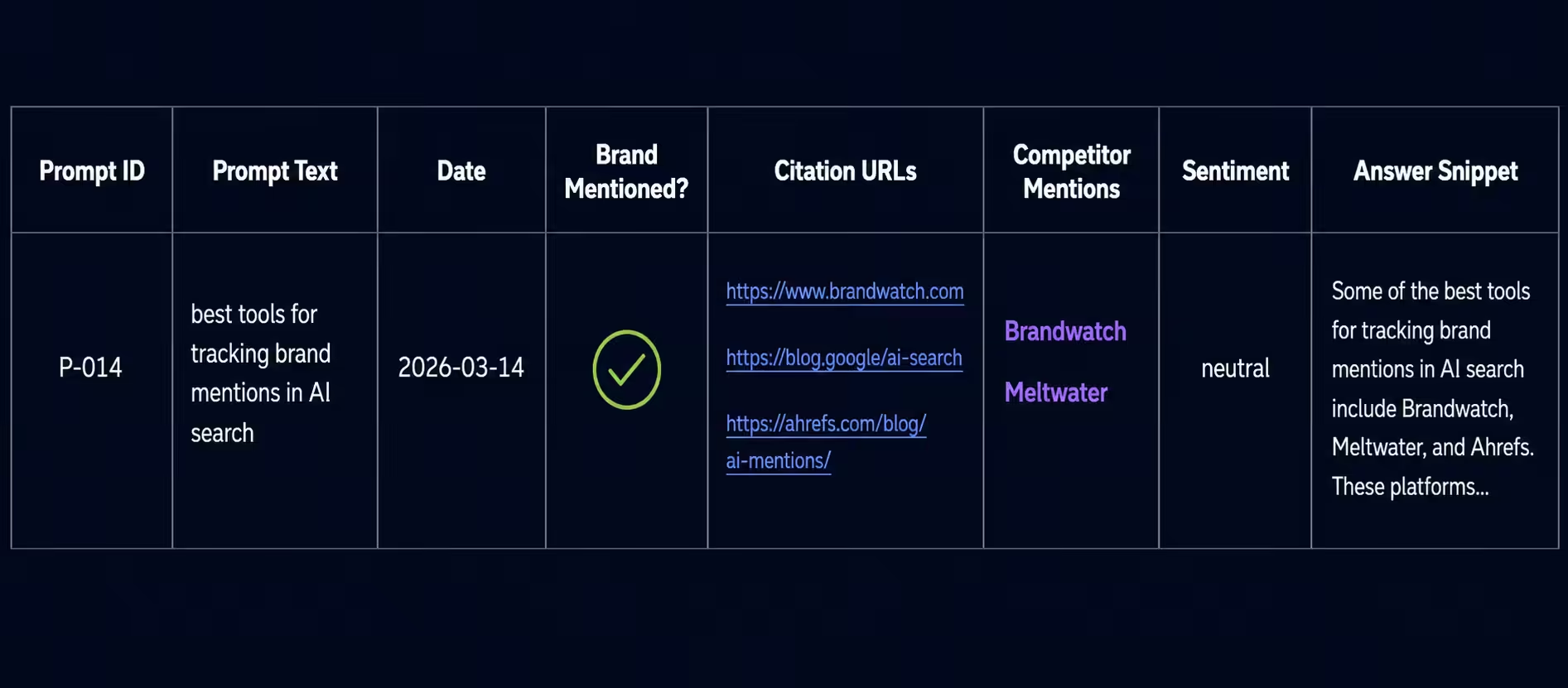
Here’s the schema we use, eight fields per prompt run:
- Prompt ID (so you can rerun the exact prompt next week)
- Prompt text
- Date and time
- Brand mentioned in answer? yes/no
- Citation URLs (all of them, in order)
- Competitor mentions (which competitors, how prominently)
- Sentiment of the brand mention if present
- Answer snippet (the 1 to 2 sentences containing the mention or the closest equivalent)
A Google Sheet works for the first 90 days. After that, the volume gets unwieldy and you’ll want something purpose-built. The point is to start with the schema, not the tool.
Measure Share of Voice the Right Way
Share of voice in Copilot is the percentage of prompts in your tracking set where your brand appears in the answer, divided by the same percentage for each competitor. Run it weekly, plot the trend, and look at three things: directional change, prompt-level patterns, and citation-source overlap.
Directional change tells you whether Copilot is mentioning you more or less over time. Prompt-level patterns tell you which buyer questions you win and which you lose. Citation-source overlap tells you which publications are pulling competitors into Copilot answers when you should be there instead.
The mistake we see most often: teams measure share of voice on category prompts only. Category prompts are the hardest to win because Copilot defaults to broad market leaders. Problem prompts and comparison prompts are where mid-market brands actually move the needle, and they should weight heavier in your scoring.
For a deeper read on calibrating this across surfaces, see share of voice in AI search.
Set Up Weekly and Monthly Cadences
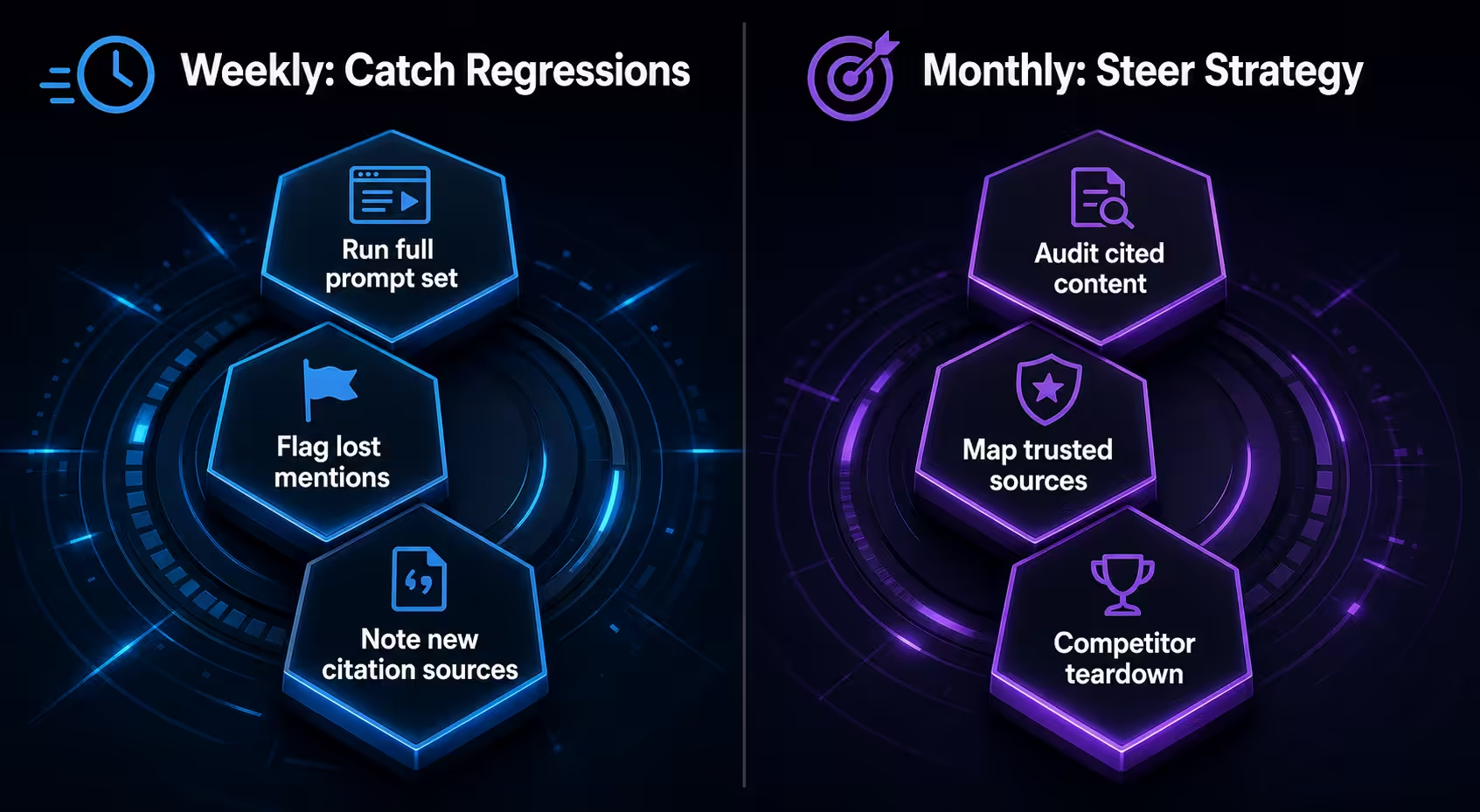
Weekly is for catching regressions. Monthly is for steering strategy. Don’t conflate them.
The weekly cadence runs the full prompt set, logs the results, and flags two things: prompts where you lost a mention you had last week, and new citation sources Copilot started pulling from. The weekly review takes 30 to 45 minutes if your prompt set is sane.
The monthly cadence does three deeper passes. First, audit which content of yours is and isn’t being cited, and why. Second, look at the cited sources Copilot trusts most in your category and identify which ones you have no presence on. Third, run a competitive teardown: pick the competitor closest to you in share of voice and reverse-engineer where they’re earning their citations.
Across roughly 40 client accounts running this cadence, the median time from a sudden share-of-voice drop to root cause identification is 9 days. Without a weekly review, it stretches past 30 days, and by then the cause is usually obscured by everything else that’s changed.
Tools That Help and Tools That Get in the Way
You can run this manually with a spreadsheet and a calendar reminder for the first quarter. After that, the volume forces a tool decision.
What helps: a tool that runs your prompt set on a schedule, captures the full Copilot answer with citations intact, stores historical responses so you can diff week over week, and lets you tag prompts by type and priority. The Microsoft Copilot brand mentions guide walks through how Copilot’s citation logic shifts across surfaces and what that means for which tool features actually matter.
What gets in the way: tools that score Copilot visibility with a single proprietary number and won’t show you the underlying responses. If you can’t see the actual answer Copilot returned, you can’t act on the data. The single-score dashboards make for good demos and bad operating decisions.
Compare options against the framework in AI visibility analytics tools tested for 2026 before committing to a contract.
Act on the Data: Three Moves That Move the Needle
Tracking without action is a sunk cost. Here are the three moves that consistently shift Copilot share of voice across our client base.
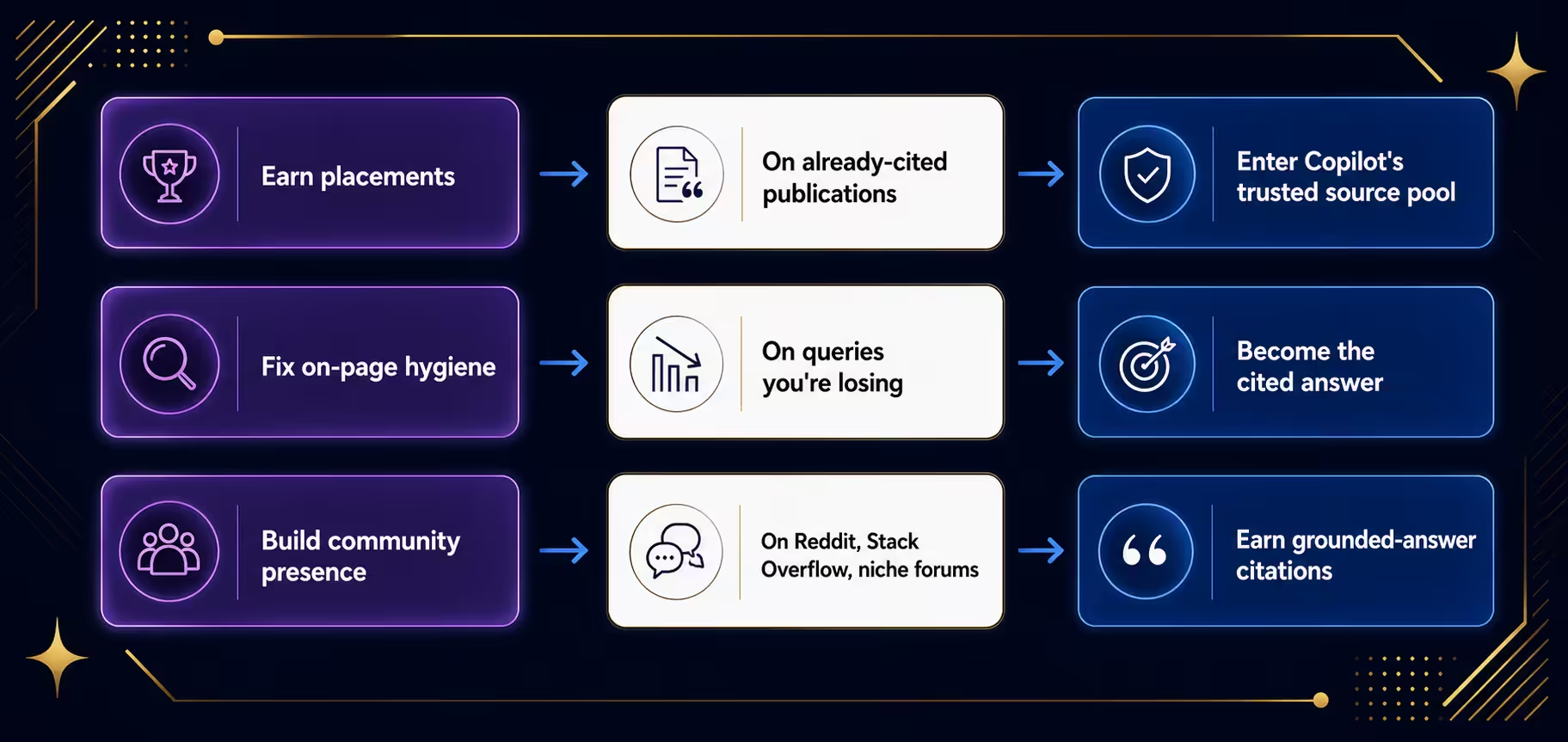
First, earn placements on the publications Copilot already cites in your category. Pull your top 20 most-cited URLs from the monthly review, find which ones are review sites or industry publications, and pitch original commentary or contributed pieces. Copilot’s grounded answers lean on a surprisingly small pool of trusted sources per topic, and getting into that pool moves your visibility faster than any on-site optimization.
Second, fix the answer hygiene on your own pages for queries you’re losing. If Copilot is citing a competitor for “how to track brand mentions in [category]” and your page on the same topic isn’t being cited, the issue is usually structural: the page buries the answer, doesn’t have a clear definitional sentence, or doesn’t reinforce the entities Copilot expects to see together.
Third, build community presence on the sources Copilot pulls from for problem prompts. Reddit, Stack Overflow, niche industry forums. The how to increase brand mentions in AI search playbook covers the mechanics. Community signals carry weight in Copilot’s grounded answers because Copilot’s web layer treats them as recency-rich, authentic discussion.
Common Mistakes That Waste a Quarter
The patterns we see most often, across roughly 60 audits in the last year:
Tracking only the brand-name prompt. If your CEO asks Copilot “what is [our brand]” and gets a clean answer, that’s not tracking. That’s vanity. You learn nothing about how Copilot represents your category.
Ignoring the answer text and only counting URL citations. Copilot mentions brands in answer prose without citing them as a numbered source. Those naked mentions still drive recall and still influence buyer perception. Log both.
Running the same prompt set forever. Buyer language shifts. The prompts that mattered in Q1 don’t match how buyers ask by Q4. Refresh 20 to 30 percent of your prompt set every quarter.
Treating Copilot tracking and ChatGPT tracking as one workflow. The two systems cite different sources, weight different signals, and update on different cycles. If you want a fuller view of how the major systems differ, the cross-platform tracking guide breaks it down.
Frequently Asked Questions
How often does Microsoft Copilot update its training data?
Copilot’s underlying models have a training cutoff, but its grounded web answers pull live results in real time. That means your tracking should run weekly at minimum, because the grounded layer can swing within days when a new article ranks or a competitor earns a big citation.
Can I track Copilot mentions without a paid tool?
Yes, for the first 90 days. A spreadsheet, a 30-prompt set, and a calendar reminder will produce real data. The constraint is time. Once you cross 40 prompts and you’re running them twice for variance, manual logging eats two hours a week and tool economics start to make sense.
Why does Copilot give different answers to the same prompt?
Copilot’s responses involve sampling and retrieval that introduce variance. The same prompt at 9 a.m. and 4 p.m. can return different cited sources and slightly different answer text. That’s why running each prompt twice per session and logging both variants is part of the protocol.
Does tracking brand in Microsoft Copilot help my SEO?
Indirectly, yes. Pages that earn Copilot citations tend to share traits with pages that perform well in classic search: clear definitional content, strong entity coverage, and inbound authority. Working on Copilot citations usually lifts traditional rankings as a side effect, not a goal.
The Honest Take
Most brands tracking Copilot are tracking the wrong layer. They watch a dashboard score and miss the point: Copilot is reshaping how buyers discover categories, and the brands that show up in its answers are the brands buyers consider. The score is downstream. The work is upstream, in your prompt set, your citation log, your weekly review, and the publications you earn placements on.
Start with the spreadsheet. Run it for four weeks. You’ll know more about how Copilot represents your brand than 95 percent of your competitors.
See where your brand stands in AI search with a short strategy call.