How to Extract Brand Mentions from PDF Content Without Missing What Matters
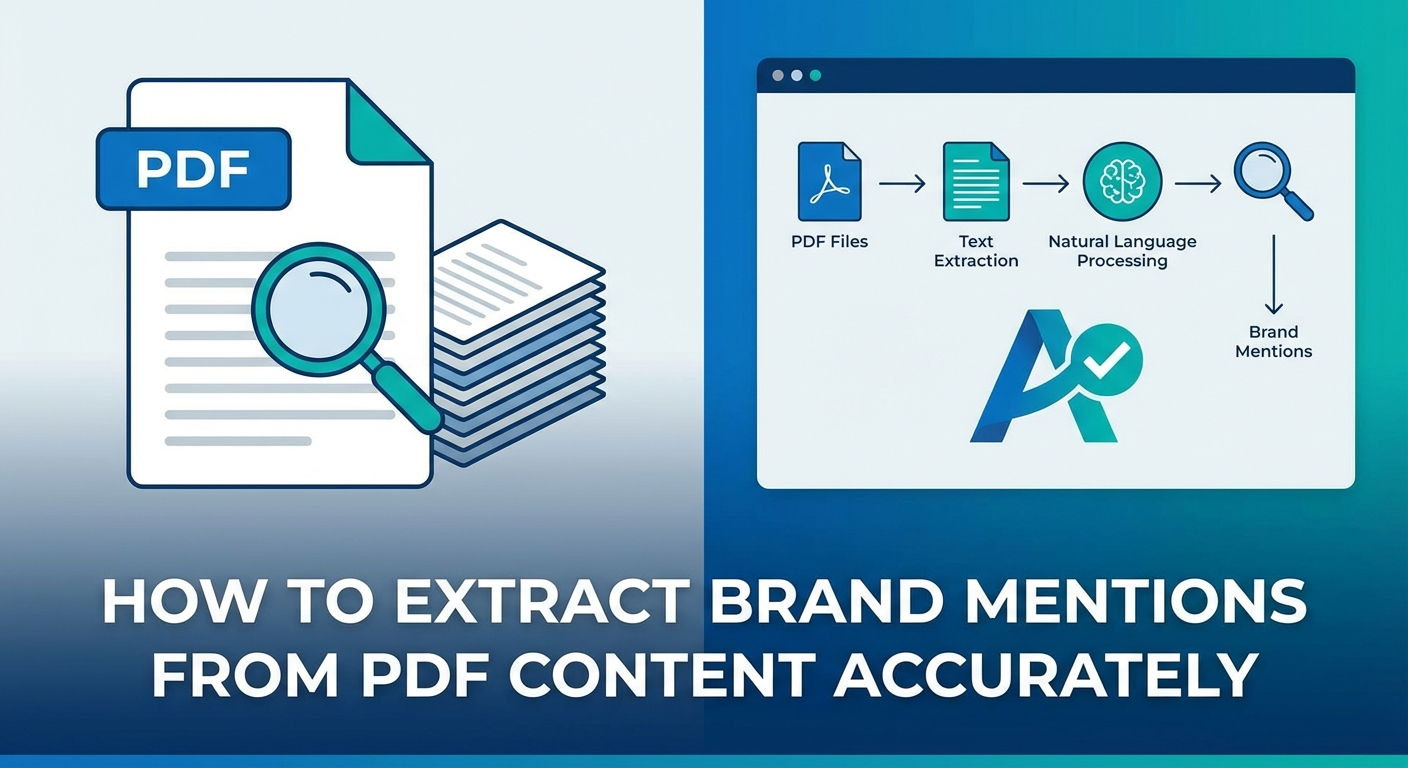
Extracting brand mentions from PDF content is a two-step process: first, you convert the PDF into machine-readable text, then you identify and isolate specific brand names, company references, and entity mentions within that text. The method you choose depends on the PDF type (text-based, scanned, or AI-generated), your document volume, and whether you need a one-time search or a repeatable workflow.
As of 2026, this process matters more than ever. Brands track their mentions across analyst reports, legal filings, competitor whitepapers, and market research PDFs to understand how they appear in the documents that shape industry perception. The same mentions that show up in high-authority PDFs often feed the training data that AI models learn from — making this a critical step in understanding your broader visibility.
This article walks through practical methods for every skill level — from manual keyword searches to Python-based Named Entity Recognition (NER) pipelines — with clear guidance on when each approach works best and where it fails.
Key Takeaways
- PDF type determines your extraction method: text-based PDFs allow direct text access, scanned PDFs require OCR first
- Manual search (Ctrl+F) works for small, one-off tasks — but breaks down beyond 10–15 documents
- OCR accuracy depends heavily on scan quality, font consistency, and document layout complexity
- Python libraries like PyMuPDF and spaCy offer scalable, repeatable brand mention extraction for larger document sets
- AI-powered NLP tools can detect brand references even when the exact name isn’t used (e.g., product names, abbreviations, subsidiaries)
- Extracted brand mention data reveals how your company appears in reports that AI models may use as training sources
Why PDF Brand Mention Extraction Is Harder Than It Looks
A PDF is designed to preserve visual layout — not to make content accessible for analysis. Unlike a spreadsheet or a structured database, a PDF stores text as positioned objects on a page. The text you see and the text a machine can read are often very different things.
This creates three distinct challenges when you try to extract brand mentions from PDF content:
- Text-layer gaps: Some PDFs contain no selectable text at all. Scanned documents, for example, store pages as images. Without Optical Character Recognition (OCR), there is no text to search.
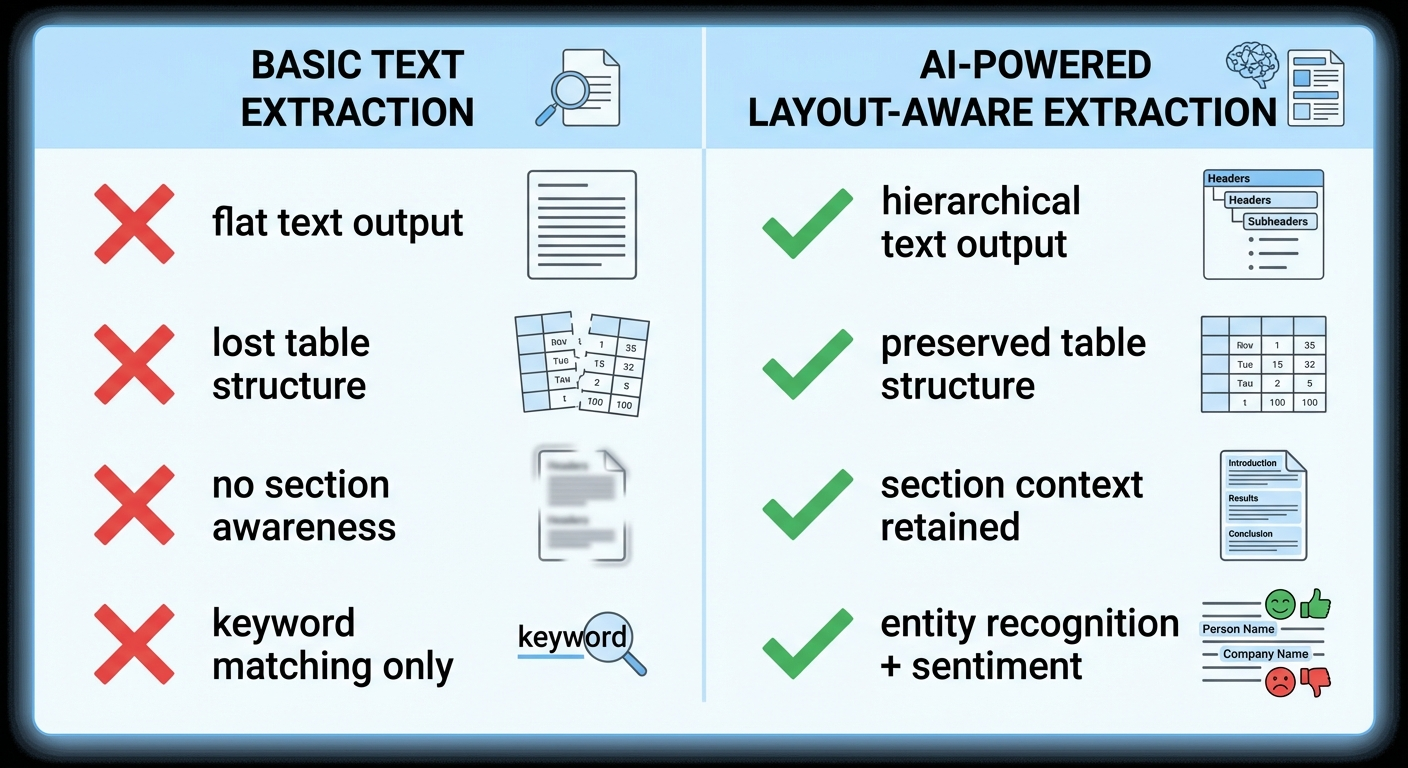
- Layout fragmentation: Multi-column layouts, tables, sidebars, and footnotes cause extraction tools to jumble text order. A brand name that appears cleanly in a table cell may get split across unrelated text blocks after extraction.
- Entity ambiguity: Brand names can appear as abbreviations, product names, or subsidiary references. A simple keyword search for “Apple” will miss mentions of “AAPL,” “iPhone,” or “Cupertino-based tech giant.”
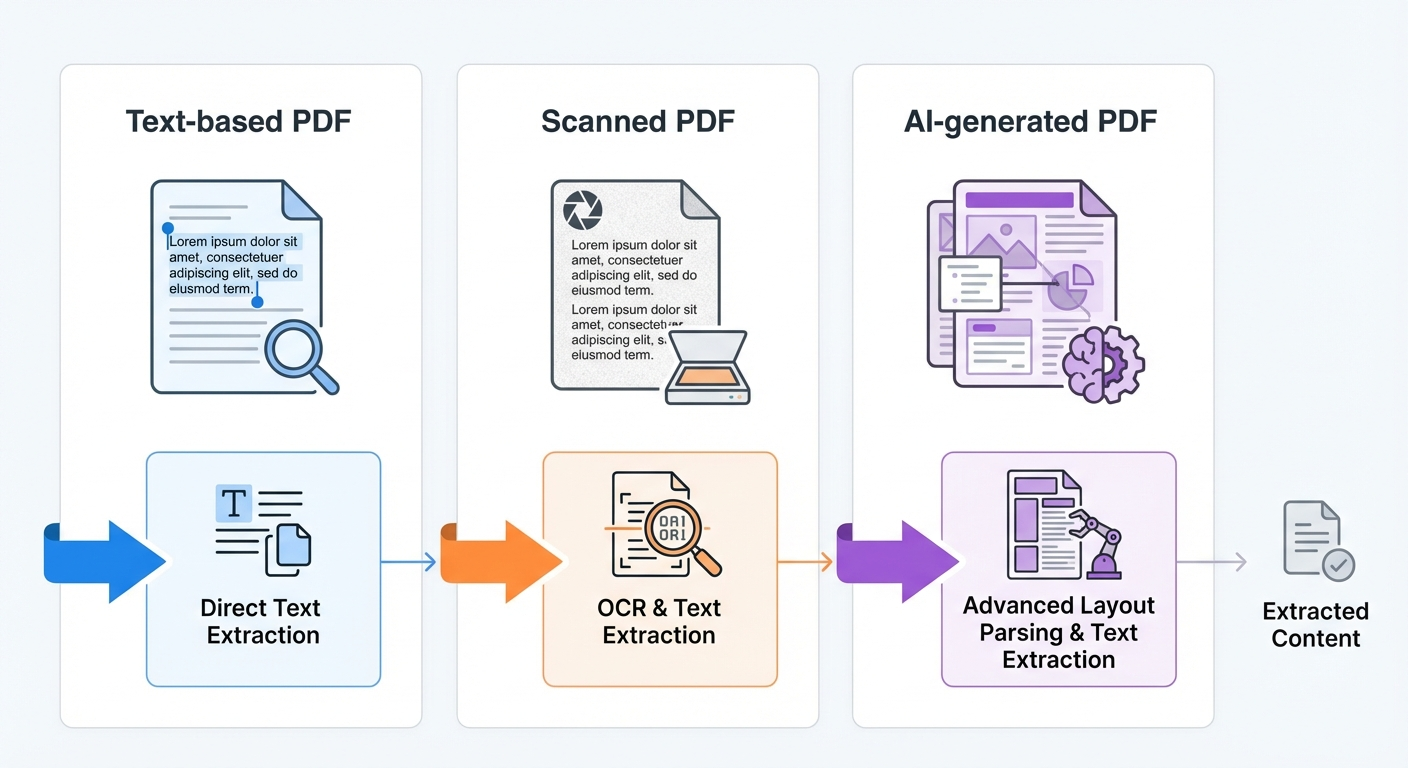
Understanding which type of PDF you are working with — text-based, scanned, or AI-generated — is the first decision point. It determines every tool choice that follows.
How to Identify Your PDF Type Before Choosing a Method
Open the PDF and try to select text with your cursor. If text highlights and can be copied, you have a text-based PDF. If nothing highlights or the copied text produces gibberish characters, you likely have a scanned PDF or a PDF with broken font encoding.
Text-based PDFs
These contain an embedded text layer. Reports generated from Word processors, spreadsheet exports, and digitally created whitepapers typically fall here. You can extract text directly using any PDF reader or parsing library.
Scanned PDFs
These are images of physical documents. Annual reports from older filings, signed contracts, and faxed documents often arrive as scanned PDFs. They require OCR processing before any brand mention search is possible.
AI-generated or complex-layout PDFs
Modern reports created with tools like Canva, advanced publishing software, or AI-based document generators often have layered text, embedded graphics, and non-standard text flows. These require layout-aware parsing tools to preserve structure during extraction.
Pro Insight: A quick test — paste copied text from your PDF into a plain text editor. If the text appears garbled, reordered, or missing characters, standard extraction will fail. You need OCR or a layout-aware parser.
Method 1: Manual Search for Small-Scale Extraction
For a single PDF or a small batch, manual keyword search is the fastest path to results.
Step-by-step process
- Open the PDF in any reader (Adobe Acrobat, browser, Preview on Mac).
- Press Ctrl+F (Windows) or Command+F (Mac) to open the search bar.
- Type the brand name you want to find. The reader highlights every occurrence.
- Record the page number, surrounding context, and mention type (direct reference, comparison, product mention) for each result.
- Repeat for each brand name, product name, abbreviation, or subsidiary you need to track.
When this works
Manual search is effective when you have fewer than 10 text-based PDFs and a short list of brand names to find. It requires no tools, no setup, and delivers instant results.
When this fails
- Documents exceed 50 pages each
- You need to track more than 5–10 brand names per document
- The PDF is scanned (no selectable text)
- You need to capture context, sentiment, or mention frequency at scale
- Brand names appear as abbreviations, product names, or indirect references
Manual search also cannot detect how your brand is mentioned — whether in a positive comparison, a negative context, or a neutral listing. For that, you need NLP-based tools.
Method 2: OCR-Based Extraction for Scanned PDFs
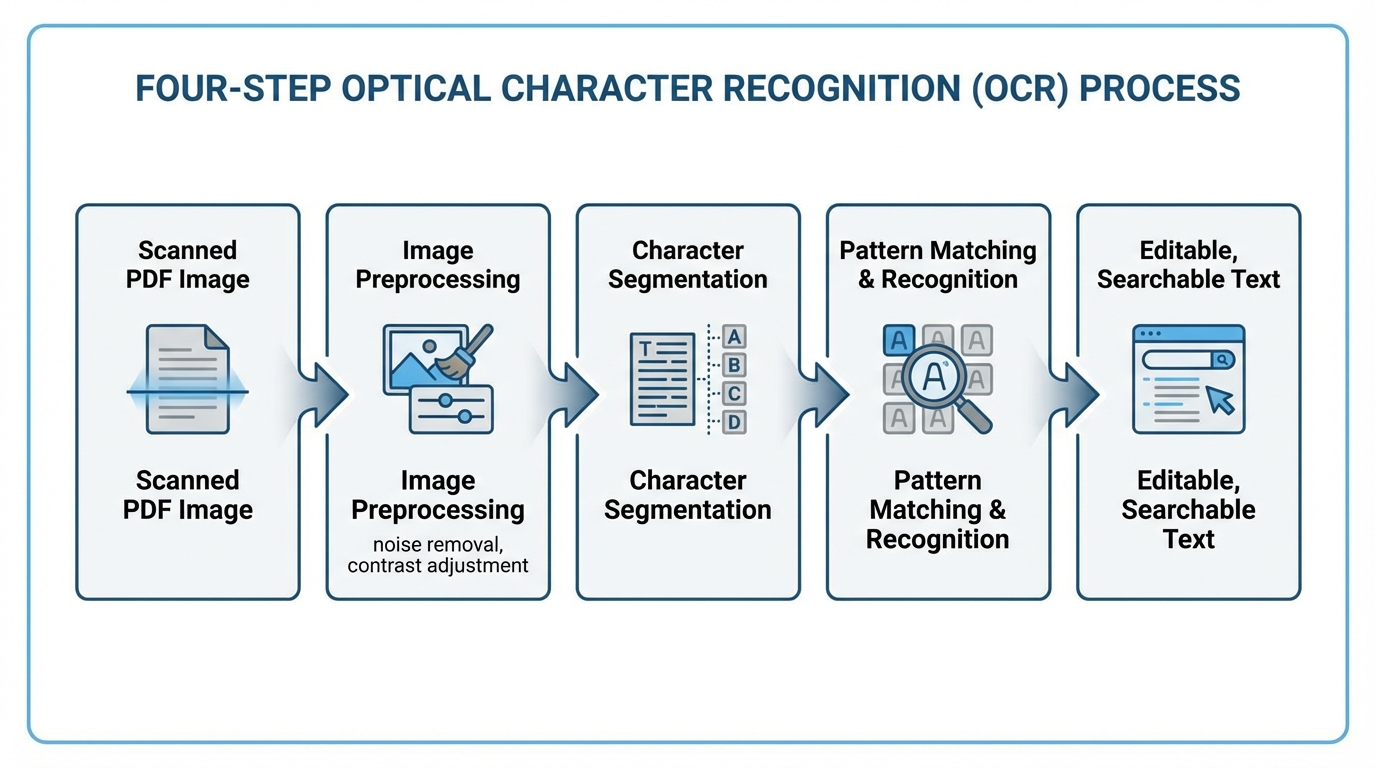
Optical Character Recognition (OCR) is the process of converting image-based text into machine-readable characters. It is the mandatory first step for any scanned PDF before brand mention extraction can happen.
How OCR works in practice
- Image preprocessing: The OCR engine adjusts contrast, removes noise, and corrects skew in the scanned image.
- Character segmentation: The engine identifies individual characters based on shape, stroke patterns, and spacing.
- Pattern matching: Each segmented character is compared against a database of known character shapes and assigned the best match.
- Post-processing: Spell-checking and language rules correct common recognition errors.
OCR tool options as of 2026
| Tool | Type | Best For | Limitations |
|---|---|---|---|
| Tesseract OCR | Open-source, Python-compatible | Developers building custom pipelines | Accuracy drops on complex layouts |
| Adobe Acrobat Pro | Desktop software | Non-technical users, single documents | Expensive for high-volume use |
| Google Cloud Vision API | Cloud API | High-accuracy OCR at scale | Requires API setup, per-page pricing |
| AWS Textract | Cloud API | Table and form extraction from scans | AWS account required, usage-based cost |
Critical accuracy factors
OCR accuracy on scanned PDFs varies widely. According to a 2023 study published by the Allen Institute for AI, modern OCR engines achieve 95–99% character accuracy on clean, high-resolution scans — but accuracy drops below 85% on documents with poor image quality, unusual fonts, or dense multi-column layouts.
For brand mention extraction, even a small OCR error can be disruptive. “BrandMentions” could become “BrandMentlons” or “8randMentions” — both invisible to a simple keyword search. Always validate OCR output against the original document for critical analysis.
Method 3: Python-Based Extraction for Repeatable Workflows
When you need to extract brand mentions from dozens or hundreds of PDFs on a regular basis, programmatic extraction is the most reliable and scalable approach. Python offers several libraries purpose-built for this task.
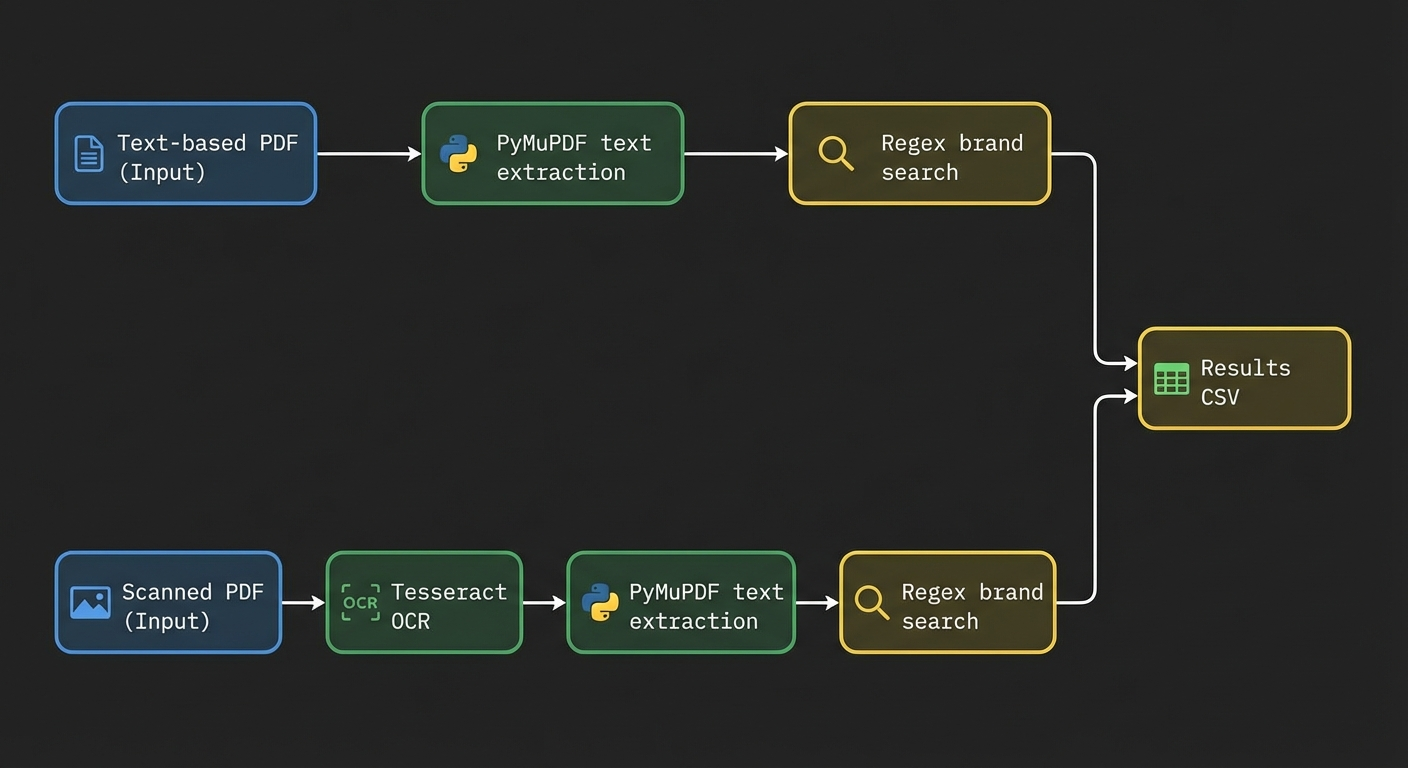
Step 1: Extract text from the PDF
PyMuPDF (fitz) is the most efficient Python library for text extraction from text-based PDFs. It is faster than alternatives like PyPDF2 and pdfminer, and handles complex layouts more reliably, according to benchmarks published by the PyMuPDF project in 2024.
import fitz  # PyMuPDF

doc = fitz.open("market_report.pdf")
full_text = ""
for page in doc:
    full_text += page.get_text()
For scanned PDFs, combine PyMuPDF with Tesseract OCR using the pytesseract wrapper to first convert images to text.
Step 2: Search for brand mentions with regex
A regular expression (regex) search lets you define multiple brand names, abbreviations, and product names in a single pattern.
import re

brands = ["Acme Corp", "AcmeCorp", "ACME", "Acme Platform"]
pattern = r'\b(' + '|'.join(re.escape(b) for b in brands) + r')\b'
mentions = re.findall(pattern, full_text, re.IGNORECASE)

print(f"Found {len(mentions)} mentions")
print(set(mentions))  # Unique brand names found
This catches exact brand name matches, including common variations. It does not catch indirect references or entity aliases.
Step 3: Use Named Entity Recognition for broader detection
Named Entity Recognition (NER) is an NLP technique that identifies and classifies entities — such as company names, product names, people, and locations — within unstructured text. It catches brand mentions that a simple keyword search would miss.
The Python library spaCy provides pre-trained NER models that can identify organization names out of the box.
import spacy

nlp = spacy.load("en_core_web_lg")
doc = nlp(full_text)

org_mentions = [ent.text for ent in doc.ents if ent.label_ == "ORG"]
print(set(org_mentions))
This approach detects company names even when you did not include them in your original search list. It is especially valuable for competitive analysis — discovering which brands appear in analyst reports alongside yours.
Step 4: Export structured results
import pandas as pd

df = pd.DataFrame({
    "brand": org_mentions,
    "source_file": ["market_report.pdf"] * len(org_mentions)
})
df.to_csv("brand_mentions_extracted.csv", index=False)
Tip: For large-scale analysis, add columns for page number, surrounding context (50 characters before and after the mention), and mention count per brand. This turns raw extraction into actionable competitive intelligence.
Method 4: AI and NLP Tools for Complex or High-Volume Extraction
When documents are large, layouts are complex, or you need to go beyond keyword matching to understand how brands are mentioned, AI-powered extraction tools provide the most comprehensive results.
What AI-based tools add beyond basic extraction
- Entity disambiguation: Distinguishing between “Apple” the company and “apple” the fruit based on context.
- Sentiment detection: Identifying whether a brand mention is positive, negative, or neutral.
- Relationship mapping: Understanding which brands are mentioned together and in what context (comparison, recommendation, criticism).
- Cross-format handling: Processing text, tables, and image captions within the same document.
Tools worth evaluating in 2026
| Tool | Strength | Best For |
|---|---|---|
| LlamaParse (LlamaIndex) | Layout-aware PDF parsing optimized for RAG pipelines | Developers building AI-powered document analysis |
| Relevance AI | Combined OCR + NLP with customizable extraction fields | Non-technical teams needing structured output from complex PDFs |
| Google Document AI | Enterprise-grade OCR with entity extraction built in | High-volume processing with Google Cloud infrastructure |
| AWS Textract + Comprehend | OCR paired with NLP entity detection | Organizations already using AWS for document workflows |
LayoutPDFReader, part of the LlamaIndex ecosystem, deserves specific attention for 2026 use cases. It parses PDFs while preserving hierarchical layout information — sections, subsections, tables, and list structures — which makes downstream brand mention extraction significantly more accurate than flat text extraction.
How Extracted Brand Mentions Connect to AI Visibility
Understanding where your brand appears in industry PDFs — analyst reports, market research documents, competitive analyses, regulatory filings — directly connects to how AI models learn about your company.
Large language models (LLMs) like those powering ChatGPT, Gemini, and Perplexity build their knowledge from training data that includes web-published PDFs, research papers, and institutional reports. When your brand appears consistently in these high-authority documents, AI models develop stronger associations between your brand name and your industry category.
Extracting brand mentions from PDF content gives you a clear picture of:
- Where you appear: Which reports, filings, and publications mention your brand
- How you appear: Whether mentions are in positive, neutral, or competitive contexts
- Who you appear alongside: Which competitors or complementary brands share the same documents
- What’s missing: Which high-authority documents mention your competitors but not you
This last point is especially actionable. If a major Forrester or Gartner report mentions three competitors in your category but omits your brand, that gap represents a specific AI visibility deficit. AI models trained on that report will associate your category with those competitors — not with you.
Agencies like BrandMentions address this by placing contextual brand mentions on 140+ high-authority publications that AI models actively learn from during training data refreshes. The first step in any such strategy is understanding your current mention landscape — and PDF extraction is a core part of that audit.
Choosing the Right Method: A Decision Framework
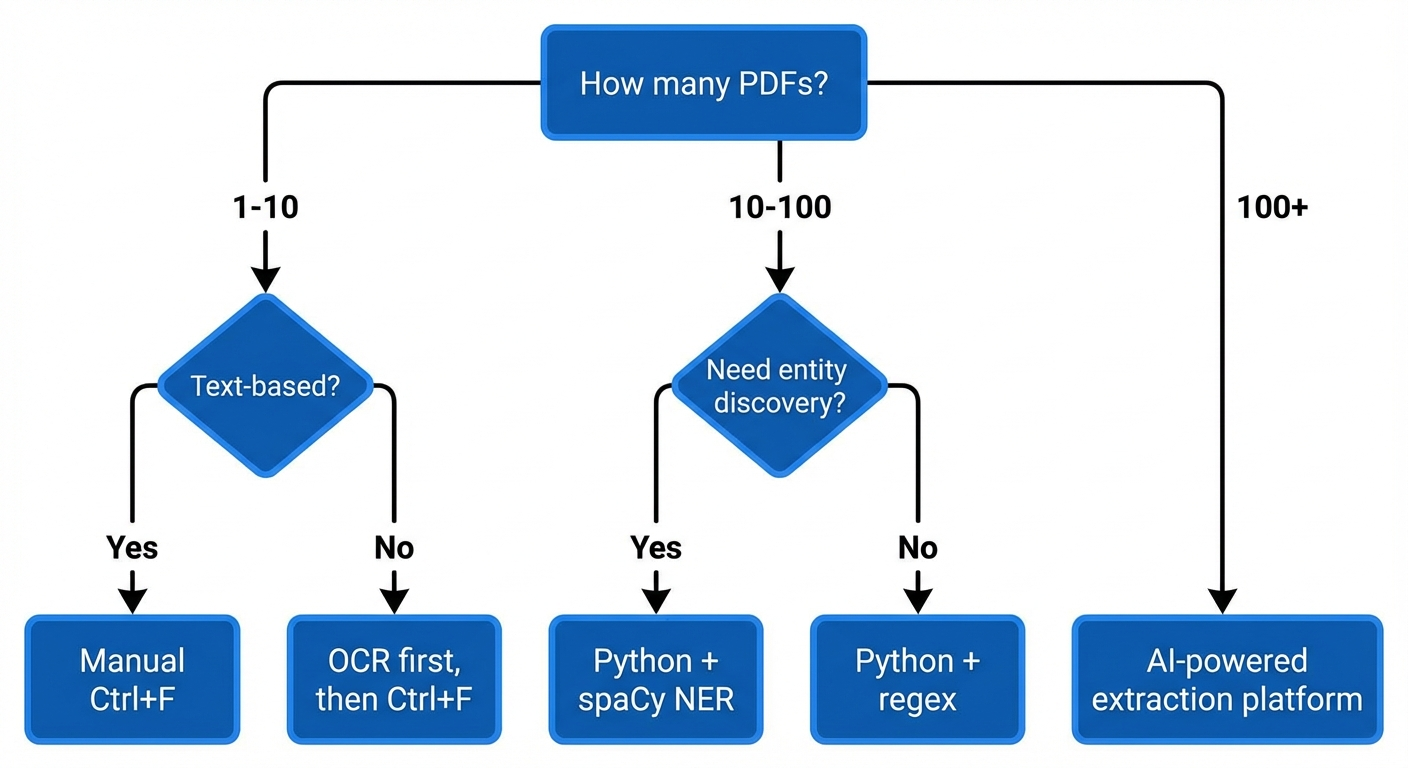
Your choice depends on three factors: PDF volume, PDF type, and the depth of analysis you need.
| Scenario | Recommended Method | Tools |
|---|---|---|
| 1–5 text-based PDFs, one-time search | Manual keyword search (Ctrl+F) | Any PDF reader |
| 1–10 scanned PDFs, one-time search | OCR → manual search | Adobe Acrobat Pro, Tesseract |
| 10–100 text-based PDFs, recurring workflow | Python regex extraction | PyMuPDF + regex |
| 10–100 mixed PDFs, entity discovery needed | Python NER pipeline | PyMuPDF + spaCy |
| 100+ complex PDFs, structured output needed | AI-powered extraction platform | LlamaParse, Relevance AI, AWS Textract + Comprehend |
| Ongoing competitive brand monitoring across PDFs | Automated pipeline with NER + export | Custom Python pipeline or enterprise platform |
Common Pitfalls That Reduce Extraction Accuracy
Even the right tool produces poor results if you overlook these issues:
1. Ignoring brand name variations
Your brand may appear as a full legal name, a trade name, a product name, a ticker symbol, or an abbreviation. Build a comprehensive list of all known variations before running any extraction. For “BrandMentions,” that list might include “BrandMentions,” “Brand Mentions,” “brandmentions.link,” and “BM AI visibility.”
2. Skipping OCR validation
OCR errors are invisible until you check. After running OCR on scanned PDFs, validate a sample of pages by comparing extracted text to the original document. Pay special attention to brand names with uncommon spellings or mixed-case formatting.
3. Losing table and layout context
A brand mentioned in a comparison table has different significance than one mentioned in a footnote. Flat text extraction destroys this context. Use layout-aware parsing tools when the position and structure of mentions matters for your analysis.
4. Treating extraction as a one-time task
Brand mentions in PDFs change over time. New analyst reports, updated regulatory filings, and revised market studies continuously reshape how your brand appears in the document ecosystem. Build a repeatable workflow — not a one-off project.
Warning: If you extract brand mentions without tracking the source document, publication date, and mention context, the data loses most of its strategic value. Always capture metadata alongside the mention itself.
Turning Extracted Mentions into Strategic Insight
Raw extraction data — a list of brand names found in PDFs — is only the starting point. The strategic value comes from analysis.
Mention frequency analysis
Track how often your brand appears relative to competitors across the same set of documents. A brand mentioned 47 times across 20 analyst reports has a fundamentally different presence than one mentioned 3 times. This ratio directly influences how AI models weight brand-category associations.
Co-occurrence mapping
Identify which brands consistently appear alongside yours. If your company is always mentioned in the same paragraph or table as a specific competitor, AI models learn that association. This can work for you (credibility by association) or against you (perpetual comparison to a larger player).
Gap identification
Compare documents where competitors are mentioned to your own mention presence. The gaps — reports, filings, and publications that include competitors but not you — represent specific opportunities to strengthen your AI brand mentions presence.
In campaigns across 67+ B2B companies, the BrandMentions team found that brands appearing in fewer than 30% of category-relevant publications had significantly lower AI recommendation rates compared to those with broader editorial presence. Understanding your current mention landscape through PDF extraction is the diagnostic step that makes targeted improvement possible.
FAQ
Can ChatGPT extract brand mentions directly from a PDF?
As of 2026, ChatGPT can process uploaded PDF files and identify brand mentions within them. However, its accuracy depends on the PDF type. Text-based PDFs work well. Scanned PDFs may produce incomplete results because ChatGPT’s PDF processing relies on embedded text layers, not OCR. For scanned documents, run OCR first and then upload the extracted text.
What is the most accurate free tool for extracting text from PDFs?
PyMuPDF (also known as fitz) is the most accurate free, open-source Python library for text extraction from text-based PDFs, based on benchmarks comparing it to PyPDF2 and pdfminer. For scanned PDFs, Tesseract OCR is the leading free option, though accuracy depends on scan quality. Combining both — Tesseract for OCR, PyMuPDF for text parsing — provides a reliable free pipeline.
How do I extract brand mentions from PDFs that contain tables?
Standard text extraction tools flatten table data into jumbled text. Use a layout-aware parser like LlamaParse, AWS Textract, or the Python library pdfplumber to preserve table structure during extraction. Once the table is extracted as structured data (rows and columns), you can search for brand names within specific cells and retain the context of where each mention appeared.
Does extracting brand mentions from PDFs help with AI search visibility?
Extraction itself does not directly improve AI visibility. However, it provides the intelligence you need to improve it. By understanding which high-authority PDFs and reports mention your brand — and which ones don’t — you can identify the specific gaps in your LLM visibility strategy and take targeted action to close them.
How often should I extract and audit brand mentions from industry PDFs?
For active competitive intelligence, quarterly extraction aligns with the publication cycles of most analyst reports and market research documents. If your industry moves faster — such as fintech or AI — monthly extraction captures changes more effectively. Set up an automated pipeline so extraction runs without manual effort each cycle.
What to Do Next
Start with the method that matches your current volume and PDF type. If you have a handful of text-based reports, Ctrl+F gets you answers in minutes. If you are building a competitive intelligence program across dozens of documents, invest an afternoon in a Python pipeline with PyMuPDF and spaCy — it will save you hundreds of hours over time.
The most important step is not the extraction itself. It is what you do with the data. Map your mention landscape, identify the gaps, and use that intelligence to strengthen your brand’s presence in the documents and publications that AI models learn from.
If you want to understand how your brand currently appears across AI search results — and where the gaps are — request a free AI visibility audit to see what AI models say about your brand today.